Last Updated
Key Takeaways
Generated from the text of customer reviews
ChiroSpring is a cloud-based chiropractic EHR and practice management platform used by chiropractors, billing teams, and front-desk staff. Users frequently highlight its customizable workflows and responsive customer support, while some reviews mention limitations with specialty-specific templates. In its recent product release, ChiroSpring introduced updates focused on campaign reports and print demographics.
Our Verdict
ChiroSpring is a practical option for chiropractic practices that need an organized system for managing high patient volumes, insurance workflows, and multi-provider operations. Its pricing is generally reasonable for growing clinics, though add-on costs may increase expenses over time. We recommend it for small to mid-sized chiropractic practices seeking an all-in-one cloud-based management platform with flexible workflows and strong customer support.
Overall Rating
Based on 75 users reviews
4.9
Rating Distribution
Positive
100%
Neutral
0%
Negative
0%
Starting Price
$149
per provider per month
ChiroSpring Specifications
- E-prescriptions
- Patient Portal
- Appointment Management/Scheduling
- Online Payments
What Is ChiroSpring?
ChiroSpring is a cloud-based chiropractic practice management software designed to make running your chiropractic practice smoother and more efficient. Whether you're a solo practitioner or managing multiple locations, ChiroSpring offers a user-friendly interface and a range of features to streamline your operations. It simplifies everything from patient scheduling and SOAP notes to billing and advanced reporting. ChiroSpring is a fully customizable solution, making it adaptable to your unique needs, and it's known for its very reasonable pricing, making it accessible for chiropractors of all sizes.
Chiro Spring EHR takes care of appointment scheduling with an online booking system, helping you manage your calendar hassle-free. Plus, it integrates with payment solutions, ensuring your billing process is seamless. Its cloud-based nature means you can access your practice data securely from anywhere. ChiroSpring also caters to chiropractic schools, making it a versatile choice for both educational and clinical settings.
What Is ChiroSpring Best For?
ChiroSpring stands out with its flexible and powerful practice management capabilities, particularly suited for chiropractic practices. Its differentiation lies in its complete customizability, cloud-based infrastructure, and very reasonable pricing. This software offers an all-in-one solution for chiropractors looking to streamline their daily operations and improve patient care.
How Much Does ChiroSpring Cost?
ChiroSpring pricing starts at $149/provider/month for the 360 plan. Other paid plans are as follows:
- 360 Pro: $249/provider/month
- 360 Pro+: $299/provider/month
In addition to the base subscription costs, organizations should account for the following expenses:
Add-Ons And Optional Features:
- Clearinghouse Integration: $149/month, includes claim management, ERA posting, and insurance verification. Can be added to the Pro and Pro+ plans
- GrowthHub Or GrowthHub Pro: $99–$249/month, includes patient engagement tools, automated messaging, and review management
- GrowthHub Pro+: $299/month
- ChiroSpring AI: $49/month, adds AI-assisted charting and claims support. It can be included in the Pro and Pro+ plans
- Transaction-Based Or Overages: Messaging and claim volume overages incur minor per-unit fees (typically $0.02/extra message or $0.35/extra claim)
- Implementation & Setup: Estimated to start at $500 – $5,000+ — Larger clinics or data migrations may incur higher costs
- Support And Maintenance: Often included (Standard) — Premium plans optional/negotiated; industry estimate $100 – $300/year
Users find ChiroSpring’s pricing fair and its features valuable, but note that add-ons, messaging overages, and claim fees can increase costs, particularly for larger or multi-provider chiropractic practices.
Disclaimer: The pricing is subject to change.
ChiroSpring Integrations
ChiroSpring offers integrations with various third-party software to enhance your practice's efficiency. Some popular integrations include pharmacy, lab, and payer systems, ensuring a comprehensive and interconnected healthcare ecosystem.
How Does ChiroSpring Work?
Here’s how to get started with the software after its successful installation:
- Log in to your ChiroSpring account using your credentials
- Set up your practice information, including clinic name, address, and contact details
- Configure your staff profiles, including doctors, office managers, and front desk staff
- Import patient data or start adding patient records manually
- Set up your appointment scheduling preferences and availability
- Familiarize yourself with the SOAP notes feature for patient documentation
- Configure your billing settings and integrate payment options
- Explore the advanced reporting tools to monitor practice performance
- Begin using the online scheduling system to book patient appointments and manage your practice efficiently
Who Is ChiroSpring For?
ChiroSpring is ideal for chiropractic practices of all sizes, from solo practitioners to those with multiple locations. It caters specifically to the healthcare niche, focusing on chiropractic care. Whether you run a small clinic or a large practice, ChiroSpring can help streamline your operations and improve patient care.
ChiroSpring Use Cases
Based on our analysis of user feedback and ChiroSpring’s current feature set, here are a few scenarios where the platform stands out:
Practices That Handle A Large Volume Of Insurance Claims
For clinics that depend heavily on insurance reimbursements, billing delays and claim denials can quickly become a major administrative burden. ChiroSpring helps reduce that pressure by automating claim creation directly from provider fee slips and using claim-scrubbing tools to catch errors before submission. The platform also includes ERA auto-posting and AI-driven insights that help staff identify claims with a higher likelihood of approval.
Busy Clinics Looking To Improve Patient Intake
High-volume chiropractic offices often struggle with crowded front desks and time-consuming paperwork. ChiroSpring makes the intake process much smoother with digital forms that patients can complete before arriving for their appointment. Information entered by patients flows directly into their records, reducing repetitive data entry and helping staff move patients through check-in more efficiently.
Growing Practices Focused On Patient Engagement
Chiropractic clinics looking to attract new patients or reconnect with inactive ones can benefit from ChiroSpring’s built-in marketing and communication tools. Through its Growth Hub, practices can manage outreach campaigns, organize leads, and track patient engagement without relying on separate marketing platforms.
Multi-Provider Clinics That Need Flexible Workflows
Larger chiropractic offices often have several people using the same system throughout the day, including providers, billers, and administrative staff. ChiroSpring supports these workflows with customizable dashboards tailored to different roles. Providers can prioritize SOAP notes, imaging, and patient documentation, while billing teams can focus on ledgers, claims, and payment tracking.
Is ChiroSpring Right For You?
ChiroSpring has earned its reputation as a reliable and efficient practice management solution. It's trusted by chiropractors across the industry and is known for its scalability, security, and user-friendly interface. If you're looking to simplify operations, improve patient care, and optimize your practice, ChiroSpring is a solid choice.
ChiroSpring includes HIPAA-compliant security features such as encrypted cloud storage, secure access controls, automatic backups, and protected remote access to help chiropractic practices maintain patient data privacy and compliance standards.
Still not sure if it's the right choice for you? Contact us at 661-384-7070 and let our experienced team assist you in making an informed decision.
ChiroSpring Features
Cloud-Based Chiropractic EHR
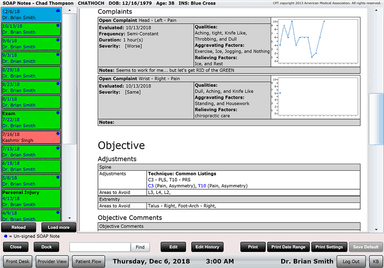
ChiroSpring offers a cloud-based chiropractic electronic health records (EHR) system, allowing chiropractors to securely store and access patient data from anywhere, enhancing data security and flexibility. The software includes customizable SOAP notes, built-in macros, and AI-assisted documentation tools that help chiropractors' complete notes more efficiently while maintaining compliance standards.
Online Scheduling And Patient Intake
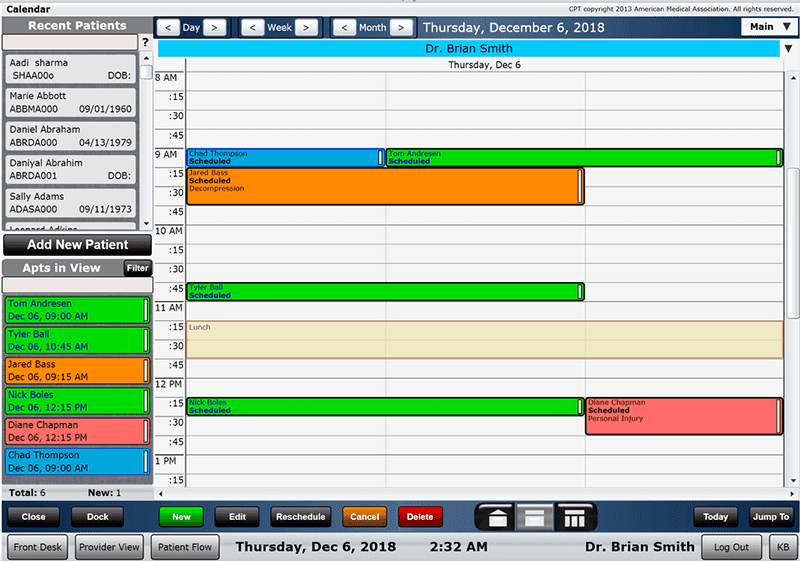
Streamline your appointment process with ChiroSpring's online scheduling system, enabling patients to book appointments conveniently. It also facilitates online patient intake, reducing administrative work at the front desk. The scheduling system also includes customizable calendar views, allowing providers and staff to organize appointments in the format that works best for their workflow.
Customizable And Flexible Practice Management
ChiroSpring stands out for its complete customizability, allowing chiropractic practices to tailor the software to their specific needs. It adapts seamlessly to practices of all sizes and configurations. Providers and administrative teams can customize dashboards, SOAP note templates, patient intake forms, scheduling workflows, and billing preferences to better match their day-to-day operations.
Integrated Payments And Billing App
ChiroSpring's integrated payments feature simplifies billing processes and ensures seamless transactions. The billing app helps chiropractors manage insurance claims, invoices, and payments efficiently. It also supports scheduled and recurring payments through ChiroSpring Pay, making it easier for clinics to offer flexible payment plans to patients.
User-Friendly Interface
ChiroSpring's user interface is designed with chiropractors in mind, making it easy for doctors, office managers, and front desk staff to navigate and utilize its powerful practice management capabilities effectively. Its customizable dashboards, organized menus, and workflow-based layouts make it easier for providers and staff to quickly access scheduling, patient records, SOAP notes, and reporting features from a centralized system.
Advanced Reporting And Analytics
Gain valuable insights into your practice's performance using ChiroSpring's advanced reporting tools. Track key metrics, analyze patient data, and make informed decisions for practice growth. Users can track important metrics such as charges, payments, claim statuses, patient recall activity, and provider productivity from customizable dashboards designed for different workflows.
ChiroSpring AI
ChiroSpring AI is designed to help chiropractic practices streamline documentation, improve billing efficiency, and reduce repetitive administrative work through a suite of AI-powered tools integrated directly into the platform. It includes features such as AI Scribe for automated note creation, AI Note Rewrite for improving clinical documentation, and AI Chart Summary tools that help providers review patient histories and organize records more efficiently. The platform also offers AI Claims Assistant capabilities that detect possible claim issues before submission.
Pros And Cons of ChiroSpring
Pros
Flexible and customizable for different practice sizes
Schedules online intake
User-friendly interface and cloud-based accessibility
Recommended by chiropractic school
Fast note-taking tools improve daily documentation workflows
Cons
Limited mobile experience
Resource intensive
Some documentation features still need workflow refinements
Specialty-specific templates may require manual setup
ChiroSpring Pricing
Disclaimer: The pricing details were last updated on May 12, 2026 from the vendor's website. Please contact us for a tailored pricing list.
ChiroSpring Reviews
Total 75 reviews
4.9
All reviews are from verified customers
Rating Distribution
5
Stars88%
4
Stars12%
3
Stars0%
2
Stars0%
1
Stars0%
Share your experience
Justin
Healthcare, 11-50 employees
More than a year
“Loyal and a happy user...”
Pros
We've been using ChiroSpring since 2018 and its proven to be a total game-changer for our practice. It is very easy to use but still quite powerful. Billing became so simple now and even managing the scheduler got so much easy too. And patients can even book their appointments online now which is amazing. In short everything about this software just clicks and makes sense.
Cons
Some of the interfaces I come across need improvement to enhance the entire process.
Rating Distribution
Ease of use
9
Value for money
10
Customer Support
10
Functionality
9
Susan
Healthcare, 11-50 employees
Less than a year
“It's a complete solution!”
Pros
I love the color-coded appointments and the little black corner tab that shows which patients have checked out. Also it is great having everything in one place, like patient appointments, notes, insurance, claims and even products. Plus both tools, the functional medicine and chiropractic sides which we needed for our practice is available here.
Cons
I'm very much looking forward for future updates that includes, integration of appointments and notes in some manner. Plus the option to customize an insertable table in notes and the capability to drag and drop appointments.
Rating Distribution
Ease of use
10
Value for money
10
Customer Support
10
Functionality
10
Amber
Healthcare, 11-50 employees
More than a year
“Simply PERFECT...”
Pros
Honestly I love everything about this software. I cannot even pick just one thing. Scheduling is super simple. Even our doctors can jump in to help if the front desk is busy. And billing? It is an absolute dream.
Cons
I can't find a single flaw in ChiroSpring. The software and its team are truly remarkable.
Rating Distribution
Ease of use
10
Value for money
10
Customer Support
10
Functionality
10
Frequently Asked Questions
What level of support does ChiroSpring Software offer?
ChiroSpring Software offers FAQ, contact form, phone, and email support.
Who are the typical users of ChiroSpring Software?
ChiroSpring Software is typically used by chiropractors and chiropractic practices, catering to practices of varying sizes and configurations.
What languages does ChiroSpring Software support?
ChiroSpring Software primarily supports English.
Does ChiroSpring Software support mobile devices?
Yes, ChiroSpring Software supports mobile devices, allowing users to access its features and data on the go.
Does ChiroSpring Software have an app?
Yes, ChiroSpring Software has a mobile app. Additionally, it can be accessed through web browsers on mobile devices.
How much does ChiroSpring Software cost?
ChiroSpring pricing starts with the 360 plan at $149/provider/month, followed by 360 Pro at $249/provider/month and 360 Pro+ at $299/provider/month. Request a personalized ChiroSpring cost breakdown today!
Does ChiroSpring have an API?
No, the vendor doesn’t offer API availability.
What other apps does ChiroSpring integrate with?
ChiroSpring integrates with various third-party solutions, including pharmacy, laboratory, and payer systems, helping practices maintain a more connected and efficient healthcare workflow.