


Zoho Forms
Last Updated
Key Takeaways
Generated from the text of customer reviews
Our Verdict
Overall Rating
Based on 11 users reviews
4.5
Rating Distribution
Positive
91%
Neutral
9%
Negative
0%
Starting Price
$12
per month
Zoho Forms Specifications
- Data Visualization
- Data Analysis And Reporting
- Scheduled Reporting
- Data Collection And Management
Zoho Forms Features
Double Opt-In
This feature sends respondents a confirmation email after they submit a form. Zoho Forms validates the entry only after the respondent clicks the confirmation link, while unconfirmed responses retain their pending status.
Smart Scan
The 'Smart Scan' field combines optical character recognition with AI to read uploaded images of documents, including IDs, receipts, and business cards. It extracts details such as names, addresses, and contact numbers, then places each value into its mapped form field.
Kiosk Mode
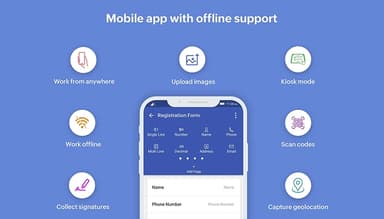
It converts a smartphone or tablet into a password-protected form station. After each submission, the form resets automatically and displays a blank version for the next respondent, supporting repeated data collection on a shared device.
Data And Analytics
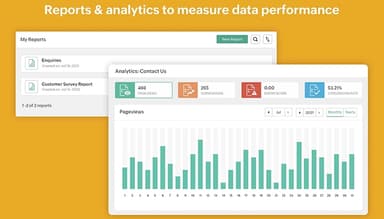
This functionality tracks the performance of forms through different metrics such as submission rates, response activity, and respondent behavior. It also organizes collected entries into configurable reports, where users can apply filters, select visible columns, and examine form-level metrics.
Pros And Cons of Zoho Forms
Pros
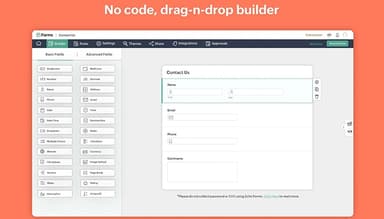
Drag-and-drop builder shortens form setup
Templates simplify repeated form creation
Conditional logic keeps questions relevant
Custom themes maintain consistent branding
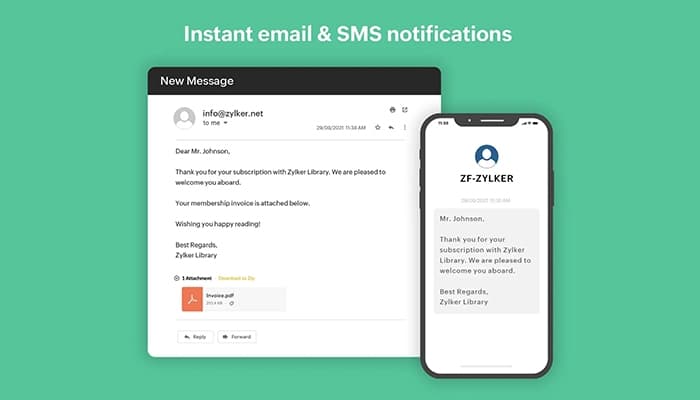
Automated notifications speed submission follow-ups
Cons
Mobile editing might constrain complex designs
Analytics may lack advanced data segmentation
Form navigation could weaken on lengthy forms
Zoho Forms Pricing
Free | Basic | Standard | Professional | Premium |
|---|---|---|---|---|
$0 | $12 per month | $30 per month | $60 per month | $110 per month |
|
|
|
|
|
Disclaimer: The pricing details were last updated on Sep 14, 2026 from the vendor's website. Please contact us for a tailored pricing list.
Zoho Forms Reviews
Total 11 reviews
4.5
All reviews are from verified customers
Rating Distribution
5
Stars64%
4
Stars27%
3
Stars9%
2
Stars0%
1
Stars0%
Share your experience
Computer Hardware, 1-10 employees
Less than 6 months
“Handy tool for quick form creation”
Pros
Building online forms is super simple and easy. I can quickly set up a form, add the fields I need and customize it without any complicated steps. The whole process feels smooth and I do not have to waste time figuring things out.
Cons
It works well for basic forms but it might feel a bit limited if you need more advanced features.
Rating Distribution
Ease of use
10
Value for money
8
Customer Support
10
Functionality
9
Design, 1-10 employees
Less than 6 months
“One of the best”
Pros
It's super simple to use and I can have a fully functional form ready to go in just a few minutes. There is no complicated setup.
Cons
It can feel a little clunky at times and the customization options are pretty limited. It is great for simple web contact forms but anything beyond that can be tricky.
Rating Distribution
Ease of use
10
Value for money
10
Customer Support
10
Functionality
10
Accounting, 11-50 employees
More than a year
“Decent overall experience”
Pros
The experience has been very easy for me. The interface is clean and easy to use. Also, the fields are simple to set up and the features are actually useful, not just extra stuff I do not need.
Cons
The workflow automation could be better, it does not always trigger things as smoothly as I would like.
Rating Distribution
Ease of use
8
Value for money
4
Customer Support
6
Functionality
9
Frequently Asked Questions
Does Zoho Forms offer an API?
Yes, the vendor offers an API.
Does Zoho Forms have a mobile app?
Yes, the vendor offers a dedicated mobile app for both Android and iOS.
What language does Zoho Forms support?
The vendor website is available in 12 languages, including English, German, Dutch, Arabic, Thai, and Hebrew.
What types of pricing plans does Zoho Forms offer?
$12/month is the Zoho Forms starting price for the ‘Basic’ plan. The ‘Standard’ plan costs $30/month, while the ‘Professional’ and ‘Premium’ plans cost $60/month and $110/month, respectively. A free plan is also available. Get a flexible Zoho Forms cost based on your organization’s requirements and size.
What other apps does Zoho Forms integrate with?
It integrates with Microsoft 365 software, Zapier, WordPress, Google Workspace software, Google Sheets software, and Microsoft Teams Phone.
Who are the typical users of Zoho Forms?
Typical users include organizations in education, healthcare, e-commerce, banking, retail, construction, travel, hospitality, government, and nonprofit sectors.
What level of support does Zoho Forms offer?
Support options include email assistance, help guides, FAQs, community forums, webinars, and product learning resources.