


Housecall Pro Software

Last Updated
Key Takeaways
Generated from the text of customer reviews
Our Verdict
Overall Rating
Based on 552 users reviews
4.4
Rating Distribution
Positive
86%
Neutral
10%
Negative
5%
Starting Price
$79
per month
Housecall Pro Software Specifications
- Project Planning and Scheduling
- Budget Management
- Resource Allocation
- Document Management
Housecall Pro Software Features
Job Scheduling And Dispatching
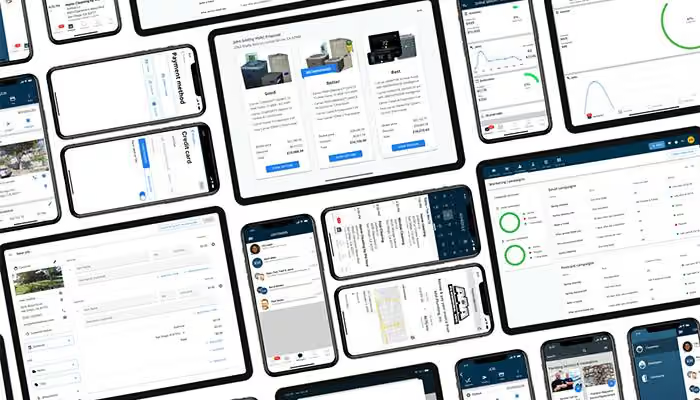
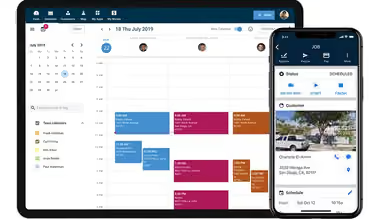
Streamline scheduling with a visual calendar and drag-and-drop functionality. Optimize technician routes, track job statuses in real-time, and provide customers with accurate ETAs, improving on-time performance and customer satisfaction.
Estimates And Invoicing
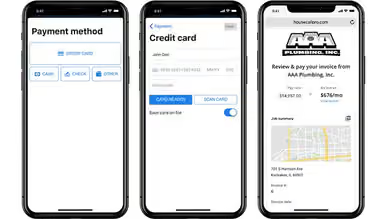
Create professional estimates quickly, get instant customer approvals, and convert estimates into invoices effortlessly. Accept online payments with various options, speeding up cash flow and simplifying your accounting processes.
Automated Marketing
Launch targeted email and SMS campaigns, nurture leads, automate review requests, and build a strong online reputation. Enhance customer engagement without constant manual effort, increasing conversions and repeat business.
Detailed Reporting
Access insightful reports on revenue, job performance, customer trends, and more. Utilize these analytics to identify growth opportunities, make informed business decisions, and track your progress toward key business goals.
Customer Communication Hub
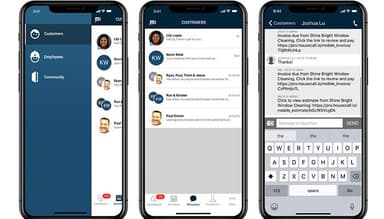
Centralize customer interactions with two-way text messaging, automated appointment reminders, and technician arrival notifications. This streamlined communication hub enhances the customer experience and reduces missed appointments.
GPS Tracking And Route Optimization
Monitor technician locations in real-time, optimize routes to save on fuel costs, and ensure timely arrivals. This feature also improves visibility into field operations, helping increase overall efficiency.
Pros And Cons of Housecall Pro Software
Pros
Offers an all-in-one solution for invoicing, payments, and scheduling
Helps capture home data about clients
Comes with the ability to run reports on multiple jobs at the same time
Cons
Has limitations in job customization
Sends invoices as one file each, making large-scale payment handling complex
Housecall Pro Software Pricing
BasicSolutions to optimize and streamline your business. | EssentialsAdvanced tools to simplify and scale your operations. | MaxUltimate plans for established and growing businesses. |
|---|---|---|
$49per month | $129per month | Custom Pricing |
|
|
|
Disclaimer: The pricing details were last updated on Sep 14, 2026 from the vendor's website. Please contact us for a tailored pricing list.
Housecall Pro Software Reviews
Total 552 reviews
4.4
All reviews are from verified customers
Rating Distribution
5
Stars66%
4
Stars19%
3
Stars7%
2
Stars3%
1
Stars5%
Share your experience
Consumer Services, 1-10 employees
“Online scheduling that delivers!”
Pros
I switched to this software mainly because I needed online scheduling and that feature has worked really well for me. It was a priority from the start and it has been effective.
Cons
There are a lot of useful tools included. It works as a full contact management platform, with invoicing, scheduling and client tracking all built in.
Rating Distribution
Ease of use
10
Value for money
10
Customer Support
8
Functionality
10
Construction, 1-10 employees
“top-notch customer service :)”
Pros
The support team has been really reliable. The training was solid and anytime I had a question, I was able to get an answer quickly. Having scheduling and payment processing together in one system is a big advantage for me since I don't have time to bounce between different apps while working in the field.
Cons
The biggest downside is the price since it costs a bit more to get started with than some other software options. I've used it before with another company and have also worked with a different platform for my own business. I definitely prefer Housecall Pro but at the moment it just isn't quite in my budget.
Rating Distribution
Ease of use
9
Value for money
6
Customer Support
9
Functionality
8
Construction, 1-10 employees
“Excellent value for money”
Pros
Considering the price, it comes with a lot of useful features. The customer support has been excellent and I've never had to wait more than a few minutes to get help. I also haven't run into many system problems, bugs or coding-related issues. Scheduling clients is simple and handling invoices and payments is very convenient. As a small business, quick payment processing matters a lot so the same-day payment transfers are a huge plus. It also includes several security features for logins and other account protection.
Cons
Some extra functionality costs more especially things like price books, CRM features and using the camera for job site photos.
Rating Distribution
Ease of use
10
Value for money
8
Customer Support
10
Functionality
8
Frequently Asked Questions
Does Housecall Pro offer an API?
Yes, Housecall Pro offers a robust API for developers to create custom integrations.
What language does Housecall Pro support?
The software supports the English language.
What other apps does Housecall Pro integrate with?
The software integrates with Broadly, CallRail, Thumbtack, QuickBooks, Wisetack, Convert, Emitrr, and Mailchimp.
Does Housecall Pro support mobile devices?
The software supports mobile devices.
What types of pricing plans does Housecall Pro offer?
The software offers Basic at $49/month, Essentials at $129/month, and a customizable Max plan. Request a custom Housecall Pro price quote.
Who are the typical users of Housecall Pro?
Housecall Pro is designed for small to medium-sized businesses in the appliance, handyman, HVAC, plumbing, electrical, and locksmith industries.
What level of support does Housecall Pro offer?
Housecall Pro offers support through various channels, including a knowledge base, online resources, and customer support teams.
How can I get real-time updates on the status of my jobs?
Housecall Pro's instant job data syncing enables you to track job status updates in the field as they happen. This provides key data points for your home services business without delays.
Does Housecall Pro help me gain better insights into my business?
Yes! By instantly syncing job data, Housecall Pro provides you with essential key data points for your home services business. Use this information to track job status, measure performance, and make informed decisions to drive success.