

QuickBooks
Last Updated
Key Takeaways
Generated from the text of customer reviews
QuickBooks - Intuit's cloud-based accounting platform – covers invoicing, alongside expense tracking, payroll, and financial reporting. While users note slow response times and advanced reporting difficulty, its invoicing, bank feed automation, and report generation are the strong points. Recent updates include: QuickBooks Time is now built into QBO, while standard ACH bill payments are free.
Our Verdict
QuickBooks suits the needs of small to mid-sized businesses that want accounting, invoicing, and payments on one platform. Pricing can scale once you add more features, and it's worth budgeting that upfront rather than being surprised by it later. We recommend it for service businesses and product companies that invoice often and want AI to do the routine bookkeeping.
Overall Rating
Based on 157 users reviews
4.4
Rating Distribution
Positive
88%
Neutral
10%
Negative
3%
Starting Price
$38
per month
QuickBooks Specifications
- Financial Reporting
- Invoice Management
- Expense Tracking
- Tax Management
What Is QuickBooks?
QuickBooks is Intuit's cloud-based accounting platform. Expense tracking, alongside invoicing, and bank reconciliation; payroll, inventory, sales tax, and financial reporting are all part of the tool. These features work well for small to mid-sized businesses, freelancers, and growing companies. The tool links directly to bank accounts, sorts transactions with AI, and pulls reports straight from live data. In turn, there is no need for manual exports.
In short, when you run accounting, payroll, and payments through separate tools, you end up reconciling the same numbers twice; QuickBooks cuts that reconciliation down by keeping everything in one connected system.
What Is QuickBooks Best For?
QuickBooks is best known for its invoicing and payment collection workflow. Businesses create and send invoices directly from the platform. In turn, clients pay through an embedded payment link (credit card or bank transfer) and the payment reconciles against the invoice automatically. Service businesses and freelancers get the most out of this. Instead of running too many tools, they get payment status, reminders, along with cash flow visibility in one place.
How Much Does QuickBooks Cost?
The pricing for QuickBooks starts at $38/month for Simple Start plan, and a 30-day free trial is available for all plans. It offers two modules: Small Business and Mid-Size Business.
Small Business
- Essentials – $85/month
- Plus – $140/month
- Advanced – $340/month
Mid-Size Business
- Advanced – $340/month
- Intuit Enterprise Suite – Custom pricing
Beyond the base price, users should also consider these additional costs based on industry benchmarks:
- Assisted Onboarding – Businesses should budget around $200–$1,000 for this one-time service
- Data Migration – Usually ranges from $300–$2,500, and is based on the volume as well as complexity of data
- ERP/CRM Integrations – Custom integrations typically cost $500–$5,000+
- Third-Party Apps – Budget around $10–$300+/month for any additional third-party app integrations
Users find QuickBooks to be good value for small businesses and consider it quite affordable, especially when it comes to all the range of features that are included in the plans. However, some users report that subscription costs can increase with add-ons. All in all, reviewers find the pricing quite reasonable initially but note that it can become somewhat costly when businesses expand further.
Disclaimer: The pricing is subject to change.
QuickBooks Integrations
QuickBooks connects with third-party apps, including:
- Mailchimp software
- Shopify software
- Square payroll
- PayPal software
- HubSpot CRM software
- Salesforce CRM
- BILL (formerly Bill.com)
- Gusto HR software
- QuickBooks Time software
- Stripe
- WooCommerce
- Amazon Business
How Does QuickBooks Work?
Log in from any device and run your books from one connected platform:
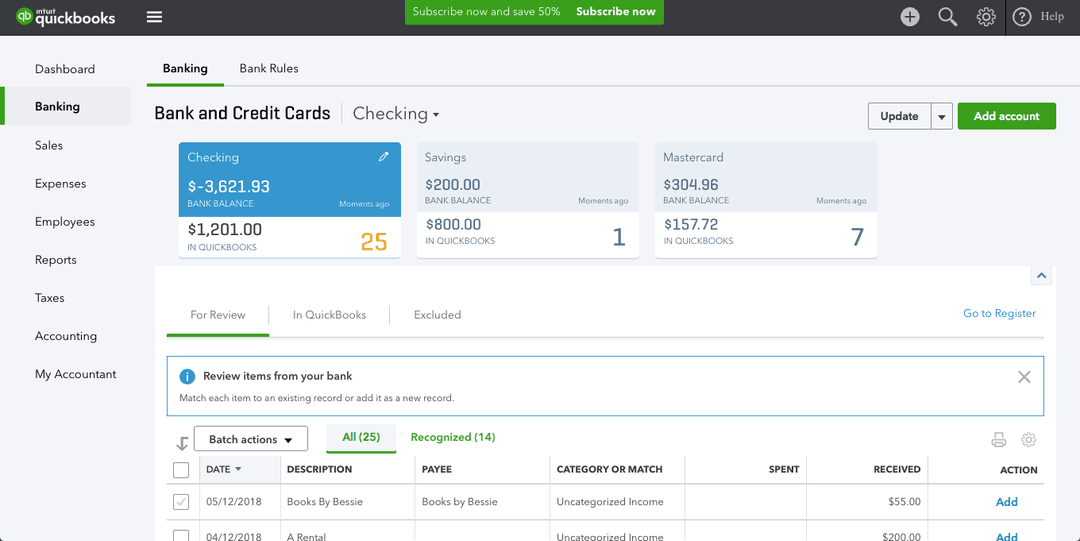
- Connect your bank and credit cards, as it helps the platform pull transactions before categorizing expenses using your past categorization history
- Check the color-coded bank feed. It flags which categorizations and vendor suggestions need review before you post them
- Send invoices straight from QuickBooks. Two modes of payment (credit and bank transfer) are offered through QuickBooks Payments
- Pay bills through QuickBooks Bill Pay. Standard ACH is free and unlimited, all while scheduling and reconciliation happen in QuickBooks
- Ask Intuit Intelligence AI Chat questions like "What was my profit last quarter?" and get answers pulled straight from your live data
- Run payroll in QuickBooks or connect to an existing provider. Time tracking flows in automatically through QuickBooks Time
- Track inventory, create purchase orders, and manage vendors
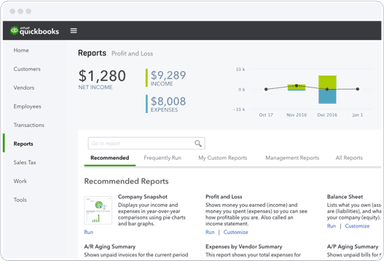
- Generate reports in one click (ranging from P&L, balance sheet to cash flow, sales, 1099s)
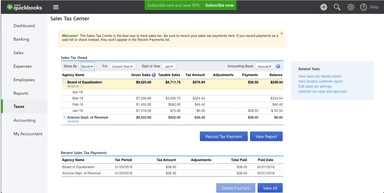
- File and remit sales tax with Sales Tax AI
Who Is QuickBooks For?
The tool is well-suited for organizations operating in the following industries and sectors:
- Accounting
- Consumer services
- Construction
- Non-profit
- Staffing and recruiting
- Healthcare
- Financial services
QuickBooks Use Cases
Our analysis of QuickBooks’ capabilities has helped us narrow down a few scenarios where the software fits well:
SMB Owners (Without An Accounting Background) Who Need Bookkeeping
Business owners that run their own books (without any formal training) may get stuck in the same place multiple times (be it categorizing transactions, or reconciling accounts). This is where QuickBooks come in. Its Intuit Intelligence layer categorizes all the expense, all while flagging anomalies before they can snowball into major penalties. Deductions are also surfaced, alongside plain language answers to questions that can be difficult to comprehend.
Service Businesses That Have To Manage Invoicing, Time Tracking, Alongside Payroll
Agencies, consultants, and contractors bill based on hours. This means that a singular entry should essentially be recorded within the invoice, payroll, as well as the client's record. Besides the extra work, there’s also room for more mistakes. Since QuickBooks Time folded fully into QuickBooks Online in June 2026, this is no longer a sync-and-export job. Now hours logged by employees flow straight into payroll and invoices.
Product Businesses That Have To Track Inventory, Cost of Goods, And Purchase Orders
Inventory and financials can't exist in separate systems for retailers and product businesses. This is because the cost of goods needs to hit the P&L when stock moves, and not only at month-end reconciliation. This is where QuickBooks' inventory tools can help. It tracks product levels and generates purchase orders. At the same time, it manages vendors and publishes all the cost of goods into reports.
Construction Businesses That Have To Manage Certified Payroll Along With Job Costing
Construction firms on government contracts have a compliance requirement most accounting software may lack. This includes weekly certified payroll reports (Form WH-347) that’s actually tied to job costing that tracks labor and materials per project. QuickBooks Workforce Elite added certified payroll report creation in June 2026, which is what makes bidding on federally funded work feasible without a separate compliance tool.
Is QuickBooks Right For You?
Does your business need invoicing, expense tracking, along with payroll, and inventory on one platform? Perhaps you prefer that routine categorization as well as flagging is executed by AI rather than getting it done yourself. If that’s the case, then QuickBooks is worth an evaluation. Its security recognition has made it quite reliable. The tool is both SOC 2 Type II and TRUSTe certified. The platform has also made some recent developments lately, including:
- QuickBooks Time folded into QBO at no extra cost
- Standard ACH bill payments went free and unlimited in June
- Certified payroll reporting landed in Workforce Elite the same month
- Bank feed picked up color-coded review signals around the same time
Still not sure about QuickBooks? Contact our support team at (661) 384-7070 for further guidance.
QuickBooks Features
Intuit Intelligence (AI-Powered Bookkeeping)
This is QuickBooks' AI layer. It categorizes expenses and surfaces possible tax deductions. In addition, the tool conducts anomaly flagging, as well as answers plain-language questions through AI Chat. Features like automatic reconciliation and discrepancy detection, along with Sales Tax AI can be accessed in further tiers.
Invoicing And Payments
Invoices can be created, sent, and tracked from QuickBooks through this feature. Automated reminders and status updates are also offered. Clients pay by credit card, bank transfer, or ACH through QuickBooks Payments. As of the June 2026 update, payment states (funded, returned, disputed) no longer face any delay; but sync back to the invoice on time. An AI invoice generator is included for free through Intuit Intelligence.
Expense Tracking And Bank Feed
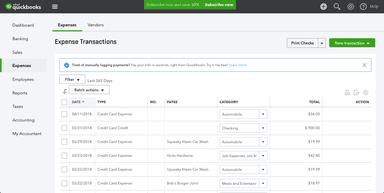
Transactions are pulled from connected bank accounts and credit cards through expense tracking. The bank feed now shows color-coded signals for which categorizations and vendor suggestions need a second look before posting. Transactions can be edited inline rather than reopened elsewhere. Receipts get captured through the mobile app, while the AI flags likely deductions as it categorizes.
Bill Pay And Accounts Payable
QuickBooks Bill Pay covers scheduling, paying, along with reconciling bills. This way, users don’t have to leave QuickBooks or log into a bank portal. Standard ACH payments have become free and unlimited across all plans since the June 2026 update. However, it’s important to note that next-day ACH and check payments still carry a fee.
Time Tracking
QuickBooks Time used to be a separate subscription; as of 2026, it's built into QuickBooks Online. Employees clock hours from the mobile app or web. The GPS tracking covers field teams while the data flows straight into payroll and invoices. Existing Time customers can now do their timekeeping inside QuickBooks directly.
Pros And Cons of QuickBooks
Pros
Reliable accounting with PayPal integration
Simplifies invoicing as well as processing of payments
Convenient online access for remote teams
Cons
Customer support response times can be slow
Some features (like reporting and customization) require user training
QuickBooks Pricing
Small Business Simple Start | Small Business Essentials | Small Business Plus | Small Business Advanced | Mid-Size Business Advanced | Mid-Size Business Intuit Enterprise Suite |
|---|---|---|---|---|---|
$38 per month | $85 per month | $140 per month | $340 per month | $340 per month | Custom Pricing |
|
|
|
|
|
|
Disclaimer: The pricing details were last updated on Sep 25, 2026 from the vendor's website. Please contact us for a tailored pricing list.
QuickBooks Reviews
Total 157 reviews
4.4
All reviews are from verified customers
Rating Distribution
5
Stars65%
4
Stars23%
3
Stars6%
2
Stars4%
1
Stars3%
Share your experience
Computer Software, 51-100 employees
Less than 6 months
“Perfect for small businesses”
Pros
Has worked well for our small business payroll routine! The process for setting up new employees is easy and managing benefits is actually simple. It handles payroll runs smoothly and makes it easy to generate the reports we need. We've been using it for about a year and everything has been pretty reliable.
Cons
There isn't a free trial for the payroll software :( It took us a little while to get the hang of the system and having a trial period would've been helpful so we could test it before paying for a plan. It's not a dealbreaker but it's worth thinking about if you're comparing options.
Rating Distribution
Ease of use
9
Value for money
7
Customer Support
8
Functionality
8
Construction, 11-50 employees
More than a year
“hands off payroll with automatic filing”
Pros
Love how simple and convenient it feels in daily use! After the initial setup, running payroll typically takes only a few minutes. A lot of the employee details can be entered through their own self service so I'm not constantly hunting down missing information. Tax calculations and filings are handled automatically and the results sync directly into my QuickBooks accounting so there's no extra double entry work or extra reconciliation just to make everything line up. The interface is clean and familiar if you're already using this solution and between the self service portal and direct deposit, payday is about as hands off as it gets. Overall, it really cuts down the usual payroll hassle!
Cons
Only part that frustrates me a bit is that locating forms or earlier tax submissions isn't always easy. When I need older filings, specific tax forms or historical records, the navigation can feel inaccessible and I sometimes end up taking extra clicks or doing extra searching to find what I'm looking for.
Rating Distribution
Ease of use
10
Value for money
9
Customer Support
9
Functionality
10
Health, Wellness and Fitness, 11-50 employees
More than a year
“Complete and central access”
Pros
Everything being in one place is really convenient! I can switch between different employees without much effort and the navigation feels easy. Tax information is simple to view too and pay stubs are easy to access when I need them.
Cons
Email notifications occasionally land in my personal inbox instead of the work account which is annoying. Customer support feels like it could be stronger and a quick chat option would make troubleshooting faster. A few bugs pop up from time to time and it can be tough to track down what's causing the issue.
Rating Distribution
Ease of use
9
Value for money
9
Customer Support
8
Functionality
8
Frequently Asked Questions
Does QuickBooks offer an API?
Yes, the vendor offers API access.
Does QuickBooks have a mobile app?
Yes. The platform has dedicated iOS and Android apps.
What language does QuickBooks support?
QuickBooks is available in English.
How much does QuickBooks cost?
Investment in QuickBooks starts at $38/month for the Simple Start plan for small businesses, and a 30-day free trial is available for all plans. It offers two modules: Small Business: Essentials ($85/month), Plus ($140/month), Advanced ($340/month), and Mid-Size Business: Advanced ($340/month), Intuit Enterprise Suite (custom pricing). Get in touch with us to get a personalized QuickBooks cost estimate.
What other apps does QuickBooks integrate with?
Integration is supported with third-party applications, including Mailchimp, Shopify, Square, PayPal, HubSpot, Salesforce, Bill.com, Gusto, QuickBooks Time, Stripe, WooCommerce, and Amazon Business.
Who are the typical users of QuickBooks?
Typical users include accounting, consumer services, construction, non-profit, staffing and recruiting, healthcare, and financial services industries.
What level of support does QuickBooks offer?
Support via phone is available for free in paid plans. Advanced plan users get Priority Circle with unlimited support and on-demand training.