

Last Updated

Overview
ArchiSnapper helps construction and architecture teams capture site observations, annotate drawings, and assign tasks quickly. It improves accuracy in documentation and reduces delays in reporting. While offline access could be more robust for remote sites, its reporting and collaboration features ensure smooth and efficient workflows.
ArchiSnapper Specifications
- Punch List / Task Tracking
- Collaboration Tools
- Project Planning and Scheduling
- Mobile App
What Is ArchiSnapper?
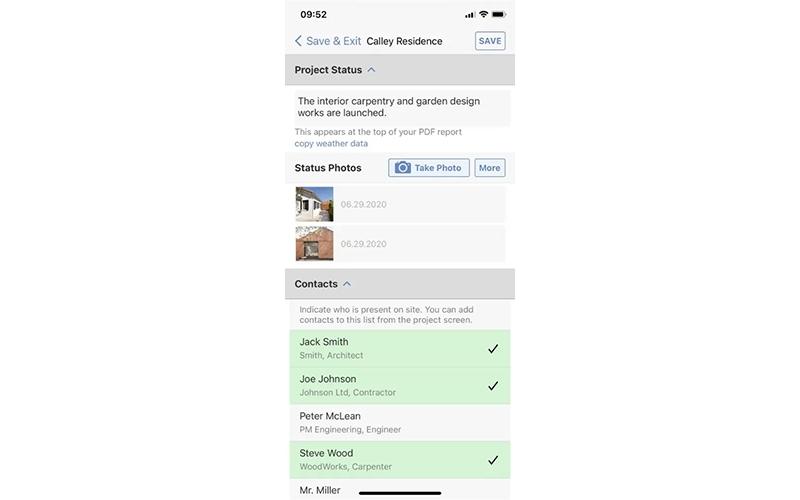
ArchiSnapper, acquired by Deltek, is a mobile-first construction management software designed for architects, engineers, and field teams. It simplifies site inspections, punch lists, and reporting, helping businesses save time and reduce errors. Key features include paperless site inspections, punch list creation with checklists, and digital drawing annotations. These tools allow teams to document issues quickly, assign tasks, and generate professional reports. ArchiSnapper suits small to medium construction firms looking to improve field efficiency and maintain accurate project records.
ArchiSnapper Pricing
ArchiSnapper offers flexible pricing based on the number of users and required features, along with a 14-day free trial. The plans starts from $34/user/month.
Disclaimer: The pricing is subject to change.
ArchiSnapper Integrations
The software supports integration with multiple systems and platforms, such as:
- Excel
- Ajera
- Vantagepoint
Who Is ArchiSnapper For?
ArchiSnapper is ideal for a wide range of professionals in the construction industry, including:
- Architecture
- Engineering
- Renovation
Is ArchiSnapper Right For You?
Looking for a field reporting solution that improves on-site efficiency? ArchiSnapper offers paperless inspections, automated punch lists, and branded PDF reports, all of which are accessible from mobile devices. It helps teams save time, reduce errors, and maintain clear documentation. Ideal for architects, engineers, and contractors, the platform is GDPR-compliant, ensuring the secure handling of sensitive data. Its security and adaptability support teams of all sizes. Trusted by Williams Blackstock Architects, Craine Architecture, and Sotrelco, it enhances collaboration and project accuracy.
Still evaluating if ArchiSnapper is the right solution for your team? Contact our experts at (661) 384-7070 for a personalized consultation.
ArchiSnapper Features
Digital Drawing Annotation And Review
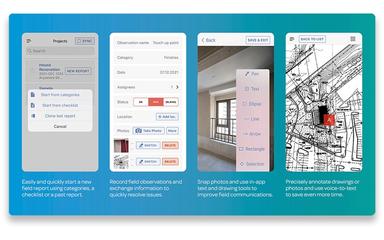
ArchiSnapper features allow users to view and annotate drawings on any device, adding notes or observations directly on plans. Standardized inspection forms simplify site reviews, and exact location marking eliminates confusion, ensuring that inspection reports are clear, accurate, and easy to interpret.
Efficient Paperless Site Inspections
The platform supports efficient walkthroughs using mobile devices to identify, assign, and track tasks in real time. Punch list items can be created directly from the field, and reports are generated instantly, reducing administrative work and helping teams maintain accurate, up-to-date documentation.
Simplified Field Reports
ArchiSnapper software allows teams to capture and annotate site photos or drawings to mark specific areas of concern. Users can assign observations to contacts for clear communication and quickly send reports in one click, saving time and keeping all stakeholders informed about project progress.
Generate Professional Field Reports
The software automatically generates company-branded PDF reports that can be emailed to any recipient with a single click. Teams can update progress quickly by starting with previous reports, reducing delays between site visits and report creation while keeping project data current.
Pros And Cons of ArchiSnapper
Pros
Makes it easy to track issues, responsibilities, and progress across phases or corrective work orders
Allows to capture site observations directly on-site without retyping later
Professional-looking reports that can be customizale to present to clients
Cons
Reports with many photos can result in large file sizes, making them harder to share
Copying reports for phased projects can cause issues, requiring manual workarounds
ArchiSnapper Reviews
Total 22 reviews
4.5
All reviews are from verified customers
Rating Distribution
5
Stars64%
4
Stars32%
3
Stars0%
2
Stars5%
1
Stars0%
Share your experience
Doug
Architecture & Planning, 11-50 employees
Free trial
“can't reach support for api sync”
Pros
My biggest hurdle so far has been simply reaching someone. Without being able to make contact, I haven't been able to actually use the product at all.
Cons
I'm trying to get the API working so it can synchronize my Ajera software with ArchiSnapper but I haven't been able to make progress.
Rating Distribution
Ease of use
2
Value for money
5
Customer Support
2
Functionality
4
Swapnil
Architecture & Planning, 11-50 employees
Free trial
“Site reporting that delivers”
Pros
ArchiSnapper has been really useful for capturing site data, creating reports and sharing updates with both team members and clients.
Cons
I wish it handled offline access better especially on remote job sites where an internet connection isn't always available and I still need to view or record data.
Rating Distribution
Ease of use
8
Value for money
8
Customer Support
8
Functionality
8
Wally C.
Architecture & Planning, 11-50 employees
More than a year
“built for construction reporting”
Pros
It's clear this software was created by people who actually understand the construction industry. Features like voice-to-text, automatic photo insertion into the report and the ability to place an observation directly on a floor plan make putting reports together much faster and more accurate.
Cons
I'm happy with pretty much everything. If I had to point out one minor issue it would be that photo processing can sometimes take a little while after the pictures are taken.
Rating Distribution
Ease of use
10
Value for money
10
Customer Support
10
Functionality
10
Frequently Asked Questions
What other apps does ArchiSnapper integrate with?
ArchiSnapper integrates with Excel, Ajera, Vantagepoint, and more.
Who are the typical users of ArchiSnapper?
ArchiSnapper is widely used across various professionals in the construction industry, including architecture, engineering, and renovation teams.
Does ArchiSnapper have a mobile app?
Yes, ArchiSnapper has a mobile app on iOS and Android.
Does ArchiSnapper offer an API?
Yes, ArchiSnapper provides API access.
What types of pricing plans does ArchiSnapper offer?
ArchiSnapper price is subscription-based, starting from $34/user/month, with a 14-day free trial. Get a tailored quote on ArchiSnapper cost.
What language does ArchiSnapper support?
ArchiSnapper supports multiple languages, including English, French, and German.
What level of support does ArchiSnapper offer?
ArchiSnapper provides support through phone and a ticket-based system.