Last Updated
Key Takeaways
Generated from the text of customer reviews
Procore is a cloud-based platform for managing construction projects from preconstruction to closeout, combining project execution, analytics, cost control, etc. While it acts as a single source of truth for owners, contractors, and subcontractors, some users find navigating between pages a bit challenging. Recent developments of the software have been focused on AI integration, asset management, and email improvements, including modernized punch list email notifications.
Our Verdict
Procore is a good option for construction teams needing a unified project management platform. While pricing may be higher for smaller contractors, it offers long-term value through centralized workflows, visibility, and scalable collaboration tools. It fits mid to large firms handling multiple projects and requiring coordination between field and office teams.
Overall Rating
Based on 859 users reviews
4.5
Rating Distribution
Positive
95%
Neutral
4%
Negative
1%
Starting Price
Custom
Procore Specifications
- Project Planning and Scheduling
- Budget Management
- Resource Allocation
- Document Management
What Is Procore?
Procore is a cloud-based construction project management software designed to streamline the entire construction lifecycle. It provides a connected platform for all project stakeholders—owners, general contractors, and specialty contractors—to enhance collaboration and workflow. The software reduces risks and protects profits by offering real-time visibility into designs, budgets, Requests For Information (RFIs), issues, and more on any device. The platform also provides jobsite visibility through integrated mapping tools that help teams trace assets and field activity by location. Widely recognized in the industry, Procore is used globally to boost productivity and ensure worker safety.
What Is Procore Best For?
The software is best known for its workflow customization. Users can adjust workflows to match their process rather than changing how their team operates. The software lets them add custom fields and configure project views based on role-specific needs. As project needs change, workflows and configurations can be adjusted without rebuilding the system, which helps teams avoid disruption and wasted setup time.
How Much Does Procore Cost?
Procore pricing generally ranges between $10,000 to $60,000+/year for most companies. This is an estimated range, and actual costs vary depending on the products you need and the scale of construction activity.
The software typically charges an upfront annual fee/product, and pricing is also based on your Annual Construction Volume (ACV), which is the total dollar value of construction work across your projects. Moreover, unlimited users, customer support, unlimited data storage, and product enhancements are included in each Procore contract at no extra cost. Initial training is also free. The software also states that there are no hidden fees, which helps save users from unexpected budget strain.
Users generally say Procore is expensive but worth it for large construction firms due to its comprehensive features and unlimited users. Smaller companies find pricing too high and complex, especially because costs scale with annual construction volume and product selection.
Disclaimer: Pricing references are based on publicly available third-party information and industry benchmarks. Actual costs may vary.
Procore Integrations
Procore integrates with several third-party applications, including:
- Egnyte
- Microsoft SharePoint
- 360 Sync
- Google Drive
How Does Procore Work?
To get started with Procore software, follow these steps:
- Log in to the Procore platform, using your credentials
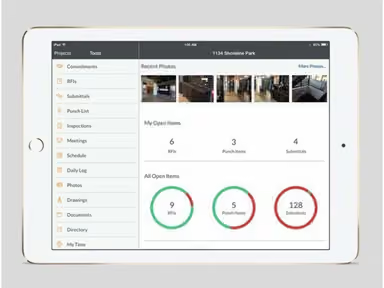
- Access the main dashboard to view project overviews
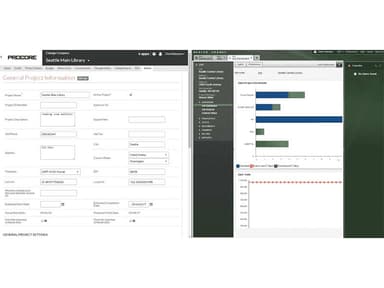
- Create new projects or select existing ones from the project list
- Assign roles and permissions to team members
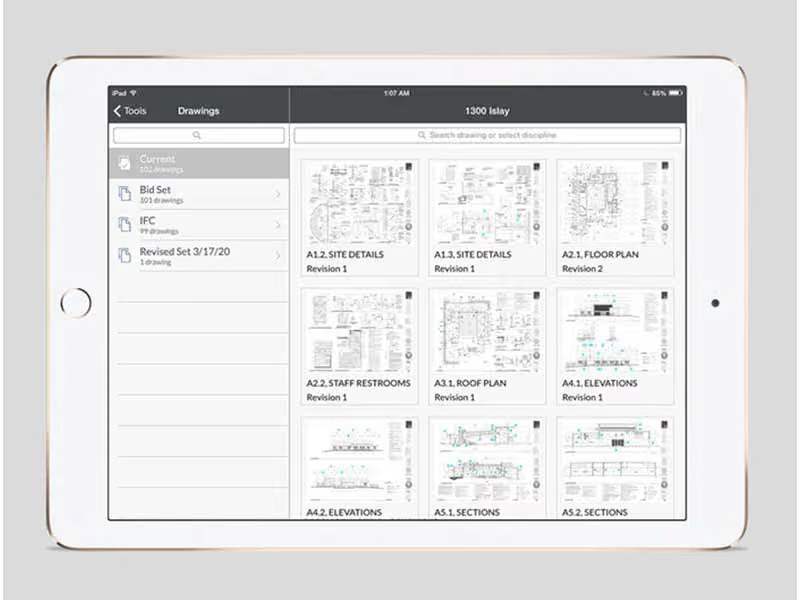
- Upload project documents and drawings
- Track project progress through real-time updates
- Generate and share reports with stakeholders
- Monitor worker safety and compliance
- Use the integration hub to connect with other essential tools
Who Is Procore For?
The software can be used across diverse industries (including healthcare and government) by the following business types and user roles:
- Construction firms
- Commercial, residential, and infrastructure projects
- Mid-sized businesses to large construction enterprises
- General contractors
- Specialty contractors
- Other project stakeholders in the construction industry
Procore Use Cases
Based on our analysis of user reviews and Procore’s current capabilities, we have identified key scenarios where this software is a good fit:
Large General Contractors Managing Multiple Active Projects
Large contractors often run several projects simultaneously, each at a different stage and with different teams involved. Keeping track of what is happening on each site can become difficult when information sits in separate tools or arrives late from the field. In these environments, Procore is commonly used to bring project activity into one place so teams can stay aware of progress without constant follow-ups. It supports day-to-day coordination between field and office teams in a way that fits fast-moving project schedules.
Owners And Developers Overseeing Construction From A Distance
Project owners and developers are usually not involved in daily site activity, yet they still need clear visibility into how work is progressing. They often depend on regular updates from multiple contractors, which can vary in timing and detail. Procore is used in these situations as a shared space where project information is recorded and updated in a structured way. This helps owners stay informed and respond to issues without needing to chase information across different channels.
Specialty Subcontractors Working Across Multiple Job Sites
Subcontractors such as electrical or plumbing teams often move between several active sites and work under different general contractors. Their challenge is staying aligned with changing schedules and site requirements while keeping communication clear across all projects. Procore is used to keep job-related updates and instructions accessible in one place. This makes it easier for field teams to understand what is expected without relying on fragmented communication.
Construction Teams Handling High Volumes Of Project Documentation
Construction work generates a steady flow of drawings, approvals, and project-related documents that need to stay current and accessible. When these records are stored in different systems or shared manually, it becomes harder to confirm which version is correct. Procore is often applied in workflows where document control and review processes need to stay consistent across teams. It supports a more organized way of keeping project records connected to the work happening on site.
Firms Standardizing How Projects Are Managed Across The Organization
As construction companies grow, different teams often develop their own ways of tracking work, resources, costs, and progress. This can lead to uneven reporting and make it harder for leadership to compare projects in a meaningful way. Procore is used in these cases to bring more consistency to how project information is recorded and reviewed. It helps align day-to-day execution with higher-level reporting needs, so decisions are based on comparable data across projects.
Is Procore Right For You?
Are you looking for construction project management software to streamline your projects and improve real-time productivity by consolidating workflows on a centralized platform? Procore construction software offers practical features designed to enhance project efficiency and ensure the success of your projects, including RFIs, invoice management, analytics, and project execution. Serving over three million individuals, companies like Greystar, Honeywell, and Hitt trust the solution. The software has also been recognized with multiple awards and accolades, including the Stevie’s International Business Awards 2024.
Procore technologies also provide high levels of security and scalability, making it a reliable choice for any construction firm. Its secure cloud infrastructure is SOC 1 & 2 (Type 2) and ISO 27001:2013 certified. It also adheres to data protection laws, including GDPR, the CCPA, and Australia’s Privacy Act of 1988.
Still not sure if Procore is right for you? Contact our customer support team at (661) 384-7070, who will help you make an informed decision.
Procore Features
Document Management
Procore's document management system allows users to easily store, organize, and share project documents. This feature ensures that all team members have access to the latest versions of documents, reducing errors and improving collaboration. These documents can be readily accessed from any device, whether in the office or in the field. The software also features RFI (Request For Information) management, allowing users to create, assign, submit, and track their status in real time. Files can also be sent to a dedicated project mail address, so that everyone stays in the loop.
Project Management
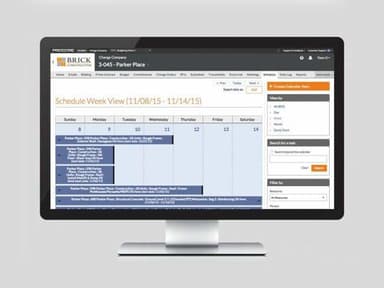
Procore features project management tools that enable users to plan, schedule, and execute projects efficiently. This includes task assignment, progress tracking, and resource management, ensuring projects stay on track. Its project management also includes change order management, which keeps track of project scope and avoids scope creep. Overall, it acts as a central source of information.
Quality And Safety Management
The software's quality and safety tools help maintain high standards on the job site. Users can conduct inspections, manage punch lists, and ensure compliance with safety regulations, thereby enhancing worker safety. It also helps standardize processes so that anyone can follow them successfully. Added verification checkpoints ensures that work is done correctly and completely. Insights on near misses, incidents, etc., also help create clear and up-to-date records.
Financial Management
Procore offers comprehensive financial management tools, including budgeting, cost tracking, and invoicing. These tools help manage project finances effectively, ensuring profitability and financial health. By providing visibility into project costs, Procore helps construction firms maintain financial control and ensure profitability.
Building Information Modeling (BIM)
The BIM feature in Procore allows users to view 3D models and drawings, facilitating better planning and coordination among project teams and enhancing the accuracy and efficiency of the construction process. The software also syncs desktop BIM workflows through integrated plugins, making file management and issue tracking easier. It also enables ‘Augmented Reality’ to compare site conditions to the 3D models. Users can also enhance BIM capabilities with Procore’s open API and BIM viewer SDK.
‘Procore AI’
Procore uses a conversational AI assistant to answer questions about specs, RFIs, and submittals directly from project data. AI-enabled workflows draft summaries and handle routine updates inside daily tasks. Moreover, agents can plan and carry out actions across connected tools. A system of intelligence also delivers real-time insights and industry benchmarks, helping teams make clearer decisions and reduce project risk across delivery.
Field Productivity
Procore tracks installed material quantities and connects them to project budgets so teams can see how work is progressing on site. Its mobile tools keep office and field teams in sync throughout the day. ‘Timesheets’ record crew and labor hours with GPS-based clock-ins for accuracy. ‘Tasks’ help manage coordination steps, while document management keeps project records in one place. ‘Time and material tickets’ capture extra work so it can be tracked and billed correctly.
Pros And Cons of Procore
Pros
New users find the interface easy-to-use
Keeps drawings, RFIs, submittals in one place
Tracks project progress and updates in real time
Responsive 24/7 support with helpful training resources available
Connects easily with asset management and accounting tools
Cons
Notifications can feel excessive and key updates get missed at times
Offline capabilities are somewhat limited
AI integration could use more updates and improvements
Procore Reviews
Total 859 reviews
4.5
All reviews are from verified customers
Rating Distribution
5
Stars58%
4
Stars37%
3
Stars4%
2
Stars0%
1
Stars1%
Share your experience
Amy Randal
Clark Builders, 500+ employees
“Its a staple for us
Pros
Procore is the go-to platform for construction management, covering everything you need to keep projects running smoothly.
Cons
It doesn't allow you to directly markup specs, which can be a limitation for some workflows.
Rating Distribution
Ease of use
9
Value for money
8
Customer Support
8
Functionality
8
trevor
Spring Valley Construction Company, 51-100 employees
“user-friendly option!
Pros
We love how easy it is to use and integrate with other products as per our requirements.
Cons
The cost is too high for us.
Rating Distribution
Ease of use
9
Value for money
7
Customer Support
8
Functionality
9
Robyn
Arts and Crafts, 1-10 employees
Less than a year
“Procore Project Management
Pros
Its top notch project management software with sections for everything required to manage projects. Furthermore it is very user friendly and great for collaboration.
Cons
Without a doubt product is excellent but it comes with a hefty price tag.
Rating Distribution
Ease of use
10
Value for money
8
Customer Support
10
Functionality
10
Frequently Asked Questions
Does Procore offer an API?
Yes, Procore has an API available for use.
What language does Procore support?
Procore supports multiple languages, including English, Spanish, and French.
What other apps does Procore integrate with?
Procore integrates with apps such as Microsoft Project, Bluebeam, Dropbox, QuickBooks, and Egnyte.
Does Procore support mobile devices?
Yes, Procore supports mobile devices, allowing users to access project information on the go. It also has apps for both iOS and Android users.
How much does Procore cost?
It typically ranges between $10,000 to $60,000+/year. Final pricing details are available upon request. Contact us for more information about the cost of Procore construction software.
Who are the typical users of Procore?
Procore is ideal for construction professionals and construction firms of all sizes involved in commercial, residential, industrial, and infrastructure projects.
What level of support does Procore offer?
Pro core software provides support via chat, a knowledge base, email/help desk, 24/7 live representatives, phone support, and FAQs/forums.
How much is Procore?
It typically ranges from $10,000 to $60,000+/year, though final pricing is customized based on the selected products and the scale of construction activity.