

SiteDocs
Last Updated
Key Takeaways
Generated from the text of customer reviews
SiteDocs is a mobile-first safety management platform for digitizing forms, certifications, and compliance tracking. It supports construction, industrial, and facilities-services crews across job sites, including those pursuing certifications like COR. Reviewers praise its customizable forms, offline access, and compliance tracking, though several mention steep renewal price increases and a less intuitive web app for admin tasks. Moreover, SiteDocs recently partnered with AuditSoft to simplify audit document handling and support COR certification.
Our Verdict
SiteDocs is a reliable option for companies needing a mobile-first system for field safety documentation and compliance tracking. It crews working across multiple or remote job sites that need offline access and audit-ready records. Pricing is lauded even for small businesses. We recommend SiteDocs to construction and industrial businesses that need digital safety forms, contractor compliance, and incident tracking.
SiteDocs Specifications
- Audit Trails
- Alerts/Notifications
- Customizable Reports
- Asset Management
What Is SiteDocs?
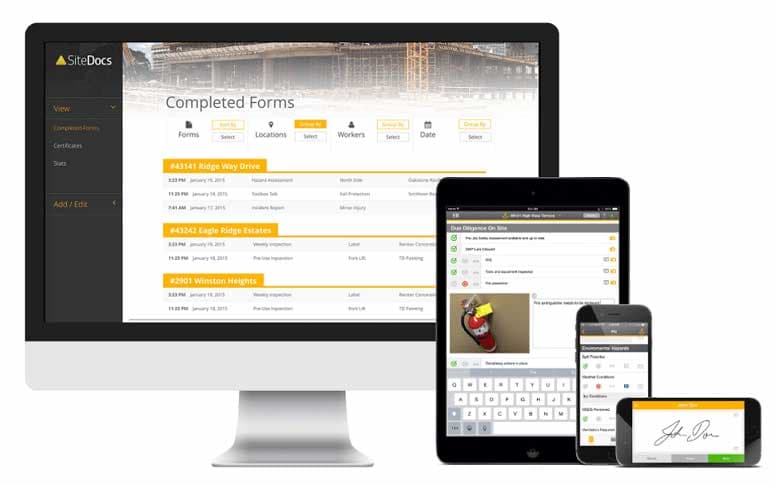
SiteDocs is a Safety Management platform that helps companies move their safety documentation off paper and onto phones, tablets, and the web. Safety managers can use it to track worker certifications, receive expiry reminders, and check that contractors meet site requirements. Teams can report incidents, near misses, and hazards, then assign corrective actions and follow them through to completion.
Moreover, field workers can access their assigned forms and complete them offline, with the data syncing once they’re back online. It helps them get automatically time-stamped, geo-tagged, and filed to a central account that supervisors and safety managers can review from head office.
What Is SiteDocs Best For?
The platform stands out for its “Workflow Studio,” a drag-and-drop automation builder connecting safety data to over 1,350 software platforms. It automates recurring tasks like scheduling toolbox talks, routing forms for sign-off, and distributing inspection reports to subcontractors. It also triggers custom alerts, such as an SMS when a near-miss occurs. This reduces manual follow-up and speeds up response to urgent issues.
How Much Does SiteDocs Cost?
The pricing of SiteDocs starts at around $49/user/month.
In addition to the base subscription costs, organizations should account for the following expenses:
- Implementation: Up to $2,000 (SMB); $2,000-$10,000 (multi-site)
- Form/Template Migration: $500–$3,000, based on the volume of paper or legacy digital forms being converted
- Admin And Field-Worker Training: $500–$5,000, depending on crew size and turnover
- API And HRIS/Payroll Integrations: $1,000–$8,000, depending on integration scope
- Add-On Modules (Analytics & Reporting, Workflow Studio): Up to $3,000/year each, depending on usage volume and complexity
Reviews regarding SiteDocs’ cost are mixed. Most users note that its pricing is reasonable for its out of the box functionalities. Some even suggest that this is the reason they switched to the platform. However, a few note that it could be more facilitated.
Disclaimer: Pricing references are based on publicly available third-party information and industry benchmarks. Actual costs may vary.
SiteDocs Integrations
The platform supports integrations with various third-party systems, including:
How Does SiteDocs Work?
Here's how you can access the platform and its features:
- Log in to the SiteDocs web dashboard or mobile app using company credentials
- Set up job site locations and add workers, assigning mobile access and permission levels for each one
- Build digital forms with the drag-and-drop form builder, or upload existing PDF safety documents to the document library
- Send forms to job sites so workers can complete, photograph, and sign them from a phone or tablet, with offline support if there's no signal
- Monitor form completion and worker signoffs in real time through the Safety Monitor dashboard
- Flag non-compliant items as corrective actions and assign them to a specific worker with a due date
- Review safety trends and KPIs through Analytics dashboards, available as an add-on
- Automate data-sharing and notifications through Zapier, Dropbox, or the Public API using Workflow Studio
Who Is SiteDocs For?
SiteDocs is ideal for a wide range of industries and sectors, including:
- Construction
- Mining and metals
- Facilities services
- Transportation, trucking and railroad
- Manufacturing
- Oil and energy
SiteDocs Use Cases
Based on our analysis of user feedback and SiteDocs features, we have identified the following key business scenarios where it is well suited:
Companies Organizing Safety Records For Audit Preparation
Safety teams can store hazard assessments, inspections, incident reports, training certifications, and toolbox talks in one SiteDocs account. This makes it easier to find records when preparing for an audit. This way associations can even allow auditors to access the Admin Panel directly. Although employers remain responsible for maintaining their own safety programs, it supports documentation for Canada’s Certificate of Recognition (COR) program. User feedback also highlights the convenience of centralized record storage and easy document retrieval during COR audits.
Safety Managers Overseeing Multiple Job Sites
Supervisors managing multiple job sites can use its safety monitor tools to see which forms have been completed, and which are still pending, overdue, or missing. They can give selected supervisors access to this information. Moreover, head office staff can check compliance from any location with web access. In this regard, reviewers specifically laud its usefulness in tracking safety forms across job sites.
Field Teams Working In Areas With Limited Connectivity
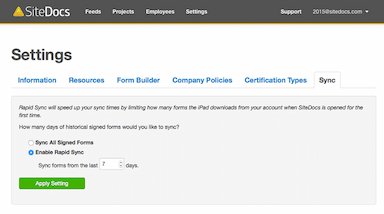
User reviews appreciate how its offline access to forms and documents is useful for teams that do a lot of fieldwork. Workers can complete forms offline, including inspections and incident reports. Forms are saved on the device and uploaded when a connection returns. SiteDocs advises signing in and loading the required resources before working in areas without coverage.
Safety Teams Tracking Worker Certification and Training Expiry
Safety managers and supervisors can track workers’ certifications, check which ones have expired or are nearing expiry, and set reminders for workers and supervisors. They can also share the lists of workers and their certifications with prime contractors and general contractors. Reviews indicate how this approach from SiteDocs of keeping certifications and competencies in one place makes compliance checks easier than searching through paper files.
Is SiteDocs Right For You?
SiteDocs tends to fit companies that already run a structured, form-heavy safety program and want to digitize it rather than companies looking to build a safety process from scratch. It's a strong match for construction and industrial employers with crews working across multiple, sometimes remote, job sites.
Moreover, the platform uses security controls for organizations that are aligned with SOC2 and NIST recommendations. It also meets standards like GDPR, CCPA, and SOC 2 compliance. Notable clients include BA Blacktop, Cake Commercial Services, and Lafarge.
Still doubtful if SiteDocs is the right fit for you? Connect with us at (661) 384-7070 for further guidance.
SiteDocs Features
Digital Form Builder
This feature lets safety teams convert existing paper forms into digital versions or build new ones from scratch using a drag-and-drop editor with different field types. Forms can include repeatable sections, private visibility settings limited to administrators, and voice-dictated text entry. This lets field workers complete inspections, JHAs, and incident reports directly from a phone without needing to type everything out.
Certification Management
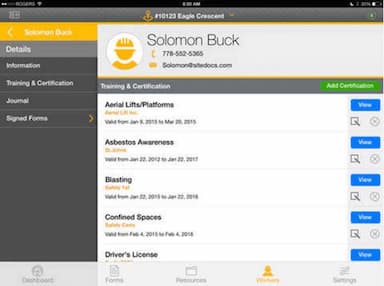
SiteDocs stores every worker's certifications and training records in a central profile accessible from the mobile app, and flags certifications as they approach their expiry dates. Supervisors and safety managers can check compliance status for an individual worker or an entire crew without pulling paper files.
Safety Monitor
This is SiteDocs' real-time dashboard for tracking form completion across every job site. Administrators can see which forms have been signed, which are still outstanding, and which require immediate attention. Such as a near-miss or incident report, without waiting for a site visit.
Corrective Actions
When an inspection or form flags a problem, this feature lets administrators assign a corrective action directly to a worker with a due date and track it through to resolution. It's built into the form workflow itself, so a failed inspection item can generate a follow-up task rather than getting logged and forgotten.
Analytics And Reporting
This feature turns completed forms and inspection data into custom dashboards, using pre-built templates or letting users build their own. Teams can filter dashboards by location, worker, form type, or date range to spot trends like recurring injury types or incident times of day. With built-in AI suggestions surfacing widgets and insights worth a closer look.
Pros And Cons of SiteDocs
Pros
Easy to use, quick adoption
Highly customizable form builder
Real-time visibility into field activity
Works reliably online and offline
Simplifies COR audits, documentation
Cons
Reports could be enhanced with better graphics
Analytics hard to navigate
Limited admin/bulk-edit flexibility
SiteDocs Reviews
Total 53 reviews
4.7
All reviews are from verified customers
Rating Distribution
5
Stars74%
4
Stars23%
3
Stars4%
2
Stars0%
1
Stars0%
Share your experience
Manufacturing, 11-50 employees
Less than a year
“Bait and Switch Pricing”
Pros
I loved the program. It was simple to use after some setup and works perfectly for our company and our safety requirements.
Cons
The initial year was costly but somewhat justifiable. I was paying $3700 CDN plus tax. Now, as it's time to renew, they've introduced a tier system, and to retain what I currently have (and keep the setup I spent months on), the price has surged to $4989.50 (this is after the $850 discount). That's an incredible 40% increase before the discount, 28% after. How can I justify that? If I downgrade to their basic Essentials tier, I still have to pay $4476.95, which is 21% more than the first year but with half the functionality. It's a bait and switch. Avoid them unless you want to spend months setting up and then get gouged at renewal.
Rating Distribution
Ease of use
10
Value for money
3
Customer Support
6
Functionality
10
Mining & Metals, 11-50 employees
More than a year
“Disappointed”
Pros
The layout of forms for administrators and the certification tracking are great.
Cons
The web app layout is not intuitive, especially when clients need to use it. Admins or workers can't edit a location once a form has been submitted. Once a form has been created as "Private" or not, you can't change it, so I'd have to recreate the form from scratch.
Rating Distribution
Ease of use
4
Value for money
5
Customer Support
10
Functionality
4
Architecture, 11-50 employees
More than a year
“Works as it should, but the annual rate increase is a bit much”
Pros
The offline access to forms and documents is invaluable since we do a lot of field work.
Cons
The annual rate hike of nearly $1000 was quite a shock with few changes beneficial to our company, but we've spent hours setting everything up and don't want to redo it in another program. It feels like a trap.
Rating Distribution
Ease of use
9
Value for money
4
Customer Support
7
Functionality
8
Frequently Asked Questions
Does SiteDocs offer an API?
Yes, it offers an API.
What language does SiteDocs support?
SiteDocs software supports English, French, and Spanish.
What other apps does SiteDocs integrate with?
The platform supports integrations with various third-party systems, including Slack, Google Drive, Microsoft Excel, OneDrive, and Dropbox.
Does SiteDocs have a mobile app?
Yes, it offers a mobile app for Android and iOS devices.
What types of pricing plans does SiteDocs offer?
The SiteDocs price starts at around $49/user/month. Get in touch for a tailored SiteDocs cost estimate.
Who are the typical users of SiteDocs?
SiteDocs is used by businesses across multiple sectors and industries, including construction, mining and metals, facilities services, transportation, trucking and railroad, manufacturing, and oil and energy.
What level of support does SiteDocs offer?
SiteDocs offers customer support via email, phone, help center, general resources, such as a resource center and FAQs.