


SiteDocs
Last Updated
Key Takeaways
Generated from the text of customer reviews
Our Verdict
SiteDocs Specifications
- Audit Trails
- Alerts/Notifications
- Customizable Reports
- Asset Management
SiteDocs Features
Digital Form Builder
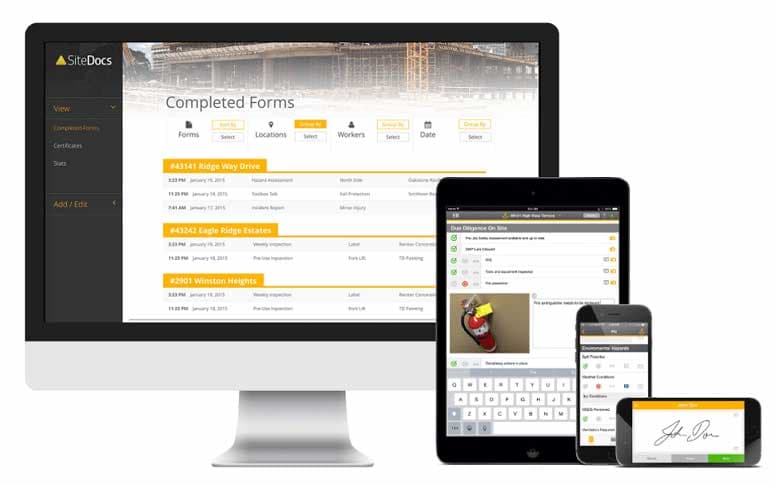
This feature lets safety teams convert existing paper forms into digital versions or build new ones from scratch using a drag-and-drop editor with different field types. Forms can include repeatable sections, private visibility settings limited to administrators, and voice-dictated text entry. This lets field workers complete inspections, JHAs, and incident reports directly from a phone without needing to type everything out.
Certification Management
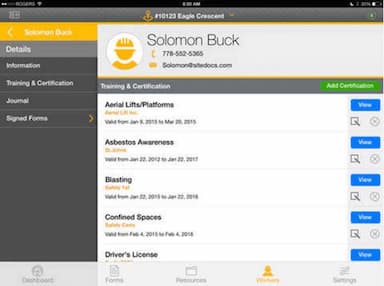
SiteDocs stores every worker's certifications and training records in a central profile accessible from the mobile app, and flags certifications as they approach their expiry dates. Supervisors and safety managers can check compliance status for an individual worker or an entire crew without pulling paper files.
Safety Monitor
This is SiteDocs' real-time dashboard for tracking form completion across every job site. Administrators can see which forms have been signed, which are still outstanding, and which require immediate attention. Such as a near-miss or incident report, without waiting for a site visit.
Corrective Actions
When an inspection or form flags a problem, this feature lets administrators assign a corrective action directly to a worker with a due date and track it through to resolution. It's built into the form workflow itself, so a failed inspection item can generate a follow-up task rather than getting logged and forgotten.
Analytics And Reporting
This feature turns completed forms and inspection data into custom dashboards, using pre-built templates or letting users build their own. Teams can filter dashboards by location, worker, form type, or date range to spot trends like recurring injury types or incident times of day. With built-in AI suggestions surfacing widgets and insights worth a closer look.
Pros And Cons of SiteDocs
Pros
Easy to use, quick adoption
Highly customizable form builder
Real-time visibility into field activity
Works reliably online and offline
Simplifies COR audits, documentation
Cons
Reports could be enhanced with better graphics
Analytics hard to navigate
Limited admin/bulk-edit flexibility
SiteDocs Reviews
Total 53 reviews
4.7
All reviews are from verified customers
Rating Distribution
5
Stars74%
4
Stars23%
3
Stars4%
2
Stars0%
1
Stars0%
Share your experience
Manufacturing, 11-50 employees
Less than a year
“Bait and Switch Pricing”
Pros
I loved the program. It was simple to use after some setup and works perfectly for our company and our safety requirements.
Cons
The initial year was costly but somewhat justifiable. I was paying $3700 CDN plus tax. Now, as it's time to renew, they've introduced a tier system, and to retain what I currently have (and keep the setup I spent months on), the price has surged to $4989.50 (this is after the $850 discount). That's an incredible 40% increase before the discount, 28% after. How can I justify that? If I downgrade to their basic Essentials tier, I still have to pay $4476.95, which is 21% more than the first year but with half the functionality. It's a bait and switch. Avoid them unless you want to spend months setting up and then get gouged at renewal.
Rating Distribution
Ease of use
10
Value for money
3
Customer Support
6
Functionality
10
Mining & Metals, 11-50 employees
More than a year
“Disappointed”
Pros
The layout of forms for administrators and the certification tracking are great.
Cons
The web app layout is not intuitive, especially when clients need to use it. Admins or workers can't edit a location once a form has been submitted. Once a form has been created as "Private" or not, you can't change it, so I'd have to recreate the form from scratch.
Rating Distribution
Ease of use
4
Value for money
5
Customer Support
10
Functionality
4
Architecture, 11-50 employees
More than a year
“Works as it should, but the annual rate increase is a bit much”
Pros
The offline access to forms and documents is invaluable since we do a lot of field work.
Cons
The annual rate hike of nearly $1000 was quite a shock with few changes beneficial to our company, but we've spent hours setting everything up and don't want to redo it in another program. It feels like a trap.
Rating Distribution
Ease of use
9
Value for money
4
Customer Support
7
Functionality
8
Frequently Asked Questions
Does SiteDocs offer an API?
Yes, it offers an API.
What language does SiteDocs support?
SiteDocs software supports English, French, and Spanish.
What other apps does SiteDocs integrate with?
The platform supports integrations with various third-party systems, including Slack, Google Drive, Microsoft Excel, OneDrive, and Dropbox.
Does SiteDocs have a mobile app?
Yes, it offers a mobile app for Android and iOS devices.
What types of pricing plans does SiteDocs offer?
The SiteDocs price starts at around $49/user/month. Get in touch for a tailored SiteDocs cost estimate.
Who are the typical users of SiteDocs?
SiteDocs is used by businesses across multiple sectors and industries, including construction, mining and metals, facilities services, transportation, trucking and railroad, manufacturing, and oil and energy.
What level of support does SiteDocs offer?
SiteDocs offers customer support via email, phone, help center, general resources, such as a resource center and FAQs.