Last Updated

Key Takeaways

Generated from the text of customer reviews

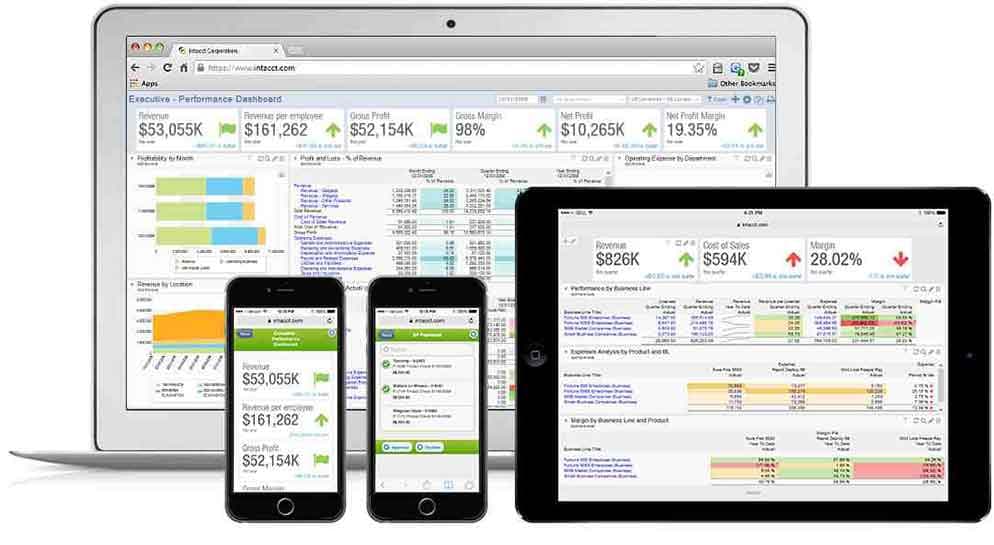
Sage Intacct is a cloud-based accounting software which is used by controllers, AP personnel, and finance teams in non-profits, healthcare, and professional service firms. Its dashboards and dimensional reporting features are commonly appreciated by reviewers, but sometimes there are concerns regarding a learning curve and increasing prices of modules. Recent updates include expanded currency support and SaaS intelligence analytics dashboards.

Our Verdict

Sage Intacct is a reliable product for mid-sized to growing companies which have different entities, branches, or funding sources. It is a practical fit for finance teams which have outgrown simple accounting software and require dimensional reporting. The price is high for the smallest non-profit organizations, but the advantages of automation and transparency make it worth trying.

Sage Intacct Specifications

  • Financial Reporting
  • Invoice Management
  • Expense Tracking
  • Tax Management
View All Specifications

What Is Sage Intacct? 

Sage Intacct is an accounting platform designed for mid-sized and growing businesses, particularly those which have at least 20 employees. It combines financial management with Artificial Intelligence (AI)-powered automation and analytics, helping accountants make data-driven decisions. The software also helps users automate tasks such as bill processing, identify unusual journal entries, and provide answers from financial data using natural-language queries. Sage Intacct can also scale with growing companies, add new currencies and business applications.

The software also supports processing transactions in over 190 currencies, integrates with over 350 applications, and offers great ease of use. All these capabilities combine to make Sage Intacct relevant for finance teams that want to add to their technology stack without replacing their core financial system. 

What Is Sage Intacct Best For? 

Sage Intacct is well known for its ‘Intelligent GL’, which is a general ledger designed to support continuous accounting workflows. It collects, records, and reports on all transactions in real-time, and its AI-driven outlier detection feature compares every journal entry to historical trends and detects any potential outliers. Finance teams can record a single transaction and then generate a report according to various standards such as GAAP, IFRS, taxes, or cash basis. Such a continuous approach to managing the ledger is particularly beneficial for finance departments seeking to close faster and rely on accurate numbers. 

How Much Does Sage Intacct Cost? 

Sage Intacct cost is estimated to range between $15,000 and $50,000/organization/year. The above prices were taken as an industry benchmark for comparable mid-market accounting and financial management applications. 

In addition to the base subscription costs, organizations should account for the following potential expenses: 

  • Implementation: $5,000–$25,000, depending on business complexity and deployment scope
  • Data Migration: $2,000–$15,000, based on financial data volume and migration requirements
  • User Training: $1,000–$10,000, depending on the number of users and training requirements 

User reviews describe the software to be a bit pricey, particularly for small firms. While some users find the cost to be justified by the services offered, others complain about the price hike associated with add-ons. 

Request a custom Sage Intacct pricing estimate based on your business needs. 

Disclaimer: Pricing references are based on publicly available third-party information and industry benchmarks. Actual costs may vary. 

Sage Intacct Integrations 

The software supports integration with multiple systems and platforms, such as: 

How Does Sage Intacct Work? 

Here's how you can get started with the software: 

  • Log in and set up the company profile, chart of accounts, and user roles 
  • Configure entities, locations, and reporting dimensions for the organization 
  • Import or enter opening balances, vendor records, and customer records 
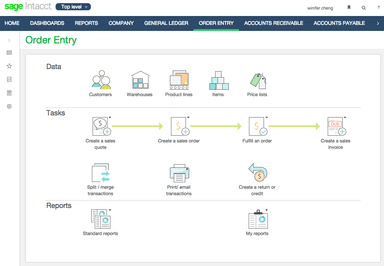
  • Process accounts payable and accounts receivable transactions as they occur 
  • Automate recurring bills, invoices, and bank reconciliations 
  • Route transactions through configurable approval workflows 
  • Generate real-time dashboards and financial reports for stakeholders 
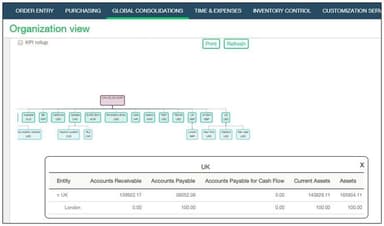
  • Consolidate multi-entity financials for a company-wide view 
Schedule a free Sage Intacct demo to see its features in action. 

Who Is Sage Intacct For? 

Sage Intacct serves various industries and sectors, including: 

  • Nonprofit 
  • Healthcare 
  • Finance 
  • Construction and real estate 
  • Hospitality 

Sage Intacct Use Cases 

Based on our analysis of user reviews and Sage Intacct features and capabilities, we have identified key scenarios where this software is a good fit for finance and accounting teams: 

1. CPA Firm Managing Client Books Across Multiple Entities 

The time spent on combining the books of accounts of several related entities by an accounting firm could range into several hours. Sage Intacct offers multi-entity consolidation capability for several hundred entities and condenses the entire time-consuming process. Its dimensional reporting is another tool that provides accountants with uniformity across different entities without the need to set up different systems for reporting. 

2. Accountant Spending Month-End Chasing Missing Tasks And Unusual Entries 

The finance team loses valuable time at month end trying to track outstanding tasks of accountants manually and analyzing each journal entry. ‘Close Agent’ from Sage Intacct keeps track of month-end activities, detects any problem areas, and pinpoints any bottlenecks. The software also provides a ‘Financial Assurance Agent’ to analyze journal entries and detect any anomaly and duplication. 

3. Growing Business Struggling To Explain Performance Beyond The General Ledger 

A company with multiple departments, locations, projects, or revenue streams may struggle to understand what drives financial results. ‘Sage Intacct Dimensions’ lets teams tag transactions and operational data with business-specific dimensions. Accountants can then analyze financials by relevant categories without creating increasingly complex account-number combinations. 

4. Accounts Payable Team Overwhelmed By Invoices And Repetitive Data Entry 

If there is too much work involved in processing the invoices for a finance staff, there is a risk of losing time and effort by having to input invoices and detect duplicate payments. With ‘Sage Intacct AP Automation’, the AI extracts invoice data, detects duplicates, and also compares vendors and purchase orders. The invoice data entry learning process further helps process more invoices using less manual effort. 

Is Sage Intacct Right For You? 

Sage Intacct can be a good option for organizations that need a move beyond entry-level accounting software in order to consolidate multiple entities. Its accounting capabilities are endorsed by AICPA and the system is utilized by 11,000 accounting and bookkeeping firms all over the United States (US). Plus, it caters to over 30,000 finance departments globally.

Moreover, Sage Intacct maintains certifications and compliance standards, including ISO 27001, SOC 1 Type II, SOC 2 Type II, and PCI DSS Level 1, to support secure data handling and compliance. Serving a diverse global clientele, including United Fire and AcctTwo, demonstrates its suitability for organizations with growing and complex financial operations. 

Still evaluating Sage Intacct? Reach us at (661) 384-7070 for expert advice. 

Sage Intacct Features

AP Automation Agent

Sage Intacct's ‘AP Automation’ agent helps users upload or email vendor bills and create a pre-populated draft for review. Accountants can identify the vendor, amount, dates, and line items, then match bills to purchase orders and flag duplicate invoices. This reduces manual data entry and helps finance teams reconcile faster, supporting frequent soft closes instead of periodic catch-up work.

See How It Works
Accounts Receivable

Sage Intacct’s accounts receivable system automates invoice generation, recurring billing, and collections through configurable dunning letters. Invoices can be sent directly or via email, while multiple payment options are available to customers. Users can also attach documents to transactions for better recordkeeping. In addition, finance users can access dashboards for monitoring customer aging and deferred revenue.

See How It Works
Multi-Entity Insights

The ‘Multi-Entity Insights’ module lets organizations manage several entities, currencies, and locations from a single shared database rather than separate systems. New entities can be configured without IT involvement, and inter-entity transactions settle automatically through centralized due-to and due-from accounts. Plus, consolidated and entity-level reports are both available, without waiting for a full close.

See How It Works
Client Proposal Management

The software’s ‘GoProposal’ tool helps accounting firms manage client proposals, pricing, and engagement letters from one platform. Its pricing tools let firms create consistent, itemized service packages and adjust costs for individual clients. Users can also create professional proposals from customizable templates and send engagement letters for electronic signatures.

See How It Works
Cash Flow Forecasting

Futrli is another Sage Intacct module that helps accountants prepare three-year financial forecasts using profit and loss, balance sheet, and cash flow data. Its reporting and dashboard tools provide valuable insights into past and expected business performance. Users can create budgets, compare scenarios, and analyze how changes in profit may affect cash flow. It also supports data-driven advisory services through customizable reports and forecasting tools.

See How It Works
Financial Reporting

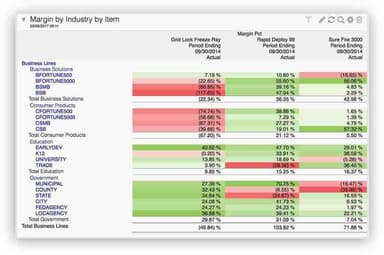
Sage Intacct offers more than 150 pre-built financial reports along with a custom report writer. Reports can be segmented on the basis of as many as ten dimensions, which include departments, projects, and locations, without affecting the chart of accounts. Plus, Intacct’s role-based dashboards provide executive and department-level drill-down access to the transaction details behind all figures.

See How It Works

Pros And Cons of Sage Intacct

Pros

  • Integrations streamline workflows and make month-end closing faster

  • Custom dashboards provide real-time data for faster reporting

  • AI-powered AP reduces manual entry when processing invoices

  • Multi-location support improves flexibility across business lines

  • Clear documentation makes daily administration easy to manage

Cons

  • No draft entries feature make it hard to review transactions beforehand

  • Budget comments do not upload, making department reviews less efficient

  • Limited fixed asset tools make depreciation and allocations harder

Sage Intacct Reviews

Total 64 reviews

4.4

All reviews are from verified customers

Rating Distribution

5

Stars

52%

4

Stars

41%

3

Stars

6%

2

Stars

2%

1

Stars

0%

Share your experience

C

Campbell

Hospitality, 51-100 employees

Less than 6 months

4.0
June 2024

Sage Review

Pros

I like the interface and how easy it is to generate reports.

Cons

The most challenging aspect of Sage for me was overcoming the learning curve and adjusting to the program's differences from my previous software.

Rating Distribution

Ease of use

10

Value for money

8

Customer Support

6

Functionality

8

N

Natasha

Accounting, 1-10 employees

Less than 6 months

4.0
June 2024

Sage Intacct Review - Daily User

Pros

It's incredibly intuitive. Each part of the program functions smoothly and delivers exactly what I need.

Cons

Right now, I have no negative thoughts about Sage Intacct, though I wish to explore more of its features. My only minor concern is the lack of easy access to additional help resources.

Rating Distribution

Ease of use

9

Value for money

9

Customer Support

9

Functionality

10

R

Rosaria

Healthcare, 11-50 employees

More than a year

5.0
May 2024

Handling Accounting Like a Pro With Sage Intacct

Pros

I find Sage Intacct to be very affordable and it seamlessly manages accounting tasks, especially accounts payable.

Cons

I haven't faced any issues; Sage Intacct has performed admirably.

Rating Distribution

Ease of use

9

Value for money

10

Customer Support

10

Functionality

9

Frequently Asked Questions

What level of support does Sage Intacct offer?

The platform offers support through a resource center and phone.

Who are the typical users of Sage Intacct?

Businesses across various industries, including healthcare, non-profit, hospitality, finance, real estate, and construction, benefit from Sage Intacct features.

What languages does Sage Intacct support?

The Sage Intacct software supports several languages, including English, Spanish, French, German.

Does Sage Intacct have a mobile application?

Yes, it offers a companion mobile app for both iOS and Android devices.

What other apps does Sage Intacct integrate with?

The platform connects with a number of systems, such as Merge, Clarity, Boomi, Countable, and Commusoft.

Does Sage Intacct offer an API?

Yes, it offers a REST API.

What types of pricing plans does Sage Intacct offer?

The software’s price is estimated to fall between $15,000 and $50,000/organization annually. You can request a personalized Sage Intacct price quote now.