Last Updated

Key Takeaways

Generated from the text of customer reviews

Althea Smart EHR is a cloud-based system for outpatient and multispecialty practices, used by physicians, front‑desk staff, and billing teams. It’s valued for its intuitive design and mobile access, especially in family medicine, though some users note missing advanced features for specialties. The software has now enhanced AI-powered ambient charting and expanded telemedicine capabilities.

Our Verdict

Althea Smart EHR is a reliable option for mid-to-large outpatient and multispecialty practices that need scalable and cloud-based solutions. It suits teams with high volumes of patients requiring coordinated workflows. Though the pricing feels higher for smaller clinics, it offers great value for those looking for growth. We recommended it to practices that prioritize efficiency and adaptability.

Get A Firsthand Look At Software
Watch Free Demo

Overall Rating

Based on 12 users reviews

4.9

Rating Distribution

Positive

100%

Neutral

0%

Negative

0%

Starting Price
Custom

Althea Smart EHR Specifications

Appointment Management/Scheduling

E-prescriptions

Lab integrations

Patient Portal

View All Specifications

What Is Althea Smart EHR?

Althea Smart EHR is a cloud-based electronic health record system developed by MD Synergy, designed to meet the needs of both outpatient practices and larger healthcare settings. It is not limited to a specific medical specialty and offers tools that span administrative, clinical, and operational workflows, guided by clinically intelligent algorithms. The platform includes features for patient intake, referral management, and revenue cycle oversight. It also supports inpatient functionality and includes inventory management capabilities, making it suitable for practices with complex operational requirements. Additionally, the system integrates with billing services and telehealth, helping providers manage care delivery more holistically.

What Is Althea Smart EHR Best For?

The platform is best known for the ‘Althea Kiosk’ feature. It is a patient self-check-in solution designed to streamline front desk operations. This feature lets patients use an iPad to check in, update their info, sign forms, and pay bills all in one go. It makes the whole process quicker and easier, cutting down wait times and helping clinics run more smoothly. 

Althea Smart EHR Pricing

Althea Smart pricing includes three subscription plans; all billed monthly per provider:

  • Introductory Plan: Starting at $295/user/month (Available only to first-time customers)
  • Essential Plan: Starting at $545/user/month
  • Premium Plan: Starting at $795/user/month
  • RCM Service Plan: Customized pricing
Request a personalized Althea Smart EHR pricing quote tailored to your practice needs today. 

Disclaimer: The pricing is subject to change.

Althea Smart EHR Integrations

Althea Smart EHR integrates with a wide range of partners across lab, radiology, pharmacy, communication, and data services. Notable integrations include:

  • Quest Diagnostics EHR
  • Surescripts
  • Change Healthcare
  • Twilio software
  • Zoom
  • Office Ally Practice Mate
  • Waystar 
Schedule an Althea Smart demo to explore the platform’s capabilities in more detail.

How Does Althea Smart EHR Work?  

Here’s a step-by-step guide on how you can navigate the system and manage clinical workflows:

  • Log in securely using your credentials to access the dashboard
  • Review your daily schedule and patient list
  • Open patient charts for notetaking using typing, templates, or dictation
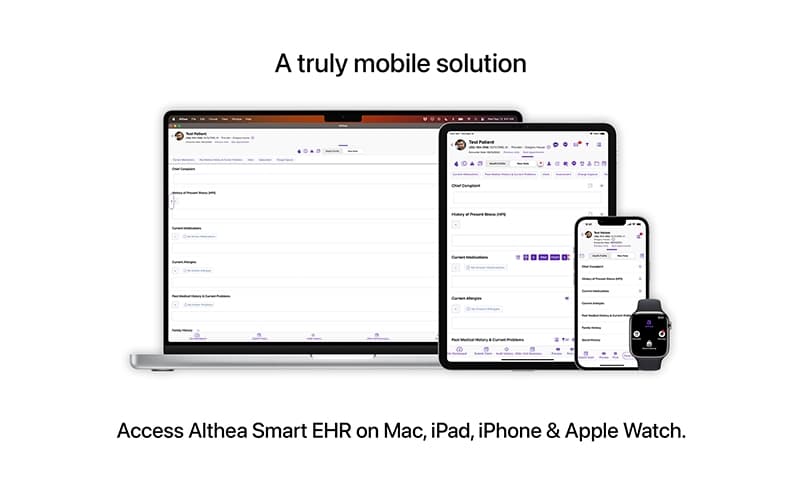
  • Access and update patient records in real time from any device
  • Use AI-powered ambient charting to transcribe patient encounters automatically
  • Manage billing, claims, and eligibility verification directly from the chart
  • Conduct telehealth visits within the platform when required
  • Review analytics and reporting for operational insights 

Who Is Althea Smart EHR For?

Althea Smart EHR serves a diverse range of healthcare industries and sectors, including outpatient clinics, specialty practices, and hospital-based systems. Its adaptable design and integrated tools make it suitable for:

  • Pain management clinics
  • Family medicine practices
  • Internal medicine providers
  • Allergy and immunology clinics
  • Dermatology offices
  • Behavioral health providers
  • Multi-specialty clinics

H2. Althea Smart EHR Use Cases 

Based on our analysis of user feedback and Althea Smart EHR’s current capabilities, we have identified key scenarios where the platform proves most effective for healthcare organizations and outpatient practices: 

H3. Multi-Specialty Clinics Streamlining Documentation 

Althea Smart EHR supports practices that manage diverse specialties under one system. Its AI-enabled documentation tools help providers transition between different clinical workflows. This helps maintain consistency across departments, hence making it suitable for multispecialty or integrated group practices. 

H3. Outpatient Practices Managing High Patient Volume 

For practices that handle steady patient flow, the system simplifies charting and billing coordination. Real-time eligibility checks and quick note entry reduce administrative overhead, helping clinicians focus on care while back-office teams manage claims more efficiently. 

H3. Telehealth-Driven Practices Expanding Virtual Care 

Clinics offering remote consultations can benefit from Althea’s embedded telehealth workflows. The platform ensures smooth scheduling, secure video sessions, and integrated charting, supporting continuity of care for both in-person and remote visits. 

H3. Behavioral And Mental Health Providers Enhancing Workflow Efficiency 

Althea’s flexible charting templates and patient management tools suit mental health and behavioral clinics that require nuanced documentation and scheduling coordination. Providers can manage progress notes, treatment plans, and follow-ups with minimal manual entry. 

H3. Small To Mid-Sized Practices Transitioning To Cloud-Based EHRs 

For clinics shifting from paper or legacy systems, Althea offers an accessible entry point into digital health records. It scales easily with growth, supports mobile access, and reduces IT dependency. This is particularly ideal for practices looking for modern and cloud-driven features without enterprise-level complexity. 

H2. Althea Smart EHR User Sentiment 

Most Positive Sentiments 

Least Positive Sentiments 

Ease Of Use & Intuitiveness 

Feature Gaps/Missing Modules 

  • 80% were Positive 
  • 5% were Negative 
  • 15% were Neutral/Mixed 

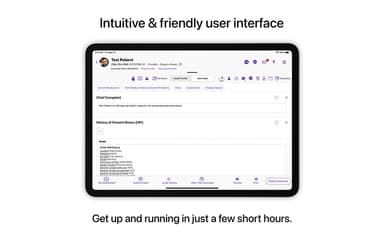
Users consistently praise Althea Smart EHR’s intuitive design. Many report that the interface feels natural, especially on iPads and iPhones, allowing clinicians and staff to get started quickly with minimal training. 


  • 5% were Positive 
  • 60% were Negative 
  • 35% were Neutral/Mixed 

While users appreciate core functions like charting and mobility, some note missing advanced features or specialty-specific tools. A few mention that certain workflows could use more customization or integration depth. 

A user said, “It’s a great system overall, but a few features feel underdeveloped. I’d like to see more specialty-specific templates.” 

Speech Dictation & Documentation Efficiency 

Customer Support & Responsiveness 

  • 70% were Positive 
  • 5% were Negative 
  • 25% were Neutral/Mixed 

Reviewers highlight the efficiency of Althea’s dictation and voice recognition tools, noting a major reduction in typing time and documentation fatigue. The AI-powered charting experience is seen as a major time-saver for providers. 


  • 15% were Positive
  • 35% were Negative 
  • 50% were Neutral/Mixed 

Feedback on customer support is mixed. Many users report prompt and helpful service, while a few mention delays or unresolved issues. Users acknowledge that support has improved over time but still expect faster follow-up for technical concerns. 


Mobility & Remote Access 

Cost & Value For Money 

  • 85% were Positive 
  • 5% were Negative 
  • 10% were Neutral/Mixed 

Many users appreciate Althea’s mobile-first approach. The system works seamlessly across iPads, iPhones, and desktops, allowing access to patient data and documentation anywhere. Users consider this flexibility a major advantage for practices with on-the-go providers. 

A user said, “I can operate it anywhere with my iPad and smartphone. It’s extremely convenient and helps me stay on top of my notes.” 

  • 10% were Positive 
  • 40% were Negative 
  • 50% were Neutral/Mixed 

Cost-related feedback is limited but somewhat divided. Some users feel the value matches the product’s capabilities, while others note that smaller practices may find it expensive compared to competitors. 

A user said, “It’s a solid system, but pricing could be more flexible for smaller clinics or startups.” 

Is Althea Smart EHR Right For You?

Are you looking for a cloud-based EHR that adapts to your practice’s growth while supporting secure, AI-powered clinical workflows? Althea Smart EHR may be a strong fit. It offers a scalable infrastructure, mobile optimization, and integrated tools for documentation, billing, and telehealth—all within a HIPAA-compliant framework.

The system also includes electronic prescribing of controlled substances (EPCS), real-time eligibility verification to help verify patient coverage instantly, and ambient AI charting, making it well-suited for modern outpatient and multispecialty environments. With local RCM support and built-in data protection, it supports both efficiency and regulatory compliance. The platform runs smoothly in any modern browser, is optimized for iOS, and is designed with the future of healthcare in mind for an efficient clinical experience.

Still unsure whether Althea Smart EHR meets your needs? Contact our team at (661) 384-7070 for personalized guidance.

Althea Smart EHR Features

Althea Smart EHR offers an intuitive charting experience, allowing providers to document patient encounters using dictation, macros, templates, or traditional typing. Features like 'Copy' and 'Merge' enable users to incorporate information from previous visits, while 'favorites' provide quick access to essential data, streamlining the documentation and ensuring accurate documentation.

See How It Works

Althea Smart EHR features AI-powered ambient listening technology that captures, transcribes, and structures patient-clinician conversations into SOAP notes in real time. This tool reduces documentation time by hours each day, decreases administrative burden, and minimizes errors. By automating notetaking, it allows providers to focus more on patient interactions while maintaining accurate and complete clinical records.

See How It Works

The ‘Althea Health Patient Portal’ strengthens patient-provider communication by enabling patients to update their demographics, sign forms, pay balances, and check in remotely, helping ensure patients arrive prepared for visits—all pending clinician review. iPhone users can also share data from their Health app directly with their provider or share documents for more comprehensive care.

See How It Works

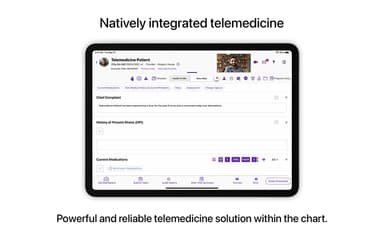
Althea Smart EHR offers a fully integrated telemedicine solution with high-quality, HIPAA-compliant virtual visits—accessible directly from the patient chart. Patients automatically receive a link to join, making virtual visits simple, secure, and just as convenient as in-person care.

See How It Works

Althea Smart EHR enables instant claim generation as soon as a note is closed, providing full visibility of ICD and CPT codes tied to each visit. Users can edit codes and view the linked progress note for complete billing clarity and improved practice revenue. For added support, its Revenue Cycle Management (RCM) service, managed by local experts in Southern California, allows providers to delegate billing tasks and stay focused on value-based care.

See How It Works

Pros And Cons of Althea Smart EHR

Pros

  • Exceptional integration with Apple products

  • Improves practice management

  • Reduces charting time with smart phrases

Cons

  • Lacks marketing tools

  • Occasional pharmacy selection login reset

Althea Smart EHR Reviews

Total 12 reviews

4.9

All reviews are from verified customers

Rating Distribution

5

Stars

92%

4

Stars

8%

3

Stars

0%

2

Stars

0%

1

Stars

0%

Share your experience

V

Velina

Medical Practice, 51-100 employees

More than a year

4.0
October 2024

My experience with Althea

Pros

Althea is really easy to use right from the start. It's flexible and adapts well to how my practice works. Since using it, managing the daily tasks and keeping everything organized has become much smoother and less stressful for me.

Cons

I'm really looking forward to when the interface with our ASC software is finished.

Rating Distribution

Ease of use

10

Value for money

10

Customer Support

10

Functionality

9

B

Bianca

Medical Practice, 1-10 employees

More than a year

5.0
July 2024

Very reliable and useful

Pros

It's very flexible and offers tons of features that can be customized for each practice's specific needs. That means it fits well with how I like to work and what my patients require, instead of forcing me to change my style.

Cons

Pricing is the only issue but it's pretty reasonable for all the features it has.

Rating Distribution

Ease of use

10

Value for money

8

Customer Support

10

Functionality

10

G

Gevorg

Medical Practice, 1-10 employees

More than a year

5.0
July 2024

Easy to use with lots of options

Pros

I really appreciate how flexible and efficient It is. The speech and dictation features work incredibly well even when I speak with an accent. It's nice that it can accommodate different ways of speaking without any problems.

Cons

Pricing is a thing, the EHR runs on iPad and iPhone but the front desk uses a desktop.

Rating Distribution

Ease of use

10

Value for money

8

Customer Support

10

Functionality

10

Frequently Asked Questions

Typical users include outpatient clinics, doctors, physicians, hospital-based systems, and specialty practices such as pain management, family medicine, dermatology, and behavioral health.

Althea Smart EHR provides support via form submission and a dedicated resource center for user assistance and guidance.

The platform supports the English language.

Yes, Althea Smart EHR software has a mobile app.

Althea Smart offers three subscription plans billed monthly per provider: the Introductory Plan starts at $295/user/month for first-time customers, the Essential Plan starts at $545/user/month, and the Premium Plan starts at $795/user/month. Additionally, the RCM Service Plan is available with customized pricing. Reach out for a customized Althea Smart EHR pricing quote.

No, Althea Smart EHR is not free.

AltheaSmart integrates with a variety of applications across labs, radiology, pharmacy, billing, communication, and data services. It also supports features such as appointment reminders and real-time communication tools. Additional integrations include Office Ally Practice Mate, Waystar, NewCrop, Labcorp, Medline Plus, and Wolters Kluwer, among others.

Yes, Althea Smart EHR software does offer an API.

Althea Smart EMR features an intuitive design that streamlines navigation and daily workflows. Tools like Althea speech enable quick, hands-free documentation, helping reduce inefficiencies in clinical operations.

Yes, practitioners can request an Althea Smart demo to explore the platform’s capabilities in more detail.