


ECP EHR
Last Updated
Overview
ECP EHR is a senior living software platform offering integrated tools for eMAR, CRM, billing, EHR, and move-ins. While the customization process may feel daunting at first, the system is trusted by over 8,000 communities for its ability to streamline workflows, improve care delivery, and support operational growth.
ECP EHR Specifications
- Appointment Management/Scheduling
- e-Prescriptions
- Lab Integrations
- Patient Portal
ECP EHR Features
eMAR
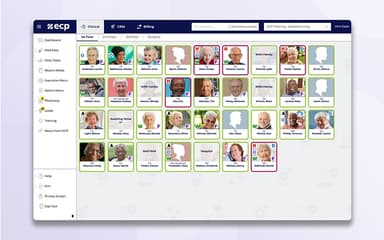
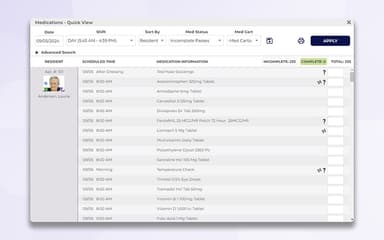
ECP’s eMAR supports accurate, efficient med administration for assisted living, group homes, and IDD settings. It integrates with over 600 pharmacies to sync orders automatically, reducing errors and manual entry. AI tools flag duplicate meds, overuse of PRNs, and controlled substances, while real-time alerts improve oversight. The interface includes the 8 Med Rights and supports offline charting via a mobile app for uninterrupted care.
EHR And Care Plans
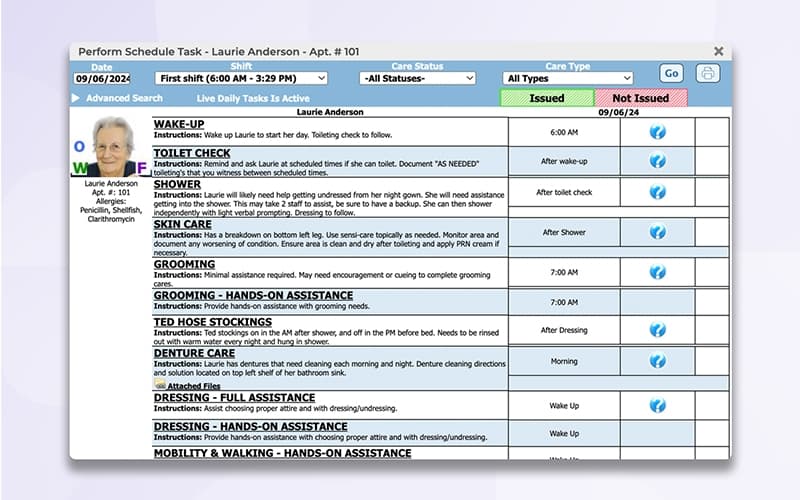
ECP EHR features comprehensive care plans for assisted living and senior care designed to simplify charting, enhance compliance, and improve care coordination. The platform automatically generates personalized care plans and task lists based on resident assessments using customizable or pre-built templates. Real-time alerts and a ‘Daily Tasks Quick View’ help staff manage care responsibilities by shift, urgency, or assignment. The system also supports digital signatures for care plans, eliminating manual paperwork and streamlining approvals. ECP’s EHR includes built-in compliance reporting for all 50 U.S. states and a comprehensive incident reporting tool that helps providers track trends and proactively address risks.
CRM
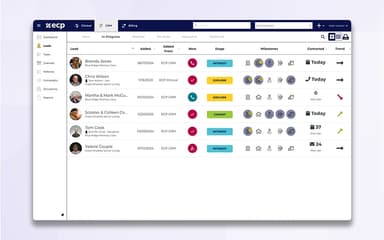
ECP’s CRM streamlines lead management, move-ins, and occupancy tracking for senior living providers. The platform enables staff to capture leads instantly, automate follow-ups, and manage communication without switching apps, thanks to full Microsoft Office 365 integration. ECP Move-Ins simplifies admissions by tracking tasks, documents, and electronic signatures in one place, reducing delays and manual work. The dashboard offers real-time visibility into lead status, referral channels, and campaign performance. Seamless integration with ECP Clinical allows care planning to begin before residents move in, improving continuity and efficiency.
Billing
This feature automates charge collection and streamlines payment processing to reduce manual work and billing errors. Charges from ECP Clinical such as level of care, rent, and service updates flow directly into invoices in real time, improving coordination between clinical and financial teams. The system supports recurring and à la carte billing, auto-pay setup, and payment via ACH, credit, debit, or check. Families benefit from flexible payment options, while providers gain real-time financial visibility and reduced missed revenue. Billing data can be exported to general ledger software, and custom charge templates simplify recurring invoice setup.
Move-Ins
ECP Move-Ins simplifies the admission process by managing every step, from initial inquiry to move-in day, within one platform. Communities can customize workflows to match their unique processes, ensuring all tasks, approvals, and documentation are completed on time. Families can submit documents and e-sign remotely, improving convenience and reducing staff workload. Seamless integration with ECP Clinical allows resident data to transfer automatically, eliminating duplicate entry and supporting a smooth transition into care. Move-Ins is available as a standalone tool or fully integrated with ECP CRM, offering flexibility for diverse operational setups.
Pros And Cons of ECP EHR
Pros
Access to multiple resident charts from one place
Exemplary customer support
Pharmacy integrations save nursing time
Cons
Occasional lag in pharmacy links and medication discontinuations
Lacks a dedicated apartment tracking module
ECP EHR Reviews
Total 132 reviews
4.6
All reviews are from verified customers
Rating Distribution
5
Stars71%
4
Stars19%
3
Stars9%
2
Stars0%
1
Stars1%
Share your experience
Medical Practice, 11-50 employees
Less than a year
“centralized records save time”
Pros
As a user, I find this tool excellent, especially because uploading is easy and it lets me store all records in one centralized location which saves time and reduces clutter. The support team has always been knowledgeable and approachable, answering questions quickly and making implementation much smoother than I expected. I'd definitely recommend this system to any assisted living facility or skilled nursing facility because it's well-suited to those environments.
Cons
I find configuring staff notification alerts to be unnecessarily complicated and on top of that there isn't any functionality that warns me when a resident hasn't had a bowel movement for 48 hours.
Rating Distribution
Ease of use
9
Value for money
10
Customer Support
10
Functionality
8
Hospital & Health Care, 101-500 employees
More than a year
“easy and responsive tool”
Pros
My team finds the system incredibly easy to use and whenever we've needed help the support team has been prompt and helpful, so I can say we've never waited longer than a day or two to get a response.
Cons
The main drawback I've come across is that I can't save certain documents and return to them later which forces me and my colleagues to spend a great deal of time re-entering assessment data that should persist between sessions.
Rating Distribution
Ease of use
9
Value for money
10
Customer Support
10
Functionality
9
Hospital & Health Care, 500+ employees
More than a year
“incredibly simple platform”
Pros
This tool is incredibly simple and easy to navigate, so our staff rarely runs into problems, when something does come up, the support team is prompt and helpful in resolving it. Our organization relies on virtually every module, ranging from eMAR to incident reporting and we've integrated our custom assessment instrument into the platform alongside additional supporting assessments and evaluations which makes the system overall an excellent solution.
Cons
I'd love for the platform to include AI-driven features for example, tools that could analyze documentation and incident reports to predict resident risk concerns proactively.
Rating Distribution
Ease of use
10
Value for money
10
Customer Support
10
Functionality
10
Frequently Asked Questions
Who are the typical users of ECP EHR?
Typical users include assisted living facilities, independent living communities, memory care units, IDD providers, pharmacies, and group homes.
What level of support does the software offer?
ECP EHR offers support via phone, form submission, an online knowledge base, training videos, and webinars.
What languages does ECP EHR support?
The platform supports the English language.
Does the software have a mobile app?
Yes, ECP EHR offers a dedicated Android and iOS mobile app.
What type of pricing plans does ECP EHR offer?
ECP EHR software offers customized pricing tailored to the size and specific needs of each community. For detailed cost information, request a personalized ECP EHR cost quote for your organization.
Does the platform offer an API?
Yes, ECP EHR offers an API.
Is the platform free?
No, the software is not free to use.
What other apps does the software integrate with?
ECP integrates with a range of pharmacy partners and third-party tools to support clinical, financial, and administrative workflows. Notable integrations include Accushield, Aline, Amazon QuickSight, BILL, HubSpot CRM, Microsoft 365, QuickBooks, Salesforce, Tableau, and more.
How does ECP assisted living software improve care delivery?
It streamlines care charting, med pass, and reminders, helping reduce med errors and support resident satisfaction. It’s user friendly, secure, and long term care compatible.
What should providers verify before choosing ECP?
Review features, research outcomes, and verify state mandated reports. While some dislike setup, many rely on its human design, strong connection tools, and responsive operations.