


Klara Health

Last Updated
Key Takeaways
Generated from the text of customer reviews
Our Verdict
Klara Health Specifications
- Appointment Management/Scheduling
- Patient Portal
- Mobile App
- Telemedicine
Klara Health Features
Two-Way Secure Messaging
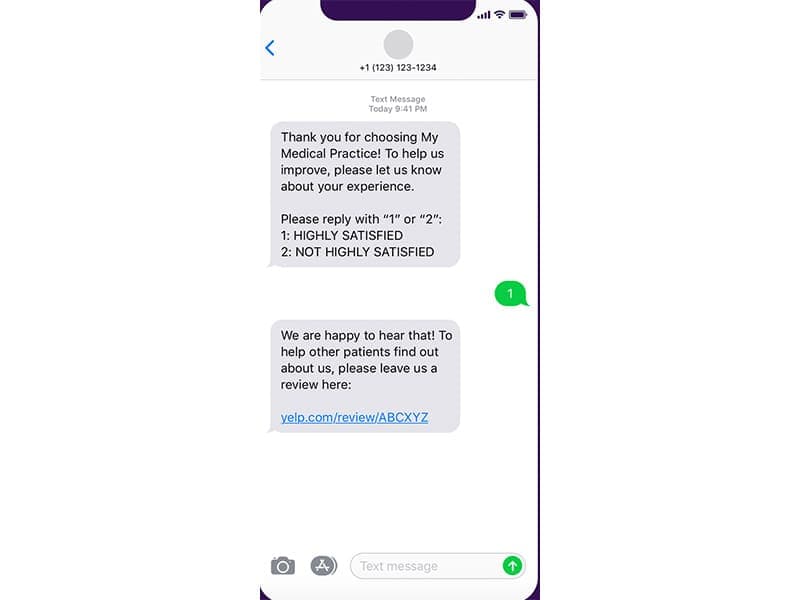
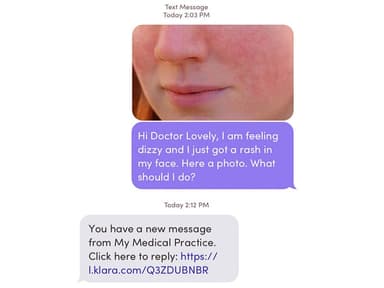
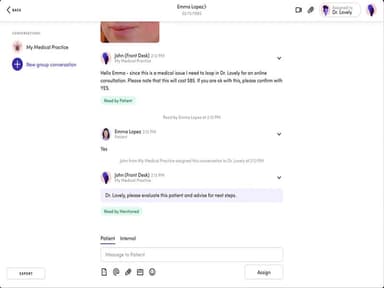
Klara enables secure messaging between healthcare providers and patients. It ensures quick and easy communication about treatment plans, test results, appointment reminders, and any other health-related concerns. Furthermore, you can reply to website messages and voicemails with the messaging function and also assign messages to your healthcare teams.
Scheduling
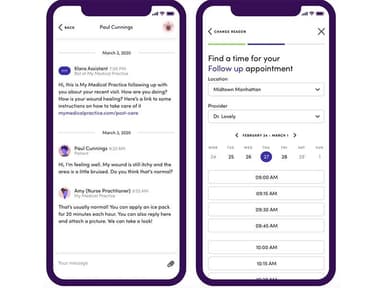
An intuitive scheduling tool allows patients to book appointments and send automated reminders to ensure patients don't miss their appointments. To enhance patient intake and engagement, klara Medical automates communication before and after visits. This includes sending pre-visit instructions prior to appointments and follow-up messages post-visit. Track each aspect of the patient's journey and provide top-notch patient care.
Telemedicine
Klara offers a telemedicine solution, allowing healthcare providers to offer patients video visits. Real-time video visits are useful during public health emergencies or for patients living in remote areas. The platform supports video visits on any device and includes a virtual waiting room for easy access. It also integrates with EHR systems, enabling clinicians to document and manage virtual encounters efficiently.
Patient Portal
Give your patients a secure platform to communicate with their doctor with a simple sign-in. The in-app Klara patient portal gives patients access to their information, treatment plans, lab results, and more. Moreover, it enhances communication and promotes better patient care.
Mobile Application
The app provides a seamless appointment scheduling feature, with automated reminders to help patients keep track of their visits. It also integrates Klara's secure messaging and video feature, letting you access them from Android or iOS mobile devices. Access the dashboard by signing up with a mobile phone number.
Digital Intake Forms
You can use the digital intake forms to save time and reduce paperwork. Patients can fill these out before their visit, streamlining the check-in process. Moreover, they can use their phone to sign into the Klara app and add information. The latest update enables seamless integration with athenahealth, allowing automatic syncing of patient intake data directly into the EHR for faster, more efficient workflows.
Pros And Cons of Klara Health
Pros
Voicemail transcription automatically links to patient messages
Quick, secure two-way messaging that enables real-time communication between patients and staff.
Improves patient satisfaction with quick, no-hold messaging
Cons
Reporting features are limited
Lack of built-in online scheduling and patient paperwork tools
Klara Health Reviews
Total 130 reviews
4.5
All reviews are from verified customers
Rating Distribution
5
Stars68%
4
Stars23%
3
Stars7%
2
Stars1%
1
Stars2%
Share your experience
Medical Practice, 51-100 employees
“AI capabilities that keep improving”
Pros
AI features keep getting better and the direct integration with our EMR makes a noticeable difference. We can get back to patients quickly and when appointments are canceled, they're removed from the providers' schedules immediately.
Cons
Like any software it has its glitches. Rarely but self-scheduling lets patients create duplicate charts but that issue does seem to be getting better over time.
Rating Distribution
Ease of use
8
Value for money
8
Customer Support
8
Functionality
9
Medical Practice, 11-50 employees
“Fast patient outreach”
Pros
Reaching patients through this has been quick and simple. It has really reduced the number of calls our nurses need to make.
Cons
It does have bugs from time to time and occasionally the system goes down for an entire day without any warning. It always ends up coming back online though.
Rating Distribution
Ease of use
9
Value for money
8
Customer Support
8
Functionality
7
Hospital & Health Care, 51-100 employees
Less than a year
“Good but has problems”
Pros
We really like Klara's patient reminder system because it has enabled our team to fully customize the types of messages we send out to patients, such as new patient intake forms, pre-appointment prep instructions, reminders about upcoming appointments and it even supports patients sending back follow-up feedback via a survey about their most recent visits.
Cons
There are persistent glitches that take forever to sort out. Most recently it's been their self-scheduling platform. we were scheduled to go live at the end of April and they still can't identify the problem and their communication has been quite sparse. If we don't proactively reach out, we receive no updates.
Rating Distribution
Ease of use
6
Value for money
5
Customer Support
4
Functionality
6
Frequently Asked Questions
What level of support does Klara offer?
Klara offers support via email, a contact form and a Help Center, though response times may vary.
Who are the typical users of Klara?
The typical users of Klara Health are healthcare providers, independent practitioners, nursing staff, and clinical administrators.
Is Klara free?
Klara is not free. Its price depends on individual practice needs.
Does Klara offer an API?
Yes, Klara does offer an API.
Does Klara have a mobile app?
Yes, Klara has a mobile app for both Android and iOS.
What other apps does Klara integrate with?
Klara integrates with apps like eClinicalWorks, AdvancedMD EHR, Greenway Health, ModMed EMR, Nextech EMR, and athenaOne.
What type of pricing plans does Klara offer?
Klara Health pricing follows a custom-quote model based on practice size, add-ons, and specific requirements. Request a custom Klara Health price quotation.
What languages does Klara support?
Klara supports the English language.