Last Updated Feb 11, 2026

Key Takeaways

Generated from the text of customer reviews

eClinicalWorks EMR is a cloud-based platform integrating electronic health records, billing, and patient engagement tools for ambulatory practices. It provides efficient appointment scheduling, population health tracking, and clinical documentation workflows. Despite occasional challenges with system upgrades, eClinicalWorks stands out for its adoption across multiple medical specialties. The most recent major update from eClinicalWorks is Version 12, which focuses on integrating AI-powered tools.

Our Verdict

eClinicalWorks EMR is a reliable option for ambulatory practices and multi-location clinics. It fits mid to large practices requiring streamlined patient management and operational efficiency. The platform handles scheduling, documentation, and population health effectively. We recommend it for healthcare providers seeking a scalable, widely used EHR that supports coordinated practice operations.

Get A Firsthand Look At Software
Watch Free Demo

Overall Rating

Based on 452 users reviews

3.5

Rating Distribution

Positive

60%

Neutral

26%

Negative

13%

Starting Price
$449

/month/provider

eClinicalWorks Specifications

Appointment Management/Scheduling

e-Prescriptions

Lab Integration

Patient Portal

View All Specifications

What Is eClinicalWorks EMR?

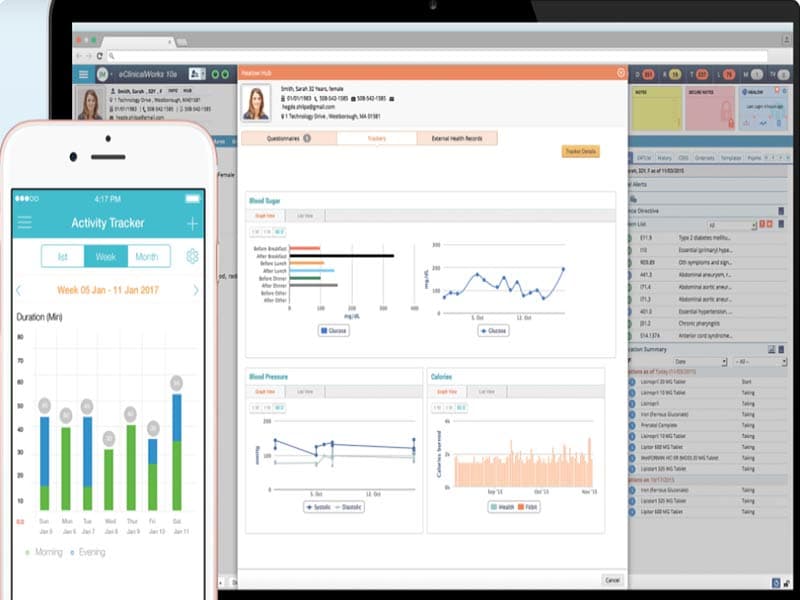
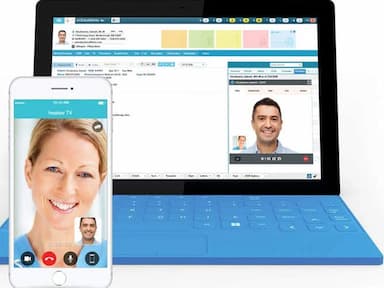
eClinicalWorks is a top-rated electronic medical records (EMR) and practice management software solution designed for ambulatory practices of all sizes. It offers a unified platform for managing patient records, scheduling appointments, documenting encounters, and processing billing. The system also supports e-prescribing, AI automation, population health management, telehealth, and patient engagement features. 

What is eClinicalWorks EMR Best For?

eClinicalWorks stands out with its AI-powered tools that simplify clinical documentation, automate administrative tasks, and improve practice efficiency. Sunoh.ai converts conversations into clinical notes to reduce the need for manual entry. The AI Assistant streamlines workflows by handling scheduling, record searches, and routine tasks. Additionally, Image AI organizes fax inboxes, and the healow No-Show AI Prediction Model helps practices reduce missed appointments and optimize revenue.

It is also known for its user-friendly interface and comprehensive features, which make it a popular choice among healthcare providers looking to adopt electronic health records.

How Much Does eClinicalWorks Cost?

eClinicalWorks EMR pricing starts at $449/month/provider for its EHR-only plan. The plan includes an EMR, eClinicalMobile, patient portal, eClinicalMessenger, document management, and more. Additional plans include:  

  • EHR with Practice Management – $599/month/provider
  • RCM as a Service – 2.9% of practice collections

Initial training covers practices with up to nine providers. Additional implementation fees apply for larger practices. Airfare is billed separately. Transaction-based fees apply per Patient Statement and eClinicalMessenger message. Practices may also incur the following costs:

  • Implementation Services: Typically $1,500 to $3,500/provider
  • Data Migration: commonly $500 to $1,500/provider (depending on volume/complexity)
  • Go-Live Support: $1,000 to $3,000/day (may vary by remote vs on-site)
  • Third-Party Integration Fees: Approximately falls between $500 to $2,000/integration
  • Hardware Setup (if applicable): $300 to $1,000/workstation
  • RCM Onboarding Fee: It may range somewhere between $500 to $2,000 (one-time)
Users report eClinicalWorks pricing as competitive for full-featured EHRs, but note higher total costs once implementation, training, integrations, and transaction-based fees are factored in practice settings. Request a personalized eClinicalWorks EMR pricing quote for your practice today!

Disclaimer: Pricing references are based on publicly available third-party information and industry benchmarks. Actual costs may vary. 

eClinicalWorks EHR Integrations

eClinicalWorks integrates with various clinical systems, including labs, imaging services, e-prescriptions, pharmacies, and transcription services. It also provides an HL7 interface for custom integrations. Some of its key integrations include:

  • FairWarning 
  • Spher 
  • Dexcom 
  • BillFlash 
  • Optum EHR 

How does eClinicalWorks Work? 

eClinicalWorks is designed to help healthcare providers manage patient information, schedule appointments, document patient visits, prescribe medications, and perform other tasks related to managing healthcare practice. Here's a general overview of how eClinicalWorks works:

  • Patient information is entered into the system by the healthcare provider or office staff. This includes demographic information, medical history, and insurance information
  • The healthcare provider uses the system to document patient visits, including assessments, diagnoses, and treatment plans
  • The system generates electronic progress notes, which can be used to track the patient's treatment over time
  • The system can be used to prescribe medications, which can be sent directly to the pharmacy
  • The system can be used to schedule appointments and send appointment reminders to patient
  • The system can also be used to track patient billing and insurance claims, as well as manage financial reports and other business-related tasks
  • Overall, eClinicalWorks is designed to help healthcare providers streamline their workflow and improve the quality of care they provide to patients
You can schedule a free eClinicalWorks EMR demo to explore the software’s full range of functionalities. Book your session before spots run out!

Who is eClinicalWorks For?

eClinicalWorks is suitable for healthcare practices of all sizes, including solo practices, small to medium-sized groups, and larger healthcare systems. It used across the following medical specialties:

  • Behavioral health
  • Urgent care
  • Vision
  • Dental
  • Ambulatory surgery center

Moreover, primary care providers, specialty care physicians, hospitals, health centers, and other facilities also use eClinicalWorks. 

eClinicalWorks Use Cases

Based on our analysis of user reviews, we have identified key scenarios where this software is a strong fit for healthcare organizations:

Growing Practices Requiring Scalable Digital Infrastructure

eClinicalWorks is a strong fit for practices that anticipate growth and want a hospital system that can scale with them. Its cloud-based architecture supports multi-location setups and remote access, making it ideal for expanding practices. Users often highlight the platform’s flexibility in adapting to different workflows and specialties, which helps clinics maintain consistency while scaling operations.

Clinics Needing Integrated Clinical And Revenue Cycle Management

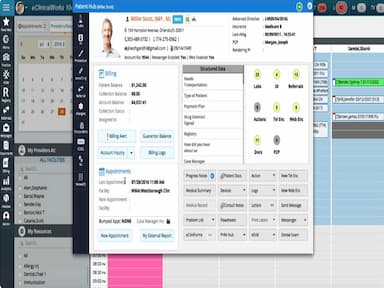
For clinics that want tight integration between clinical documentation and billing processes, eClinicalWorks offers a comprehensive suite. The EMR and practice management modules work seamlessly together, helping reduce claim errors and improve reimbursement timelines. Many users appreciate the built-in analytics and customizable templates that support both clinical efficiency and financial performance.

Practices Enhancing Patient Engagement and Telehealth Services

eClinicalWorks is well-suited for practices aimed at enhancing patient interaction through digital tools and better managing patient accounts. Its patient portal, Healow app, and telehealth capabilities allow for convenient scheduling, secure messaging, and virtual visits. Reviews often mention how these features help improve patient satisfaction and reduce no-shows, especially in tech-savvy or rural populations.

Scalable Digital Infrastructure

eClinicalWorks is ideal for practices planning growth, offering a cloud-based system that supports multi-location setups and remote access. Users note its flexibility in adapting to different workflows and specialties. It helps clinics maintain consistent operations while expanding, making it a reliable choice for growing healthcare organizations.

eClinicalWorks User Sentiment 

Most Positive Sentiments 

Least Positive Sentiments 

Ease of Use & Learning Curve 

Customer Support / Helpdesk 

  • 65% positive 
  • 20% neutral 
  • 15% negative 
  • 25% positive 
  • 20% neutral 
  • 55% negative 

Many users highlight that once the system is learned, it becomes efficient and manageable. They mention that training is sufficient, and the interface becomes intuitive.

A user said: “It’s been very good. The system is easy to navigate and learn.” 

Many users complain about slow response times, language barriers, unresolved support tickets, or downgraded responsiveness after upgrades.

A user mentioned, “Don’t expect to speak to anyone that’s first language is English when you call support.” 

Reporting and Analytics 

System Stability, Speed & Click Burden 

  • 60% positive 
  • 25% neutral 
  • 15% negative 
  • 10% positive 
  • 25% neutral 
  • 65% negative 

Users appreciate the reporting side of eClinicalWorks, especially EBO reporting, revenue and encounter reports, and population health dashboards. The reporting tools are often highlighted as delivering important insights.

A user noted that “The ability to pull reports is pretty good with their EBO system. We get almost everything we need reporting wise from that system whether it’s financial or encounter data.

Complaints often revolve around slowness, system crashes, excessive clicking, template problems, and inefficiencies especially after updates. 

A user expressed his frustration with many clicks saying, “There are sometimes a lot of clicks with ECW. Anytime you do an upgrade something is not going to work which is very frustrating.” 

Scheduling, Billing And Practice Management 

Upgrade-Related Issues And Data Migration 

  • 55% positive 
  • 30% neutral 
  • 15% negative 
  • 15% positive 
  • 20% neutral 
  • 65% negative 

Reviewers frequently praise the integration of scheduling, billing, and clinical documentation, saying it simplifies workflows and helps manage practice operations in a unified way.

As one reviewer shared, “Among the features that really stand out is how electronic health records (EHR) are integrated with scheduling, billing, and clinical documentation.” 

Upgrades and version migrations are frequently cited as pain points. Reviewers often mention that functionality breaks, dashboards stop working, data export is difficult, or new patches cause more problems than they solve. There are also reports of costly, slow, or technically challenging data export/migration when switching away from eClinicalWorks, which has left some users very dissatisfied. 

For example, a user said, “If you are a CPC practice you will be frustrated as their reporting dashboard took until the middle of 2018 to start working and then we upgraded and now we are waiting on a patch to get the dashboard back up.” 

Is eClinicalWorks Right For You?

Trusted by over 850,000 healthcare professionals, eClinicalWorks is a popular EHR software widely-used in the healthcare industry, with a range of features spanning from population health management to customized patient portals. The platform is compatible with Mac, Chrome, and Window browsers, and is also accessible on mobile devices.

Many user reviews have recommended the software for its overall functionality and comprehensive tools, noting how easy it is to fill out notes, auto-populate data, code for medical billing, and handle messaging and e-prescriptions. In addition, many doctors have found the appointment scheduling feature beneficial, as it allows them to see which patients will be coming in each day with ease.

However, some have pointed out the eClinicalWorks’ user interface to be rather cluttered or confusing, making it more difficult for first-time users to navigate. There is also no easy way to track the authorization process.

As HIPAA-compliant software, eClinicalWorks EMR is best for healthcare providers looking for an electronic health record (EHR) system to manage patient records, schedule appointments, document visits, and bill for services. The software also includes encryption and secure login protocols to protect patient information from unauthorized access.

It is the largest cloud-based EHR software in the U.S., and is well-suited for primary care physicians, clinicians, and specialists, as it includes features designed to support clinical and administrative workflows.

Ready to explore eClinicalWorks further? Call us at (661) 384-7070, and we will help you decide whether it will be the right fit for your healthcare practice.

eClinicalWorks Features

eClinicalWorks EMR includes tools that can help healthcare organizations track and manage the health of their patient populations, including identifying trends and risk factors and developing targeted interventions. In addition, the platform includes a comprehensive patient record system that allows providers to easily access and update patient information, including demographics, medical history, allergies, medications, and lab results.

See How It Works

The software includes an appointment scheduling system that allows providers to manage their schedules and schedule appointments for patients. The usability of scheduling features lets users fix important appointment schedules, as well as streamline the front desk tasks of eClinicalWorks EHR.

See How It Works

The software includes a patient portal that allows patients to request prescription refills, communicate with their providers online, and access their health information, such as medicine, supplements, lab test results, medical billing, and records of past visits. This helps improve overall patient engagement and satisfaction.

See How It Works

eClinicalWorks includes an electronic prescribing feature that allows physician practices and medical professionals to prescribe medications electronically, which can help reduce the risk of errors and improve overall patient safety.

See How It Works

eClinicalWorks EHR includes a range of clinical decision support tools that can help healthcare providers make more informed treatment decisions for urgent care based on the latest evidence and industry guidelines.

See How It Works

Pros And Cons of eClinicalWorks

Pros

  • Automates administrative tasks to help healthcare providers improve patient care

  • Sends automated appointment reminders to reduce no-shows

  • Enhances care coordination to improve patient outcomes and overall care quality

  • Highly customizable for provider needs

Cons

  • Some users may find the software difficult to learn and use

  • Could occasionally disrupt workflow for healthcare providers

  • May not be compatible with some healthcare software systems or devices

eClinicalWorks Reviews

Total 452 reviews

3.5

All reviews are from verified customers

Rating Distribution

5

Stars

28%

4

Stars

33%

3

Stars

19%

2

Stars

7%

1

Stars

13%

Share your experience

DL

Dawn L.

Hospital & Health Care, 51-100 employees

More than a year

3.0
December 2025

Only positive is connecting platforms

Pros

There are not many positives I can point out aside from the fact that it connects with other platforms. That's what lets us piece together a working EHR/PM setup because on its own, it just does not work.

Cons

Though it technically serves as an EHR but I would not rank it highly. During the sales pitch they promised a long list of features and capabilities that simply never materialized for us which was really disappointing. Getting help from support is basically impossible as it feels like there is no customer service to speak of and on the rare occasions someone responds, the communication is disrupted by a language barrier that makes troubleshooting frustrating. Their reporting tools are particularly weak as the system struggles to pull even basic metrics we need to monitor performance and KPIs. For example we cannot generate a reliable no-show report which is a fundamental, industry-standard report which means we are left without essential data for managing operations.

Rating Distribution

Ease of use

6

Value for money

6

Customer Support

3

Functionality

5

JC

Joe C.

Medical Practice, 500+ employees

Less than a year

1.0
December 2025

awful mobile app

Pros

I have not found many positives in ECW overall. One thing I do like is that the patient portal is comparatively user friendly for both clinicians and patients to access and use.

Cons

It is far too clicky. I mean to say it usually requires a lot of clicks to finish even the simplest things. I also notice that sending prescriptions is especially the worst. For example, switching the pharmacy to send a medication can easily take me around ten clicks. Plus the interface just does not hold up next to larger systems like Epic. The mobile app is also awful and using dictation on it is really slow.

Rating Distribution

Ease of use

5

Value for money

4

Customer Support

2

Functionality

4

BM

Brandon M.

Hospital & Health Care, 11-50 employees

Less than a year

4.0
December 2025

Easy charting and helpful color coding

Pros

The user interface is pretty easy to pick up even for someone who isn�t overly tech-savvy and it genuinely makes my daily charting and schedule management much easier. I�ve also found that the color coding isn�t just decorative.. it actually helps me quickly scan and prioritize which saves mental energy and keeps me organized throughout the day.

Cons

What frustrates me is how many clicks it takes to reach certain sections of the portal. Navigation is possible but the number of steps feels unnecessary and would benefit from streamlining.

Rating Distribution

Ease of use

8

Value for money

7

Customer Support

8

Functionality

8

Frequently Asked Questions

Yes, to fully benefit from the training, it is important to complete the minimum amount of training required. For providers it is 12 - 16 hours, for billers: 12 hours and for front office: 8 hours.

The software features include medical billing, patient health records, diagnostic tests, and telemedicine. It also includes a patient portal, operates on Windows, Chrome, and Mac, and offers Health  Wellness Tracking, Population Health tools, and Revenue Cycle Management. This comprehensive suite addresses the core needs of medical practices and empowers them to deliver value-based care.

Yes. eClinicalWorks EHR includes features and templates customized for more than 50 specialties.

Yes, to fully benefit from the training, it is important to complete the minimum amount of training required. For providers it is 12 - 16 hours, for billers: 12 hours and for front office: 8 hours.

Yes, eClinicalWorks supports e-Prescribing, and there is no additional cost. The cost is included in the per provider monthly fee.

Yes, eClinicalWorks EMR is 2015 CEHRT.

eClinicalWorks offers data conversion for demographic data, metadata, and clinical data.

eClinicalWorks EMR 11 and 11e are now compatible with Mac.

Yes, eClinicalWorks supports mobile devices.

eClinicalWorks offers support via email, phone number, live chat and ticketing system.

ambulatory surgery centers. In addition, primary care providers, specialty physicians, hospitals, and health centers also rely on eClinicalWorks to manage their workflow.

eClinicalWorks is primarily offered in the English language.

eClinicalWorks EMR offers three pricing options tailored to different practice needs. The EHR Only plan costs $449/provider/month, while the EHR with Practice Management plan is priced at $599/provider/month. Practices can also choose the RCM as a Service model, which charges 2.9% of monthly collections. Practices can incur additional costs for implementation, migration, integrations, and optional RCM services. Get in touch to request a personalized eClinicalWorks pricing quote directly from the vendor.

eClinicalWorks integrates with a wide range of clinical systems, including FairWarning, Spher, Dexcom, BillFlash, and Optum EHR.

Yes, eClinicalWorks offers API access.

No, the tool is not available for free.