

Most pest control revenue doesn't come from one-off jobs. It comes from customers who pay for service every month or quarter. In 2025, recurring service made up 85.4% of residential pest control revenue in the U.S., according to data released by NPMA.
More recurring customers means more visits to keep track of. When the schedule lives in spreadsheets and phone calls, it's easy for a visit to slip through or for a technician to end up driving back and forth across town.
Pest control software keeps that schedule organized as the business grows, so recurring visits happen on time, and routes make sense.
In this guide, we'll cover the key features to look for, how much pest control software costs, and what capabilities matter at different stages of business growth.
Pest control software is a specialized type of field service software built for pest management and control companies. It connects office teams with field technicians, giving both sides access to the customer, property, service, and treatment information they need to manage pest control services.
Unlike generic tools, it is built around the recurring nature of pest management, where each visit adds to the property's service and treatment history.
Why Generic CRMs And Scheduling Systems Fall Short For Pest Control Businesses
A generic scheduling tool can book an appointment, and a generic CRM can store a customer's contact details. But pest control scheduling is rarely a one-time booking. Most accounts run on recurring service plans, so your team needs to keep monthly, quarterly, and seasonal visits on track, fit them into daily routes, and make room for callbacks when pests return between visits.
To schedule those visits correctly, the software also needs to account for the property's service history: how often it is serviced, what was treated during the last visit, which products were used, which technician is qualified for the job, and when the customer is available. This is where the CRM and scheduling functions need to work together. The CRM holds the customer and property records that the schedule depends on.
For example, a generic CRM might store:
John Smith → 123 Main Street → Phone → Email
But a pest control company needs something closer to:
John Smith → 123 Main Street → Phone → Email
- Service plan: Quarterly general pest control
- Next visit due: Date
- Preferred time window: Weekday mornings
- Assigned technician: Qualified for termite work
- Property type: Residential/Commercial
- Current issue: Ant activity
- Previous treatment: Termite treatment
- Areas treated: Kitchen, basement, exterior
- Products used and application dates
- Photos and technician notes
- Callback terms: Re-service conditions if pests return
Pest control software keeps these records connected, so your team can schedule each visit with the property's service history and relevant job details readily available.
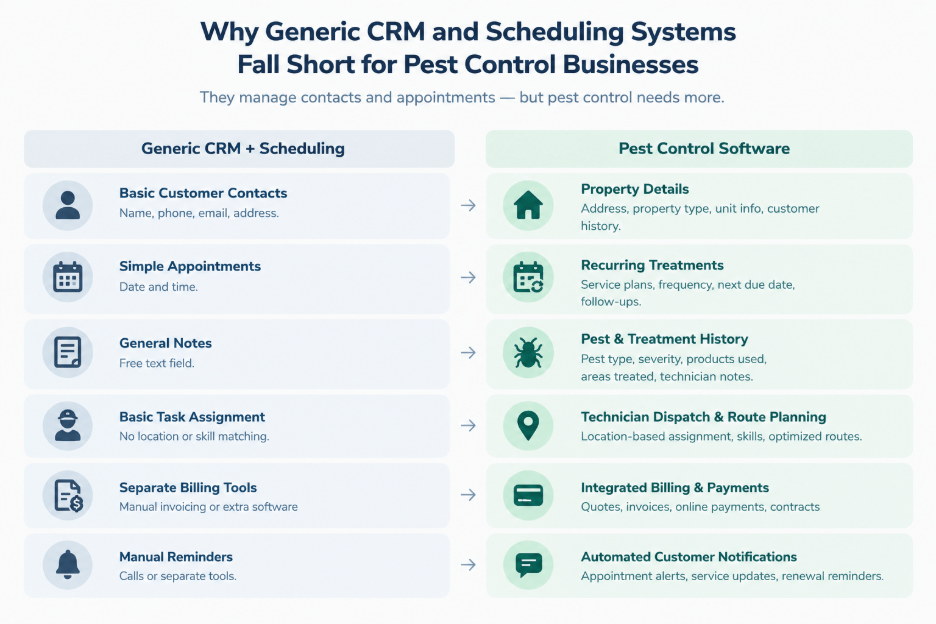
These features separate dedicated pest control scheduling software from generic service order software. Pest control runs on repeat visits, legal recordkeeping, and route density that generic tools are not built for. Therefore, a platform missing any of these operational details forces the business back onto spreadsheets, paper logs, or manual follow-up.
Recurring Service Scheduling
This feature creates monthly, quarterly, or custom-cycle service visits and assigns them to technicians based on availability, location, and workload. Schedules can be adjusted when a customer changes service frequency, skips a visit, cancels, or reschedules.
Technician Dispatch And Route Optimization
This capability enables businesses to arrange multiple client appointments into an optimized daily route. Users can assign jobs to technicians based on their availability, location, workload, and service requirements. Dispatchers can update assignments and routes as jobs are added, canceled, or rescheduled. This helps reduce unnecessary travel between properties and allows technicians to spend more of their scheduled day on customer appointments.
Customer And Property Management
It allows users to store customer details alongside property-specific and treatment-specific information in one shared system. This includes property type, address, access instructions, pest issues, service plans, and chemical treatment history. Multiple properties can be linked to the same customer while maintaining separate service records for each location.
Mobile Technician Access
Dedicated field service mobile apps enable technicians to access their daily schedules, work orders, customer details, property information, treatment history, and service instructions. Users can also update job status, add notes, upload photos, and record treatment details from the field.
Digital Service Reports
This tool replaces paper treatment tickets with digital reports containing job details, inspection findings, pest activity, treatment areas, photos, technician notes, and follow-up actions. Completed reports are saved to the relevant customer and property records.
Treatment And Chemical Records
The software documents the products used during each treatment, including application quantities, treatment areas, application dates, technician details, and treatment notes. These records create a property-level history of pesticide applications that can be retrieved for future visits and required documentation.
Contract And Service-Plan Management
Using this feature, users can track ongoing service agreements, including service frequency, pricing, included treatments, contract dates, renewal dates, and billing schedules. Recurring visits and invoices can be linked directly to the active service plan.
Invoicing And Payments
It generates invoices for one-time and recurring services and links charges to the relevant customer, property, or service agreement. Payment features can include online payments, payment tracking, automated reminders, and recurring billing.
Companies that bundle pest control with lawn treatments under one recurring plan may also want to look at lawn care software.
These features extend the core capabilities of pest control business management software with additional tools for customer communication, documentation, accounting, inventory, and business management. They become more useful as a business adds technicians, locations, or commercial accounts:
- Online Booking: Lets customers request pest control services through a website or online booking form. It captures details such as property address, pest type, preferred appointment time, and service requested. Those requests can flow into the scheduling workflow, giving office staff the information needed to review, assign, and confirm the job
- Customer Portal: Gives customers a self-service space to view upcoming appointments, past treatments, service agreements, invoices, and payment information. For recurring pest control accounts, customers can also use the portal to request additional service or report a new pest issue without calling the office
- Digital Signatures: Allows technicians to collect electronic signatures on treatment reports, service agreements, estimates, or completed work orders from their phone or tablet. Signed documents are stored with the relevant customer or property record, eliminating the need to print, scan, and manually file paperwork after a visit
- Before-and-After Photos: Lets technicians take photos during inspections and treatments and attach them to the relevant property, work order, or treatment record. For recurring accounts, those photos give the next technician a visual reference for issues such as termite damage, entry points, bait stations, or areas that require treatment
- Inventory Management: Tracks chemicals, baits, traps, equipment, and other supplies by quantity and location, including stock held at a warehouse or in individual technician vehicles. Product usage can be recorded against service visits, allowing the business to see what has been consumed and which supplies need replenishment
- QuickBooks And Accounting Integrations: Connects the pest control platform with accounting software so customers, invoices, payments, and other financial information can move between systems without duplicate data entry. This keeps operational records and accounting records aligned when a job is completed, an invoice is issued, or a payment is received
- Custom Forms: Lets businesses create inspection checklists, treatment reports, customer intake forms, and other documents around their own workflows. A company can add fields for pest-specific observations, treatment details, chemical applications, commercial customer requirements, or compliance information that may not fit the software's standard forms
- Reporting And Analytics: This feature brings operational and financial data into reports covering areas such as completed jobs, technician productivity, revenue by service type, recurring-service performance, customer retention, and route activity. Managers can use these reports to compare technicians, identify underperforming services, and track how the business is performing across locations or service categories
AI capabilities in pest control management software are still less standardized than core features such as scheduling and treatment records. Current implementations tend to focus on automating decisions and customer interactions that would otherwise require manual dispatching or office staff. These include:
AI-Assisted Scheduling And Dispatch
AI is used to assign jobs to technicians based on factors such as availability, location, workload, service requirements, and appointment constraints. Instead of relying entirely on a dispatcher to build the day's schedule, the software can generate technician assignments automatically and adjust them as scheduling conditions change.
Real-Time Route Re-Optimization
This feature recalculates technician routes when the day's schedule changes, such as when a customer cancels, an urgent job is added, or a technician falls behind schedule. The updated route can account for the technician's current location, remaining appointments, and new job priorities. Live location data for this often comes from GPS tracking software connected to the platform. Unlike standard route optimization, which plans the day in advance, real-time route optimization adjusts routes as conditions change, so a dispatcher can respond to disruptions without rebuilding the schedule manually.
AI-Powered Customer Communication
This functionality uses AI agents or virtual receptionists to handle customer calls and messages. This includes answering routine service questions, capturing job details, scheduling appointments, and following up on estimates. Agents can then connect these interactions with the business's customer and scheduling records. This way, new bookings and requests enter the same workflow as jobs handled by office staff.
Pest control software can cost anywhere from around $25/month for basic plans to about $500/technician/month for enterprise platforms. The price depends largely on how the software charges (/technician, /user, /active customer, by subscription tier, by route, or through a custom enterprise quote) and which features are included.
1. Per-Technician Monthly Pricing
Under this model, the monthly fee is based on the number of technicians using the software. Standard field-service plans typically range from $24 to $150/technician/month, while more advanced enterprise platforms can reach $250–$500+/technician/month.
The total cost increases as the business adds technicians, although some providers reduce the effective per-user cost at higher volumes. Plans may also vary by the number of features included, such as scheduling, route optimization, treatment records, inventory, reporting, and automation.
2. Flat Monthly Or Tiered Pricing
Instead of charging separately for every technician, some platforms offer a fixed monthly subscription that includes a set number of users, jobs, customers, or features. Entry-level plans typically fall around $25–$150/month, with higher tiers increasing the monthly fee as businesses need more users or advanced capabilities.
This model can be more predictable for smaller teams, but the advertised monthly price may not include additional users, premium features, payment processing, or other add-ons.
3. Custom Or Quote-Based Pricing
Larger pest control companies may receive a custom quote based on the size and complexity of their operations. Enterprise pricing can range from roughly $250 to $500+/technician or user/month, depending on the platform, number of locations, users, integrations, and required features. Enterprise deployments may also involve a one-time implementation fee. This can range from a few thousand dollars to as much as $50,000 for platforms like ServiceTitan.
Other Costs To Plan For
The monthly subscription is only part of the total cost. When comparing vendors, also check for:
- Data migration costs
- Setup fees
- Training costs
- SMS credits
- Payment processing fees
- Add-ons that may not be included in the base plan
Your team should also take into account the time required to train technicians and office staff during implementation.
Disclaimer: Pricing references are based on publicly available third-party information and industry benchmarks. Actual costs may vary.
A solo technician and a 50-person pest control company may use the same core software, but they don't have the same operational problems. As teams grow, scheduling more technicians requires greater coordination, recurring services call for more structured contract management, and operating across locations creates the need for multi-branch compliance and reporting.
The sections below break down the problems at each stage and the features that address them.
Solo Operators: 1 Technician With No Office Staff
The Problem: Solo operators work like a one-man army. Along with treating properties, they manage scheduling, invoicing, customer inquiries, and other day-to-day tasks. For them, one missed call means one missed job. A forgotten invoice means unpaid work. There's no admin buffer, so every minute spent on paperwork takes time away from treating properties or booking the next job.
What They Need: Speed and simplicity over depth, with a free or low-cost plan and mobile-first scheduling.
What Features Help Them Solve The Problem:
A solo operator doesn't need multi-branch reporting or a sales pipeline. All they need is to capture a job, get to it, get paid, and move to the next one, while keeping repeat customers coming back. The following features in a pest control scheduling platform help:
- Low-cost or freemium plans keep the software affordable for a one-person operation without paying for features or users they don't need
- Customer and property records with treatment history let the operator quickly review previous treatments, products used, and service notes before returning to a property
- Mobile, route-ordered scheduling puts the day's jobs, addresses, and service details on the technician's phone without requiring a separate office dashboard
- On-site invoicing and recurring billing let the operator collect payment after a visit and automatically bill customers on recurring service plans
- Automated reminders send appointment and payment reminders without requiring the operator to make follow-up calls between jobs
Small Teams: 2–9 Technicians With Light Office Support
The Problem: In small teams serving residential and light commercial customers, the biggest bottleneck is coordination. With multiple technicians handling monthly, quarterly, and seasonal treatments, manual scheduling can lead to missed recurring visits, double-bookings, and inconsistent treatment records. Minimal office support also means there may be no dedicated person responsible for keeping every technician's schedule, customer history, and chemical records up to date.
What They Need: A shared system of record for centralized scheduling, histories, and chemical tracking without the cost of a larger enterprise platform.
What Features Help Them Solve The Problem:
The following features in a pest control business software help small teams work efficiently:
- Centralized scheduling gives office staff a shared view of technician availability so they can assign, reschedule, and balance jobs without relying on calls or messages
- Technician dispatch and route optimization assigns jobs based on technician availability, location, and service requirements while reducing unnecessary travel and scheduling conflicts
- Chemical and compliance tracking records products, quantities, application details, and treatment information as part of the technician's normal workflow, reducing inconsistent or missing records
- Connected CRM and service history keep customer details, property information, treatment records, and scheduled services in one system instead of separating customer data from field operations
- Customer portals and automated reminders give customers access to service information and handle routine appointment notifications without adding more work for limited office staff
Mid-Market Or Growth-Stage: 10–49 Technicians With Growing Commercial Accounts
The Problem: Mid-market pest control businesses often serve restaurants, hospitals, food processing facilities, and multi-unit properties that require detailed service records. Technicians may need to document Integrated Pest Management (IPM) activities, chemical applications, bait station inspections, and corrective actions to pass inspections and audits from regulators such as the U.S. Food and Drug Administration (FDA) and U.S. Department of Agriculture (USDA), as well as third-party auditors such as AIB International.
As job volume grows, businesses also need to track leads, quotes, technician performance, and territory-level results. Lead volume can also grow faster than the team can follow up manually, increasing the risk of quotes going cold.
What They Need: Audit-ready documentation, routing that scales across a bigger area, and sales automation to handle more leads. Plus, reporting that shows which territories and technicians are profitable.
What Features Help Them Solve The Problem:
A growing pest control business needs a stronger operational structure without creating separate systems for every function. The following features help a pest control scheduling platform support that growth:
- IPM and commercial compliance documentation records bait inspections, chemical applications, corrective actions, and other service details as part of each visit
- Connected CRM and scheduling keeps lead sources, quotes, customer records, contract renewals, and scheduled jobs connected in one workflow
- Technician onboarding and training workflows give new technicians structured training materials, procedures, and service information to follow as the team expands
- Territory-based route optimization organizes jobs across larger service areas and multiple branches while accounting for technician locations and daily workloads
- Marketing and sales automation tracks leads and automates quote follow-ups so increasing inquiry volume does not create additional manual work
- Technician and territory reporting shows job volume, revenue, route performance, and other operational metrics across teams and service areas
Enterprise Or Commercial Stage: 50+ Technicians With Multi-Branch And Heavy Commercial Accounts
The Problem: At this stage, businesses often handle large commercial accounts with bait-station audits, different regulatory requirements across states, and contracts with strict service windows. There is little room for mistakes. A missed inspection or service visit can create contractual, compliance, or customer issues. Multiple branches also make it harder to keep scheduling, records, finances, and operations consistent across the business.
What They Need: Businesses at this point need platform depth over simplicity, along with an integration-level API and pest-specific regulatory reporting, including pesticide-use records required under FIFRA and state laws, WDI/WDO reports, and EPA registration numbers.
What Features Help Them Solve The Problem:
Along with core features, enterprise businesses need advanced tools to manage compliance, multiple locations, commercial accounts, and integrations:
- Pest-specific compliance and reporting supports bait-station inspections, chemical application records, WDI/WDO reports, and other regulatory documentation across different locations
- eLogbook for inspection reports replaces paper and scattered PDF records with a searchable, audit-ready log that QA teams can access when needed
- Multi-branch reporting and centralized operations bring scheduling, financial, and compliance data from every branch into one view
- API and integration depth connect the platform with accounting, HR, and other systems already used across the business. For companies that also provide commercial cleaning or hygiene services, this can include cleaning service software
- IPM workflow management for multi-unit and commercial properties organizes inspections, corrective actions, and service records by property, zone, building, or unit
The right pest control software is the one that solves the problem you're facing, not the one with the longest feature list. Therefore, even before comparing vendors, answer a few questions about your business and pest control operations:
- How many technicians do you have, and is that number likely to change soon?
- Do you serve commercial accounts that require detailed documentation, or is your business mostly residential?
- Do you operate from one location or across multiple branches or states?
- What is your biggest bottleneck: admin work, technician coordination, or growth?
- How many recurring accounts do you manage, and how do you currently handle missed or rescheduled visits?
- Do you need an open API to connect the software with your existing systems or build custom workflows?
- Do you need pest-specific compliance features, or are basic field-service records enough for your operation?
- How much are you willing to spend/technician or/month, and does the pricing model still work as your team grows?
Once you know your business tier and non-negotiable requirements, compare software against those needs rather than against feature counts alone. The best platform is the one that solves your biggest operational problems today, fits the way your technicians actually work, and can keep up as the business grows.