



Last Updated
Key Takeaways
Generated from the text of customer reviews
Our Verdict
Overall Rating
Based on 13 users reviews
4.8
Rating Distribution
Positive
100%
Neutral
0%
Negative
0%
Starting Price
$250
per month
Everlaw Specifications
- Case Management
- Document Management
- Workflow Automation
- Compliance & Security Features
Everlaw Features
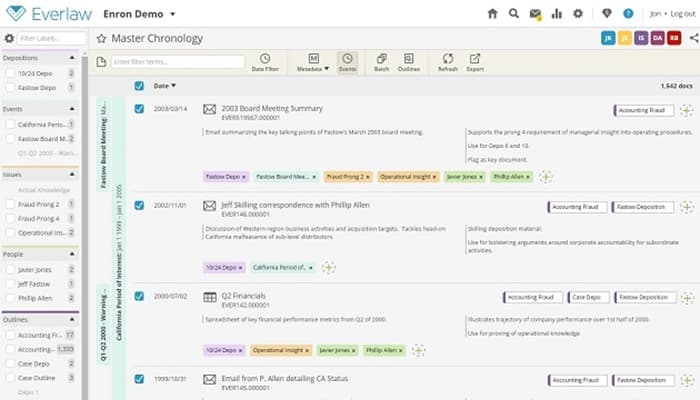
Storybuilder
Storybuilder is Everlaw’s narrative-building workspace for organizing the evidence, facts, people, deposition material, and written work product that make up a case. It lets legal teams build fact timelines, organize evidence, prepare depositions, analyze testimony, and develop drafts while keeping these materials connected to the underlying case record. Teams can also use transcript search, deposition designations, exhibit lists, and collaborative drafts.
Writing Assistant
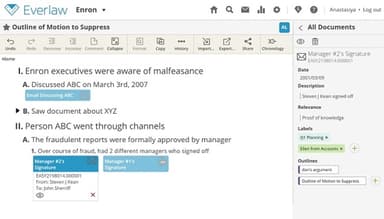
This feature generates first drafts, evidence outlines, legal memos, comparison tables, and other case-preparation materials from document sets selected by the legal team. It can also analyze deposition transcripts and create question outlines or summaries with page-line citations that point back to the underlying testimony.
Predictive Coding
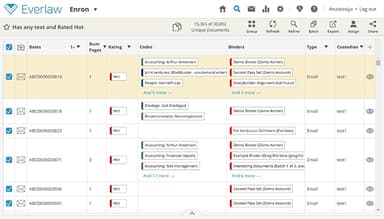
Everlaw Predictive Coding uses machine learning to learn from a legal team’s existing document-coding decisions and predict which remaining documents are likely to be relevant. It prioritizes high-value evidence while allowing teams to de-prioritize potentially non-responsive files, helping reviewers focus their efforts on the most important materials first. Teams can also reuse previously trained models across matters, overlay predictive coding results with Everlaw’s clustering visualization, and validate model performance using built-in precision and recall metrics.
Review Assistant
Review Assistant provides document-level analysis inside Everlaw’s review workflow, including summaries, topic analysis, custom extractions, sentiment analysis, and natural-language Q&A. Custom extractions can pull specific information such as people, organizations, dates, numbers, or other user-defined data points from documents, while document Q&A returns answers with citations to the relevant source passages.
Clustering
This feature automatically organizes documents by conceptual similarity, rather than requiring reviewers to define keywords or categories first. Everlaw represents these groups visually, allowing users to move from a high-level view of the document population into individual clusters, related documents, and specific evidence. The visualization can handle up to 25 million documents on a single screen and can be combined with search results, coding decisions, and Predictive Coding scores.
Pros And Cons of Everlaw
Pros
Simplifies complex review workflows for users with limited technical experience
Enables faster coding, helping teams complete reviews and productions efficiently
Provides AI capabilities to streamline legal electronic discovery workflows
Cons
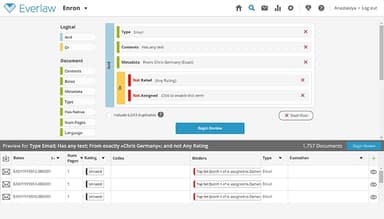
Search syntax can be complex and require additional training
Some search features may require users to learn query techniques to use effectively
Everlaw Reviews
Total 13 reviews
4.8
All reviews are from verified customers
Rating Distribution
5
Stars85%
4
Stars15%
3
Stars0%
2
Stars0%
1
Stars0%
Share your experience
Legal, 1-10 employees
More than a year
“Really easy and efficient”
Pros
Everlaw is easy to use and you do not need to be a computer expert to figure it out.
Cons
Its simply the best. I have no complaints. I really like it.
Rating Distribution
Ease of use
10
Value for money
10
Customer Support
10
Functionality
10
Legal, 101-500 employees
Less than 6 months
“loved using it”
Pros
I really like the document review feature as it helps me review documents quickly and efficiently.
Cons
I do not have enough experience with Everlaw yet, but so far everything seems great.
Rating Distribution
Ease of use
9
Value for money
4
Customer Support
4
Functionality
9
Legal, 51-100 employees
More than a year
“It has EVERy Important feature available”
Pros
Everlaw software is easy to use and the single price for everything, without constant add-on charges is a huge plus. They consistently work on improving the software which tell they are considering the client needs. Moreover the customer service is top notch, the reps are knowledgeable and communication is great. I could go on but its something you should experience yourself.
Cons
Still trying to find something negative...
Rating Distribution
Ease of use
10
Value for money
10
Customer Support
10
Functionality
10
Frequently Asked Questions
Does Everlaw offer an API?
Yes, Everlaw provides API access.
What language does Everlaw support?
Everlaw primarily supports English.
What other apps does Everlaw integrate with?
Everlaw integrates with several third-party applications and AI platforms, including Google Gemini, Harvey AI, OpenAI, Thomson Reuters, Legora, and Anthropic.
What types of pricing plans does Everlaw offer?
Everlaw pricing starts at $250/month and offers customized pricing plans tailored to each organization’s specific needs and requirements. Contact us for a customized Everlaw price quote based on your organization’s requirements.
Who are the typical users of Everlaw?
Everlaw is designed for legal professionals across a range of industries, including law firms, corporations, federal government agencies, and state and local government organizations.
What level of support does Everlaw offer?
Everlaw offers phone, email, FAQs, live chat, a contact form, a help center, and a knowledge base.