


Last Updated

Key Takeaways
Generated from the text of customer reviews
Paylocity is a cloud-based HR and payroll platform. HR and payroll teams are its main users, and healthcare organizations report the most value from its compliance tools. Its ease of use and mobile self-service draw the strongest feedback. However, mobile app’s limited functionality draws criticism. Paylocity recently launched Ignite AI for pay, time, and recruiting tasks.
Our Verdict
Paylocity fits mid-sized to large organizations that want payroll, HR, benefits, and compliance under one system. Multi-state employers and regulated industries benefit most from its compliance tracking. Module-based, custom pricing keeps costs proportional to actual use, which suits growing teams better than flat-rate plans. We recommend it for organizations scaling past basic payroll needs.
Paylocity HR & Payroll Specifications
- Employee Information Management
- Recruitment and Applicant Tracking
- Performance Management
- Attendance and Time Tracking
What Is Paylocity HR & Payroll?
Paylocity brings payroll, HR, benefits, and talent management into one cloud-based system. For payroll, the platform handles wage calculations, tax filing, and direct deposits. Benefits administration works through the same dashboard, so employees and HR teams do not need a separate portal.
Keeping these functions together also means employee data stays in one place. For example, changes made in HR can carry over into payroll without duplicate entry. Managers can then access the same information from any location. They can approve timecards or check open tasks without waiting to get back to their desks. This connected setup is what Paylocity relies on to cut down the number of separate systems an HR department has to manage day to day.
What Is Paylocity HR & Payroll Best For?
The platform stands out for connecting talent management with payroll. As the data moves into pay setup without re-entry, it helps with a new hire's recruiting and onboarding process. This is especially useful for growing companies with frequent headcount changes. Their recruiting, performance, and compensation processes can stay connected to payroll rather than split across separate systems.
How Much Does Paylocity HR & Payroll Cost?
Paylocity’s pricing is structured around three customizable modules, including the following, offered at custom rates:
HR
- Payroll
- Human Resources
- Workforce Management
- Talent Management
- Benefits Management
- Employee Experience Platform
- Marketplace Integrations
- Beyond Traditional HRIS
Finance
- Expense Management
- Corporate Cards
- Accounts Payable Automation
- Guided Procurement
- Headcount Planning
IT
- Access Management
- Asset Management
- Integrations and Developers AI
Users generally view Paylocity as offering reasonable value for its capabilities, though some mention higher costs for add-ons and custom features. Overall, pricing sentiment leans positive, but the total cost can vary with the modules selected.
Disclaimer: The pricing is subject to change.
Paylocity HR & Payroll Integrations
The platform integrates with several third-party applications, such as:
- Slack software
- QuickBooks
- Oracle Aconex
- Sora
- Paytient
How Does Paylocity HR & Payroll Work?
Here's how you can access the platform and start using its features:
- Log in with your credentials to reach the main dashboard
- Open the ‘Human Resources’ tab to manage employee records, self-service access, and compliance documents
- Set up onboarding and offboarding steps for new hires and departing employees
- Configure pay rules, tax settings, and direct deposit under the ‘Payroll’ section
- Track time cards, PTO requests, and schedules from the Time & Attendance tab
- Review staffing reports and analytics under HR Edge to support workforce decisions
Who Is Paylocity HR & Payroll For?
The software is suitable for businesses of all sizes in diverse industries and sectors, such as:
- Healthcare
- Nonprofit
- Retail
- Transportation
- Education
- Government
Paylocity HR & Payroll Use Cases
Based on our analysis of user reviews and Paylocity HR & Payroll features, we have identified key scenarios where this software is a good fit:
Multi-State Employers Coordinating Payroll Tax Compliance
Running payroll across several states means tracking different withholding rules, unemployment insurance rates, and filing deadlines for each one. Paylocity helps apply the correct state tax rules during each payroll run and files as a Registered Reporting Agent with the IRS across all 50 states, Puerto Rico, Guam and the Virgin Islands. This cuts the manual cross-checking that multi-state payroll usually demands.
Healthcare And Other Regulated Employers Managing Compliance Documentation
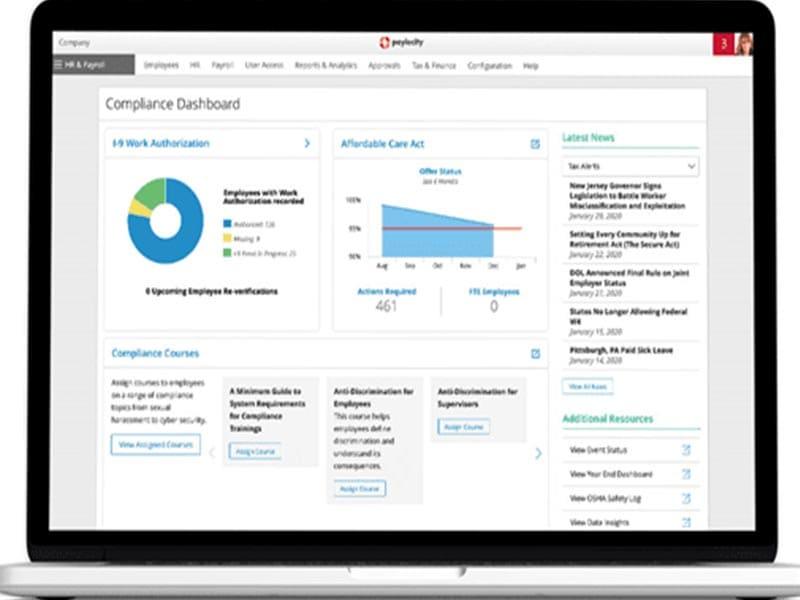
Paylocity keeps certification dates and required documents attached to each employee file. That can help healthcare, finance, and government employers keep up with recurring compliance reporting and credential renewals across a large staff. An expiring license or missing document can surface before it becomes an audit issue. This scenario applies most directly to employers where a single missed renewal carries regulatory consequences.
Companies Running Benefits Open Enrollment Without A Separate Portal
Many benefits platforms sit apart from payroll, so elections made during open enrollment have to be re-entered into pay records by hand. Paylocity keeps benefits enrollment inside the same system as payroll. This way, once an employee finalizes their selections, the deduction updates carry over automatically without a second data entry step. Organizations that want enrollment changes to reach a paycheck without manual follow-up would find this useful.
Distributed Teams Handling Time Off And Pay Details Without Desk Access
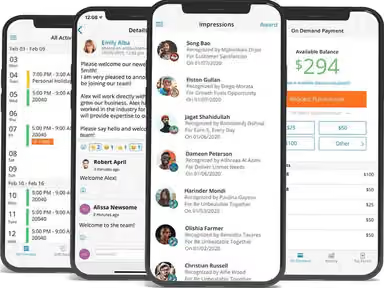
For field staff and remote employees, even simple tasks like requesting time off or checking a pay stub can be harder without a company computer. Paylocity's self-service app puts those tasks on a phone, letting employees clock in, request PTO, and view pay stubs without going through HR for each request.
Organizations Consolidating HR, Payroll, And IT Under One Vendor
Paylocity's IT module extends the platform beyond HR and payroll to access management and asset tracking. A new hire's equipment and account setup can then tie back to the same record created during onboarding. This is relevant for companies already running separate systems for device provisioning and account access, where employee records otherwise end up in more than one place. It fits organizations trying to cut down on the number of vendors involved in setting up a new employee.
Paylocity HR & Payroll User Sentiment
Most Positive Sentiments | Least Positive Sentiments |
|---|---|
Ease of Use & Workflow | Mobile App Limitations |
|
|
Users consistently appreciate Paylocity’s intuitive workflows for payroll and HR tasks. Once learned, processes like onboarding and scheduling become smooth and efficient. | The Paylocity mobile app works for basic functions but has limited support for complex tasks like benefit enrollment or performance reviews. Many users prefer the desktop version. |
Employee Self‑Service & Time Tracking | Customer Support |
|
|
Employees value the ability to manage timecards, tax updates, and time off requests independently. This transparency saves HR teams time and empowers staff. | Issues with responsiveness are frequently flagged, with slow resolution times and inconsistent follow‑up during payroll adjustments or implementation. |
Value for Money | Payroll & Reporting Accuracy |
|
|
Organizations often cite Paylocity as cost‑effective compared to competitors, offering scalable HR and payroll solutions that fit mid‑sized businesses. | Users report PTO accrual errors, reporting issues, and payroll setup challenges. Many double‑check reports or rely on support to resolve discrepancies. |
Is Paylocity HR Right For You?
Paylocity is worth considering if you need payroll and HR tools that can keep pace with a growing workforce. Its platform brings payroll, benefits, talent management, time, and IT into one system. That makes security and compliance important considerations, particularly for employers managing sensitive employee and payroll data.
Paylocity's systems are ISO 27001:2022 certified. The company also undergoes annual SSAE 18 audits covering SOC 1 and SOC 2 Type II controls, on top of HIPAA compliance for health-related employee records. Those safeguards become even more relevant as pay transparency requirements continue to expand. Moreover, Paylocity scales with your business through modular add-ons and multi-state payroll support, so you only pay for what you need as you grow.
Pay transparency laws now apply in multiple states. It requires salary ranges in job postings or on request from current staff. Paylocity's Market Pay tool pulls real-time salary data from Salary.com into employee records. HR teams can use this data to set and defend pay ranges without bringing in an outside compensation consultant.
Still unsure if Paylocity HR & Payroll is the right fit for your organization? Get in touch at (661) 384-7070, and we will help you make an informed decision.
Paylocity HR & Payroll Features
Benefits Administration
Paylocity's Benefits Administration tool lets employees compare and select coverage from the same dashboard they use to check a pay stub. They even offer 401(k) and 403(b) retirement plans. It helps automate paycheck deductions and gives employees a clear, single view of their savings inside their everyday portal or mobile app.
Time And Attendance
This feature syncs punches, overtime, and PTO requests into payroll. It removes the need to export and upload spreadsheets before payroll processing. Employers can also set geolocation restrictions for clock-ins, which helps track attendance across multiple job sites or store locations.
Payroll Processes
Once time data is confirmed, Paylocity's payroll engine runs wage calculations, tax withholding, and direct deposit on its own. It helps cut manual entry out of each pay cycle. Employees get visibility into an upcoming paycheck ahead of payday and can request access to wages they have already earned.
Automated Workflows
Paylocity allows employees to create customized workflows for common HR tasks. Users can utilize pre-designed templates or build their own workflows according to their organization's specific needs. This feature helps automate tasks such as onboarding, offboarding, position changes, rate changes, and skill certification collection.
Employee Self-Service
This platform helps take the burden off HR teams as employees can directly access pay stubs, benefit details, and time-off balances – all through its employee self-service portal. It is accessible through both the web and mobile app. Similarly, they can also update the information on their own without having to involve HR teams.
Intelligent Scheduling
Paylocity's scheduling tool uses AI-driven recommendations to match employees to shifts based on job function, skill set, and certification. It also flags employees approaching an overtime threshold. This helps managers avoid unexpected overtime costs.
Workforce Analytics
The platform helps pull HR metrics such as turnover, headcount, and compensation trends into ready-made dashboards. These dashboards can also break down position-level data. It can help teams plan for open roles and spot turnover patterns as they develop.
Spend Analytics
The software offers comprehensive visibility into organizational spending across departments and vendors. It identifies duplicate or inefficient spend, tracks payment cycles, and highlights cost‑saving opportunities. Automated reporting and compliance monitoring streamline procurement processes, enabling finance teams to make faster, more strategic decisions.
Fraud Detection
Paylocity monitors card and vendor transactions for suspicious activity. It sends alerts when anomalies occur. Moreover, its built‑in workflows require approvals for vendor bank account changes, supported by two‑factor authentication. These controls protect against unauthorized payments and reduce the risk of financial fraud.
Headcount Planning
Headcount Planning keeps hiring plans tied to Paylocity's live payroll and HR data. This way, a forecast updates on its own as headcount changes. Finance, HR, and recruiting work from the same plan rather than reconciling three different versions of it.
Pros And Cons of Paylocity HR & Payroll
Pros
Employee pay information can be accessed easily
Mobile app works well for employees
Reports provide useful workforce insights
Payroll includes helpful checks before processing
Payroll checks help catch errors before processing
Cons
Custom reports can be difficult to build
Some reports only export as PDFs
The interface can feel crowded across modules
Paylocity HR & Payroll Reviews
Total 578 reviews
4.2
All reviews are from verified customers
Rating Distribution
5
Stars46%
4
Stars40%
3
Stars9%
2
Stars2%
1
Stars3%
Share your experience
IT, 500+ employees
More than a year
“easy interface”
Pros
It as a very accessible user interface and so it is easy to use.
Cons
I don't like the account manager structure at all. Changes to account managers prevents consistent support.
Rating Distribution
Ease of use
8
Value for money
7
Customer Support
7
Functionality
7
Nonprofit, 51-100 employees
More than a year
“Try it out!”
Pros
The software is easy to use.
Cons
Different modules don't always work together.
Rating Distribution
Ease of use
10
Value for money
10
Customer Support
10
Functionality
9
Human Resource, 101-500 employees
More than a year
“Not expensive”
Pros
The software is cost effective and easy to use.
Cons
Customer service could be better, they don't have a dedicated rep
Rating Distribution
Ease of use
8
Value for money
8
Customer Support
7
Functionality
10
Frequently Asked Questions
Does Paylocity HR & Payroll offer an API?
Yes, Paylocity offers an API.
What language does Paylocity HR & Payroll support?
Paylocity HR supports the English language.
What other apps does Paylocity HR & Payroll integrate with?
Paylocity HR integrates with applications, such as Sage, QuickBooks, Slack software, and more.
Does Paylocity HR & Payroll have a mobile app?
Yes, Paylocity HR offers a mobile app.
What types of pricing plans does Paylocity HR & Payroll offer?
Paylocity HR offers three custom pricing plans, including HR, Finance, and IT. Get in touch with us for a personalized Paylocity HR price estimate.
Who are the typical users of Paylocity HR & Payroll?
Typical users of Paylocity HR include professionals working in sectors like education, retail, transportation, and more.
What level of support does Paylocity HR & Payroll offer?
Paylocity HR offers support through phone.