




Last Updated

Overview
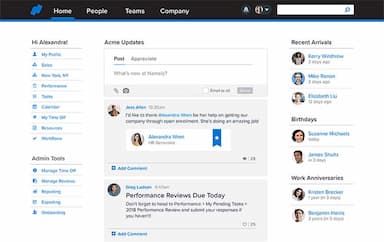
Namely HR streamlines human resources (HR) operations with its feature-rich cloud-based platform. Catering to small and medium-sized businesses, it features an intuitive interface and robust features. Although there are limited customization options for features, the platform's integrated approach helps reduce administrative burdens, promoting strategic initiatives and employee engagement.
Overall Rating
Based on 266 users reviews
4.1
Rating Distribution
Positive
76%
Neutral
21%
Negative
3%
Starting Price
$9
per employee per month
Namely HR Specifications
- Employee Information Management
- Recruitment and Applicant Tracking
- Performance Management
- Attendance and Time Tracking
Namely HR Features
Employee Management
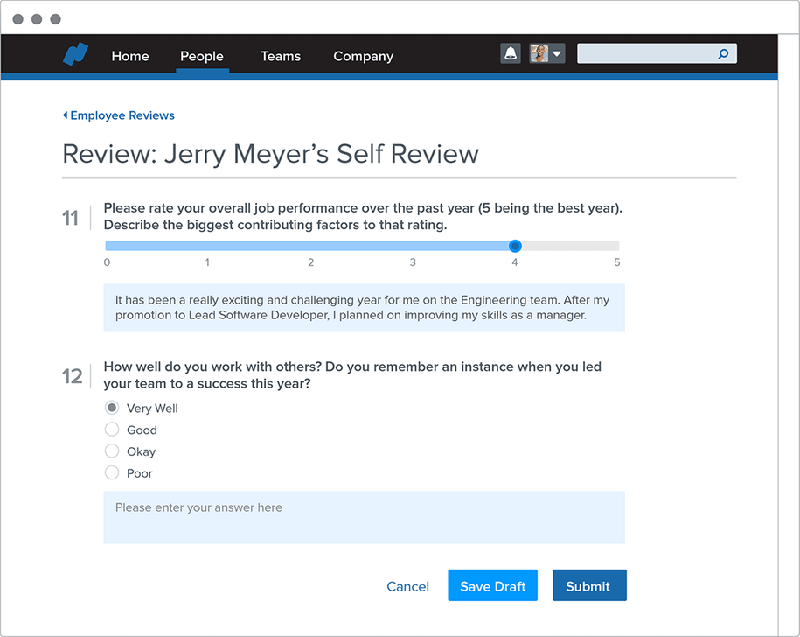
Namely offers comprehensive tools to manage all aspects of employee information, including personal details, job roles, and compensation. The system facilitates performance tracking through regular reviews and goal setting, ensuring employees stay aligned with company objectives. Additionally, Namely simplifies the onboarding process with automated workflows and checklists and streamlines offboarding to ensure compliance and efficiency when employees exit the company.
Benefits Administration
This feature allows HR teams to configure and administer benefit plans, ensuring employees can easily enroll in and manage their benefits. It also includes tools to track benefit usage and costs, providing valuable insights into the effectiveness of benefit programs.
Talent Management
Namely helps with recruiting, onboarding, performance reviews, and career development. The platform offers tools for posting job openings, managing applicants, and conducting interviews, making the recruitment process more efficient. Once hired, employees can be onboarded through a streamlined process that includes necessary training and document completion.
Reporting And Analytics
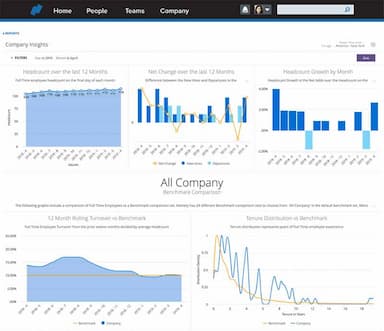
The software offers robust reporting tools to generate insights from HR data and support strategic decision-making. Users can create custom reports on various HR metrics, such as employee turnover, payroll expenses, and benefits utilization. The analytics feature provides visualizations and dashboards that help HR professionals and managers make data-driven decisions to improve workforce management and operational efficiency.
Compliance Management
Namely ensures compliance with labor laws and regulations, reducing the risk of penalties and legal issues. It keeps track of changes in employment laws and automatically updates policies and procedures to stay compliant. It also includes tools for managing mandatory training, reporting incidents, and maintaining proper documentation, ensuring the company adheres to all relevant regulations.
Pros And Cons of Namely HR
Pros
User-friendly interface
Effective tax compliance tools
Integrated payroll and benefits management
Scalable for growing businesses
Cons
Limited customization options for some features
May require training for full utilization
Namely HR Pricing
Namely Now | Namely Plus | Namely Plus People | Namely Complete |
|---|---|---|---|
$9 per employee per month | Custom Pricing | Custom Pricing | Custom Pricing |
|
|
|
|
Disclaimer: The pricing details were last updated on Sep 14, 2026 from the vendor's website. Please contact us for a tailored pricing list.
Namely HR Reviews
Total 266 reviews
4.1
All reviews are from verified customers
Rating Distribution
5
Stars42%
4
Stars33%
3
Stars17%
2
Stars4%
1
Stars3%
Share your experience
Human Resources, 11-50 employees
Less than a year
“good but not efficient”
Pros
The reporting for HR is best and updating or inputting data is also very simple and smooth. It's also great for creating and editing employee profiles.
Cons
It's pretty slow and doesn't integrate well with other platforms which can be a issue. also, the tutorials for users could definitely be improved and customer service could be better. I've had some struggles getting the support I need when I run into issues.
Rating Distribution
Ease of use
5
Value for money
5
Customer Support
5
Functionality
6
small-Business, 11-50 employees
“disappointing system”
Pros
I had really high hopes when I switched from Gusto. To be honest the whole setup and experience were a bit of a letdown. But I have to say, Wendy from the benefits team was absolutely fantastic. She really tried her best to help us succeed.
Cons
I really wanted this to work but honestly found nothing user-friendly about it. The HRIs and payroll systems aren't integrated at all, you have to make changes in one system then go repeat everything in the other. That completely defeATs the point of buying software thATs supposed to make things more efficient.Payroll was an absolute nightmare that took us hours to complete, not because we made mistakes but because of constant system errors and confusing processes. When we called support, they just kept transferring us between different teams. The payroll people couldn't help with HRIs issues and the HRIs team couldn't handle payroll problems which just wasted even more of our time.The training was practically non-existent across the board. To make things worse, most of the helpful people from our initial setup got laid off after some acquisition. A few of them actually reached out later to apologize for how terrible our experiance ended up being.
Rating Distribution
Ease of use
3
Value for money
5
Customer Support
2
Functionality
3
Construction, 1-10 employees
Less than a year
“smart choice, though a bit costly”
Pros
This tool truly has everything you need for managing HR and the best part is that it all comes from just one provider. Whether it's handling payroll, tracking employee data or managing compliance, it covers all aspects of HR in one place.
Cons
The tiered pricing is frustrating because it locks out some of the features that are actually necessary. I feel like I have to pay more just to get what I need.
Rating Distribution
Ease of use
8
Value for money
7
Customer Support
7
Functionality
8
Frequently Asked Questions
Does Namely Payroll offer an API?
Yes, it offers an API for integrations with other systems and custom applications.
What language does Namely Payroll support?
Namely HR software supports English as its primary language.
What other apps does Namely Payroll integrate with?
It can be integrated with various third-party apps, including ThrivePass, SimplyMerit, Vestwell, Zapier, Slack, and OrgVision.
Does Namely Payroll support mobile devices?
Yes, Namely performance management software supports mobile devices.
What types of pricing plans does Namely Payroll offer?
Namely offers four pricing plans to cater to the diverse needs of different organizations. These include Namely Now (starting from $9/employee/month), Namely Plus (custom pricing), Namely Plus People (custom pricing), and Namely Complete (custom pricing). Contact us for a customized Namely HR pricing plan.
Who are the typical users of Namely Payroll?
Typical users include small to medium-sized businesses across various industries and sectors such as technology, finance, nonprofit, and e-commerce. You can request a Namely HR demo to know if it works for you or not.
Who are the typical users of Namely Payroll?
Typical users include small to medium-sized businesses across various industries and sectors such as technology, finance, nonprofit, and e-commerce. You can request a Namely HR demo to know if it works for you or not.
What level of support does Namely offer?
Namely offers various levels of support, including customer service, training resources, and a help center.