



Legal teams sometimes find it hard to effectively manage contracts, documents, and routine tasks. Choosing the wrong platform can lead to filing errors, missed deadlines, and wasted effort. This is where tools like Contract Lifecycle Management (CLM) and Legal Workspace come in to provide structure and functionality that help enhance efficiency.
A CLM system simplifies the contract lifecycle from drafting to approval, whereas Legal Workspaces offer a larger setting for law professionals to manage cases/matters, documents, and ongoing work in one location. Knowing which solution better matches your workflow helps your staff stay organized, minimize errors, and allows teams to provide high-quality legal services.
Read on to learn about their main functions, basic differences, and factors to consider before going for a solution that best suits your team's workflow.
Aspect | CLM | Legal Workspace |
Core Focus | Built around the full contract lifecycle, keeping every stage organized from drafting to renewal | Designed as a central place where legal teams store documents, collaborate, and handle daily case activities |
Main Functionalities | Supports teams that handle steady contract volumes and need clarity across each stage | Fits environments where diverse documents, discussions, and workstreams come together under one roof |
Business Stage Fit | Best suited for mid-to-large organizations with high contract volumes or formalized contract processes | Works well for small to large legal teams needing a unified workspace for diverse legal tasks |
Primary Value | Reduces errors, ensures compliance, speeds up contract processing, and provides audit trails | Improves visibility across matters, enhances team collaboration, and centralizes legal work in one place |
Implementation Time | Generally moderate to long, depending on contract complexity and integrations | Usually shorter, as it focuses on general legal work rather than strict workflows |
Security And Compliance Depth | Strong, especially around contracts, approvals, and audit trails | Strong overall, but may vary by platform; focuses on protecting documents and sensitive legal data |
Collaboration Style | Structured; multiple stakeholders review and approve contracts in defined workflows | Flexible; teams collaborate on documents, tasks, and matters in a shared workspace |
A CLM system helps legal teams handle contracts in an organized, consistent manner. It brings drafting, reviews, approvals, and storage into one place, so every team member works from the same version and follows the same processes.
Instead of searching for documents in various emails or drives, the process flows naturally from contract drafting to approval and storage. This creates a consistent workflow, manages compliance, and allows teams to work more confidently as the contract volume increases. For more specialized platforms, see our legal contract lifecycle management software category.
Core Features Of CLM
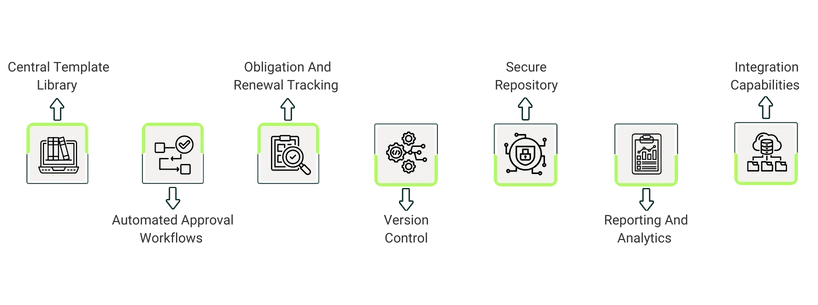
- Central Template Library: Teams can store approved clauses and templates in one place. When drafting new contracts, teams can refer to this library rather than writing the same clauses again and again. This maintains language consistency while reducing unnecessary drafting work
- Automated Approval Workflows: Admins can set rules for who reviews and approves contracts at each stage. The system automatically delivers contracts to the relevant person, sends reminders if approvals get delayed, and notes down all actions so no steps are missed
- Obligation And Renewal Tracking: The system lets teams track important contract dates, deliverables, and milestones. Timely alerts prevent deadlines, renewals, and obligations from getting overlooked. This helps maintain compliance without having to manually monitor each date
- Version Control: Every edit and comment is recorded, providing teams with a complete history of all changes. Users can compare versions, update drafts as needed, and clear up confusion about which document is the most recent
- Secure Repository: Contracts are stored in a secure, well-organized location with controlled access. Users can search, filter, and retrieve documents at any time, while sensitive information remains secure for audits and internal reviews
- Reporting And Analytics: Dashboards show how contracts are progressing, where delays occur, and which approvals are still pending. These insights help teams to identify trends, evaluate performance, and make data-driven decisions
- Integration Capabilities: The platform integrates with CRMs, ERPs, and other business tools, allowing contract data to move smoothly between departments. Updates made in one system can be automatically reflected in the CLM, keeping information consistent and preventing duplicate entries
Examples Of CLM
- Icertis Contract Intelligence (ICI)
Icertis is meant for large organizations that handle a high volume of complex contracts in various regions. It assists teams in remaining compliant with multiple jurisdictional requirements while also organizing all agreements. The platform also uses AI to highlight potential risks or delays early, so the issues can be addressed before they get out of hand - Conga CLM
Conga CLM is a central hub for contract management that is used by big companies like Sony and Adobe. Teams can collaborate on drafts in real time, automatically track approvals, and make sure no steps are ignored. The platform is particularly useful for facilitating close collaboration between legal and commercial teams.
A Legal Workspace is a centralized platform that allows legal teams to manage documents, track cases, and complete daily tasks, such as reviewing drafts and updating notes. In addition to storage, it offers workflow tracking, automated task reminders, and collaborative tools that allow teams to see progress in real time. Legal professionals can work more efficiently, reduce missed deadlines, and maintain compliance in all cases by combining task management and secure document handling. Explore our legal operations software category for platforms that support broader legal workflows beyond contracts.
Core Features Of Legal Workspace

- Matter And Task Management: Allows teams to accept new legal cases, assign responsibilities, track progress, and see what's pending all in one place, instead of switching between ticketing tools and emails
- Document And Knowledge Repository: Contracts, matter files, precedents, internal policies, and reference materials are all stored in one place. Teams can easily find what they need without spending time searching through shared drives
- Contract And Spend Tracking: Some platforms combine contract lifecycle features with billing or e-spend workflows. This gives teams a better understanding of how matters and contracts use up time and money
- Reporting And Insights: Dashboards show trends, such as where work is piling up, which contracts or matters are being delayed, and where costs are increasing. These analytics let teams make proactive, informed decisions rather than simply reacting to what comes their way
- Collaboration And Access Control: Users can work together on documents and tasks in a secure environment, with clearly defined roles and permissions to keep sensitive information protected
Examples Of Legal Workspace
- LawVu Legal Workspace
LawVu helps in-house legal teams manage matters, documents, and daily tasks in one place. It integrates intake, document storage, contract workflows, and task updates to make sure everything stays connected. Teams can manage ongoing issues, securely share files, and meet deadlines without switching between tools. - Legalspace Matterwise+
Matterwise+ facilitates case and matter management by combining updates, notes, and key documents. Legal teams can review files, track active cases, and document ongoing tasks with minimal manual effort. The platform also organizes research materials and timelines, making it easier to efficiently move cases forward.
Purpose And Focus
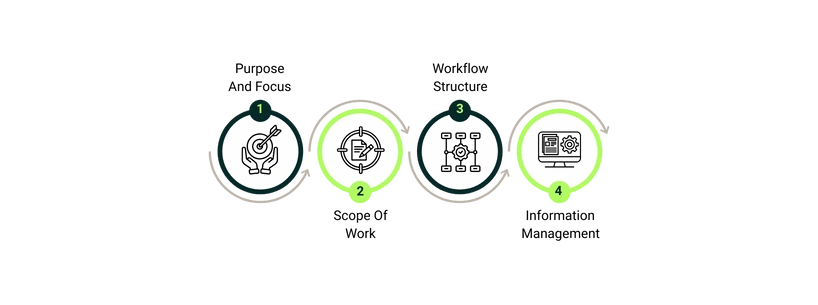
A contract lifecycle manager is in charge of drafting, reviews, approvals, and storage of contracts. In contrast, a Legal Workspace simplifies broader legal activities, like managing cases and matters, organizing drafted documents, and keeping track of all daily legal tasks.
Scope Of Work
Contract creation, negotiation, and full lifecycle management are the primary focuses of CLM systems, which support structured processes to maintain consistency across all agreements. On the other hand, Legal Workspaces handle a broader range of legal activities, such as matter intake, team collaboration, document storage, and task management, to facilitate coordination beyond contracts.
Workflow Structure
CLM systems use structured workflows to organize contract tasks (from start to finish), maintain compliance, and provide a clear audit trail. In contrast, Legal Workspaces offer more flexible workflows that let teams manage multiple tasks, update files, and track work in ways that match their daily routines.
Information Management
Contract lifecycle management systems help manage contracts, clauses, versions, and negotiation histories. Whereas the Legal Workspace manages a broader range of content, such as emails, notes, matter files, reference documents, and internal requests, enabling teams to manage structured and unstructured data more effectively.
The decision to select a CLM or a Legal Workspace comes down to understanding your team's needs. The following section explains which scenarios each platform is best suited for, assisting you in matching your workflows with the suitable solution:
Choose CLM When:
A CLM is the better option when contracts take up an important portion of your legal workload. It assists legal teams in structuring their drafting, negotiation, and approval workflows to make sure that nothing is missed. Organizations that manage a high volume of agreements or rely on standard workflows usually benefit from the control that a CLM provides. If your team has determined that a CLM is the right path, reviewing the best legal contract management software can help you shortlist the top-rated platforms and compare them based on features, pricing, and firm size fit.
Choose Legal Workspace When:
A Legal Workspace proves to be useful when a legal team handles a variety of tasks other than contracts. It provides a single place to manage cases/matters, documents, internal requests, and regular activity. Teams that want more clarity into their work and prefer a single location for all legal files will benefit from a Legal Workspace.
Both CLMs and Legal Workspaces improve the functioning of legal teams, but they cater to distinct purposes. A CLM system is suitable for handling contracts that require structured workflows and approvals. On the other hand, a Legal Workspace deals with a wider range of legal work, including documents, matters, and team tasks.
Understanding your team's priorities and daily workflows allows you to select a platform that will keep your legal operations organized and running smoothly. Firms ready to move from decision to selection can explore the best legal software list to compare leading platforms across both categories and find the right fit for their practice.
For teams leaning toward the contract-first approach, understanding the full scope of legal contract lifecycle management — from drafting and negotiation to renewals and compliance — can help clarify what to prioritize when evaluating a CLM platform.