



Finding the right EHR or EMR for your practice needs can be a daunting task when you do not know the right factors to keep in mind. The process can get complicated if you forget to ask important questions to the vendor or fail to evaluate the software on the right metrics.
Whether you’re running a small family practice or managing IT decisions for a hospital system, choosing the wrong EHR can cost more than money; it can impact patient care and hinder your practice’s growth. A structured evaluation checklist helps you avoid costly mistakes by ensuring each system is assessed against your specific needs, not just what the sales demo highlights.
So, how can you confidently select the right EMR/EHR solution? This comprehensive checklist is the answer, guiding you through every critical factor to consider before making this important investment.

You need to start by identifying the core functionalities and clinical feature depth of the platform. The ideal EMR/EHR platform should qualify on the following metrics:
Documentation And Charting Capabilities
Your EHR's charting functionality will determine how much time clinicians spend on documentation versus patient care. Look for solutions that offer customizable templates that match the workflow of your practice.
For example, a cardiology practice needs different documentation structures than a behavioral health clinic. Can physicians create their own templates? Does it support various note formats (SOAP, DAP, narrative)? Can clinicians use the speech-to-text feature to take notes?
Workflow Efficiency And Optimization
The system you select should ideally reduce administrative burden, not create more. Evaluate how the EHR handles recurring tasks like prescription refills, appointment scheduling, and prior authorizations. Does it reduce the risk of duplicate data entry? Does the platform allow staff to multitask from a single screen? You should prefer features like smart forms that auto-populate based on data.
Clinical Decision Support Tools
Built-in clinical decision support can prevent medical errors and improve overall outcomes. You should look for features like drug interaction alerts, allergy checking, age and weight-based dosing calculations, and reminders for preventive care measures. However, make sure the system allows customization, as too many or unnecessary alerts lead to staff ignoring important warnings.
E-Prescribing And Lab Integration
Seamless e-prescribing isn't optional anymore. Verify that the EPCS- certified system connects with major pharmacy networks and supports controlled substance prescribing (EPCS). Check if the EHR can electronically order tests and automatically import results into the patient chart, eliminating manual data entry and reducing errors.
Patient Portal And Engagement Features
Modern patients expect digital access to their health information. Your EHR should offer an all-in-one patient portal where patients are able to view test results, request appointments, message providers, and complete intake forms online. Mobile accessibility is very important as patients should be able to engage through smartphone apps, not just desktop browsers.
Specialty-Specific Customization
This is where many practices make critical mistakes. A dermatology clinic evaluating software must require different features than an orthopedic surgery center or a pediatric practice. For instance, physical therapy practices require treatment planning tools, progress tracking for functional goals, and exercise prescription libraries. Mental health providers need specialized templates for therapy notes and outcome measurement tools. Always assess whether the vendor has experience with the specific specialty you are dealing with.
Data protection and technical ability are two areas where proficiency should be non-negotiable in EHR/EMR systems. The following technical and security requirements need to be a priority when making the right choice:
HIPAA Compliance And Data Security
HIPAA compliance is mandatory; every EHR must adhere to it. Your EHR should offer encrypted data storage and transmission, secure user authentication (ideally multi-factor), automatic timeout features, and comprehensive audit trails to track who accessed information and when. Ask vendors about their security certifications and request documentation of their most recent security audit. It’s also important to understand data ownership and what happens to your data if you switch vendors.
Data Migration And System Interoperability
Moving from your current system to a new EHR is one of the biggest implementation challenges. Ask about the vendor's data migration process: What data can be transferred? How long does migration typically take? What's the error rate? Make sure that the system supports HL7 and FHIR standards, allowing it to exchange information with hospitals, labs, imaging centers, and other healthcare providers you work with regularly.
Cloud VS. On-Premise Deployment
Cloud-based systems offer lower upfront costs, automatic updates, and access from anywhere with internet. On-premises solutions provide more control over data and may be preferred by larger organizations with robust IT departments. Consider your practice's technical capabilities, budget, and disaster recovery needs when making this choice.
Mobile Accessibility
Physicians increasingly expect to review charts, approve prescriptions, and respond to patient messages from their smartphones or tablets. The EHR should offer a responsive mobile interface or native apps for iOS and Android, with full functionality, not just read-only access.
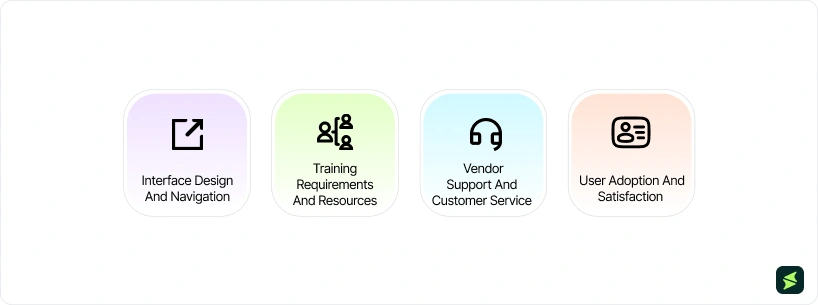
Even the best systems can fail at their job if they do not resonate with the users. Always judge your potential EMR/EHR solution on the following metrics of usability:
Interface Design And Navigation
A clunky interface can waste time and cause daily frustration. During demos, pay attention to how many clicks it takes to complete common tasks. Is the layout intuitive? Can users find what they need without extensive training? Test the system with actual end-users, front desk staff, nurses, and physicians, not just administrators. Their feedback is invaluable in helping you select the best EHR.
Training Requirements And Resources
Even the best EHR is useless if your team can't use it effectively. Evaluate the vendor's training program: Is it role-based? Do they offer on-site training, webinars, or video tutorials? What is the typical learning curve? Request access to their training materials during evaluation to assess quality and comprehensiveness.
Vendor Support And Customer Service
When problems arise, responsive support is critical. Investigate the vendor's support schedule; Is it 24/7 or business hours only? What channels are available (phone, email, chat)? What is their average response time? Check online reviews and ask references about their support experiences.
User Adoption And Satisfaction
The best system on paper means nothing if your staff won't use it. Look at the vendor's typical adoption rates and implementation timeline. Request references from practices similar to yours and ask specific questions about user satisfaction post-implementation. Warning signs include high staff turnover at reference sites or practices that went back to paper workflows.
Money is always one of the most important things to consider when managing a business. You need to consider the following financial factors before making your choice:
Total Cost of Ownership (TCO)
Don't just look at the sticker price. Calculate the true TCO including: software licensing fees, implementation and setup costs, data migration expenses, hardware requirements, ongoing maintenance and support, training costs, and potential productivity loss during transition. Get a detailed, written quote breaking down all costs for at least the first three years.
Pricing Models And Hidden Fees
EHR pricing varies widely: per-provider monthly fees, per-patient charges, one-time perpetual licenses, or tiered pricing based on features. Watch for hidden costs like interface fees (connecting to labs or other systems), additional charges for support, costs for extra users, fees for data storage over certain limits, and penalties for contract termination.
ROI And Efficiency Gains
While EHRs require significant investment, they should deliver returns through improved billing accuracy, faster claim processing, reduced administrative overhead, and better compliance with value-based payment programs. Ask vendors for case studies showing measurable ROI from practices similar to yours.
Scalability For Practice Growth
Your EHR should grow with you. Can it handle more providers, locations, and patients without requiring a complete overhaul? Are there additional costs as you scale? Consider your 3-5 year growth plans when evaluating.

Market research is paramount when it comes to the safety of your patients and the progress of your practice. Always consider the following factors when evaluating the EMR/EHR vendor you wish to do business with:
Vendor Reputation And Longevity
Research the vendor’s history and stability. How long have they been in business? Are they financially sound? Have they undergone recent acquisitions? Check their standing with independent rating organizations like KLAS Research or Black Book Rankings, which evaluate vendors based on user satisfaction.
Customer Reviews And Testimonials
Look beyond the vendor's curated testimonials. Search online reviews on healthcare IT forums, check ratings on software review sites, and request references from practices similar to yours in size, specialty, and location. Ask references tough questions about challenges they've faced.
Update Policy And Product Roadmap
Technology evolves rapidly, and your EHR needs to keep pace. How often does the vendor release updates? Are they included in your contract or additional costs? Ask about their product roadmap, what features are planned? How do they incorporate customer feedback into development?
Implementation Team Structure
Successful implementations require a strong internal team, including a project manager to oversee the transition, physician champions to encourage adoption, super users who master the system and help others, IT support for technical issues, and front-office staff to manage scheduling and workflow changes. Identify these roles before signing any contract.
Data Migration Planning

Data migration is complex and high-risk. Work with your vendor to create a detailed plan: What data will migrate (active patients, archived records, templates)? How will data accuracy be verified? What's the backup plan if migration fails? Schedule migration during slower periods and always maintain access to your old system for several months post go-live.
Staff Training Plan
Create a structured training schedule based on roles—receptionists need different training from clinicians. Include hands-on practice with test environments, workflow-specific scenarios, refresher sessions after go-live, and ongoing training for new hires. The most successful implementations over-invest in training.
Start by assembling your evaluation team with representatives from all stakeholders—physicians, nurses, administrative staff, billing personnel, and IT. Assign sections of the checklist to team members based on their expertise to gather informed feedback on each area.
Create a scoring system based on your priorities (for example, a solo practitioner may prioritize ease of use over scalability). Use the checklist during vendor demos and take detailed notes and scores for each system.
Most importantly, don’t rush the process. Plan for a 3–6 month evaluation period—the upfront time investment can save years of frustration.
You need to steer clear of:
- Vendors that are not transparent about their features and specifications
- Unclear and complicated pricing structures
- Lack of experience with your specialty
- Poor reviews from customers
- No clear data migration solutions
- Limited or expensive support options
- Resistance to providing references or trials
On the other hand, keep your eyes open for:
- Transparent pricing with everything in writing
- Strong references from practices like yours
- Responsive and knowledgeable sales and support teams
- Flexible customization options
- Proven implementation methodology
- Active user community
- Willingness to provide an extended trial period or pilot program

Choosing an EHR is one of the most significant technology decisions your practice will make. While the evaluation process requires time and effort, using this comprehensive checklist lets you make a better decision based on your needs, not just vendor promises. Questions like whether clinicians can have access to and view patient history while writing progress notes will help you evaluate which EHR is better for your workflows.
Remember that low-cost options rarely offer the best value, and the most popular system may not be right for your specialty or workflow. Take your time, listen to your staff, and consider dropping vendors that can not meet your requirements.
Your perfect EHR is definitely out there; you just need to follow the right process to find and improve your practice. By using this checklist, you will be able to identify the top names and then sift through them to choose the one that is best for you.