Article
Recruitment Software Comparison: Features, Top Picks, And How To Choose The Right One
4 mins read
Last Updated


By Usama Rafique and


Article
4 mins read
Last Updated
By Usama Rafique and

Hiring teams often struggle with rising cost-per-hire, inconsistent hiring workflows, and low-quality hires, all of which can be solved with recruitment software. However, choosing the right recruitment software can be difficult, especially with all the vendors claiming they are the best at hiring candidates faster and improving overall hire-quality. In order to make this decision confidently, you need to have thorough knowledge of how to evaluate and what to evaluate.
This article equips you with all the necessary information you need to make that decision confidently. We will cover what features you should look for, how to choose one for your organization, and in the end, we’ll also list some software based on their pricing and what industry they are best suited for.
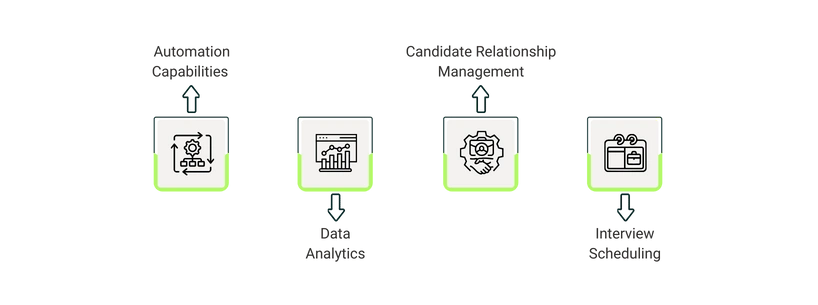
Before evaluating solutions, you need to know what features are being offered in this software category and what each feature is for. Here’s a list of common features you’ll find in recruitment software and what you need to know about them:
Automation capabilities don’t necessarily have to be the most advanced but should be able to automate your specific workflows. For example, there are software that offer automations to trigger multi-step workflows. But if you only need a tool that automatically updates candidates about their application status, you would do well with a basic email-automation feature. Other advanced features you can find in recruitment software are automated job postings, auto assigning candidates, automated resume parsing, etc.
Most recruitment software come with strong data analytics features, such as forecasting tools, pipeline bottleneck visualizations, and recruiter performance dashboards that give insights into how the whole recruitment process is performing. These systems provide a number of metrics, such as time-to-hire, source-of-hire, and candidate drop-off rates. Having access to this data insight it won’t only help you in improving your processes but will also help you calculate the Return On Investment (ROI) on your software.
Recruitment software come with built-in CRM. This gives recruiters the ability to seamlessly communicate with applicants using tools like, email templates, SMS messaging, and in-app messaging portals. They can even reach out to good candidates using automation tools for outreach, which is extremely useful if a company decides to source external candidates instead of just relying on inbound applications.
Scheduling interviews often requires candidates and the recruiters to correspond on email to finalize time for interviews. Scheduling tools simplify this process by letting candidates select a time slot based on a recruiter’s availability. These slots are also automatically synced to calendars. Reminders are sent to both recruiters and candidates, which can help reduce the number of no-shows. Moreover, they offer advanced features like multi-interview scheduling, panel/round scheduling, and more.
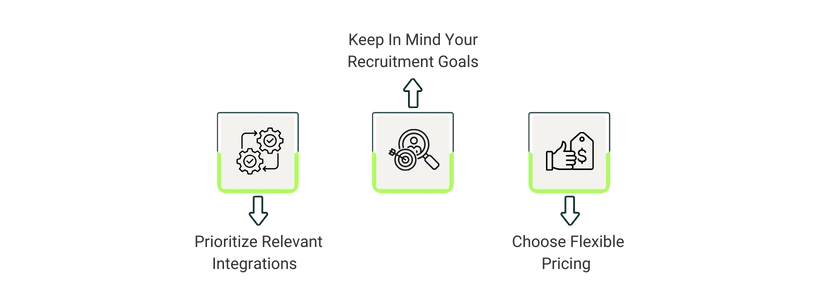
Here are some core factors you should consider when selecting the solution for your organization:
Recruitment is usually connected with almost all of the other departments of a company, such as finance, operations, IT, and Human Resource Information System (HRIS). So, while choosing a software, you should make sure that it integrates well with other software and offer APIs to enhance data transfer and interoperability.
Make sure you are selecting software that’ll help you with the right stage of your recruiting pipeline. If you need help with the whole process, you should go with a bigger, more comprehensive solution. But if you just need to simplify a part of the recruitment process, then go for more specialized solutions that are designed for individual stages of the process, such as resume parsing, interviewing, etc.
Always prioritize software with flexible pricing that easily fits your recruitment requirements and budget. The demand for hiring new people can either grow, get stagnant, or dip. Being able to change plans based on this demand will save you from paying extra and will also give you the ability to scale your operations at any time.
Software | Best For | Pricing |
Zoho Recruit | Best for end-to-end ATS + CRM workflows | Free plan, paid plans starting from $30/user/month; 15-day free trial |
Greenhouse | Best for structured, scorecard-driven hiring processes | Three plans with custom pricing |
Deel | Best for global hiring, payroll & compliance | Custom pricing; Free demo available |
Recruitee | Best for collaborative, pipeline-first sourcing, and employer branding | Three plans with pricing starting from €301/month + 18-day free trial |
Pinpoint | Best for managing multiple, complex hiring workflows side-by-side | Custom pricing |
Comparing different software can be confusing, difficult, and time-consuming. But by understanding the core features and functionalities of these solutions, you’ll be able to make a better decision by comparing and mapping out these features back to your processes.
We highly recommend that you thoroughly research these solutions or the ones that you have shortlisted before starting the comparison. Also, keep stakeholders from other departments in the loop, too, as it will help select software that fits all the workflows in your company.

