


Cube Dev
Last Updated
Overview
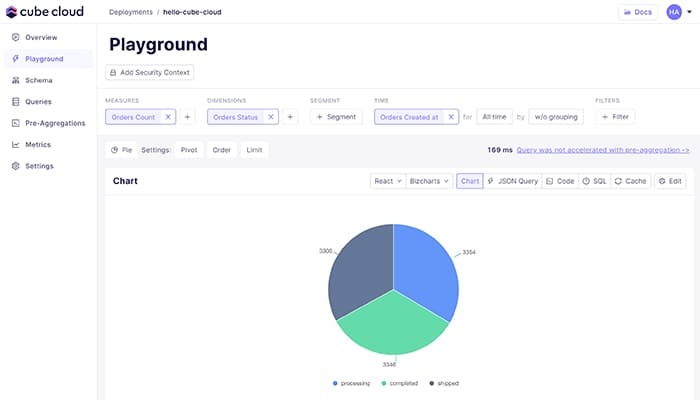
Cube software is an AI-powered semantic layer platform. It improves data accuracy by eliminating inconsistent models and metrics, delivering trusted data faster across various use cases. While some users mention insufficient documentation for specific solutions, its fully managed hosting ensures quick setup and efficient server management.


Cube Dev Specifications
- Data Visualization
- Customizable Dashboards
- Data Analysis and Reporting
- Scheduled Reporting
Cube Dev Features
Data Modeling
Cube software centralizes business metrics into a unified data model to ensure consistency across applications. It supports seamless integration with various APIs and tools. Thus, it enables efficient collaboration, rapid prototyping, and visual data modeling for faster, more accurate insights across teams.
Data Access Control
The software offers granular data access controls, enabling customized permissions for users, roles, and applications. It supports multi-tenant configurations, ensuring data isolation per tenant. With flexible security models and industry-standard authentication, Cube software integrates seamlessly with external services like Auth0 or AWS Cognito to enforce secure access.
Caching and Data Performance
This feature optimizes data performance by using in-memory cache and pre-aggregations to reduce latency and improve speed. Its supported single orchestration layer eliminates redundant queries, cuts costs, and ensures consistent, scalable API performance across applications, streamlining the data pipeline.
Data APIs
It simplifies integration with your existing stack to provide fast, consistent insights and real-time analytics. With SQL, REST, and GraphQL APIs, it accelerates data performance, reduces setup time, and enhances flexibility. This feature also enables easy connectivity to BI tools and enhances AI solutions with secure, accurate data handling.
Security
The solution prioritizes security and privacy, offering deployment options across AWS, GCP, or Azure with VPC or BYOC models. It supports strong encryption, token-based API security, and regular pen testing and is SOC 2, HIPAA, and GDPR compliant. Its functionalities, like backup, disaster recovery, and audit logs, ensure data protection and compliance.
Pros And Cons of Cube Dev
Pros
Enables efficient handling of large datasets
It ensures consistent data and metrics across all BI and data tools
Minimal maintenance required for infrastructure
Fully managed hosting allows for quick setup
Cons
Some users find the documentation insufficient
Presents query delays and pre-aggregation issues
Cube Dev Reviews
Total 9 reviews
4.8
All reviews are from verified customers
Rating Distribution
5
Stars78%
4
Stars22%
3
Stars0%
2
Stars0%
1
Stars0%
Share your experience
Not Specified, 1-10 employees
More than a year
“This is how an ideal modern semantic layer solution should be”
Pros
Building the semantic layer using CubeJS Cloud has been fantastic! It alleviates much of the development burden, which is especially valuable for small teams that lack DevOps engineers to create and monitor a platform. The development and maintenance process has been pretty simple and their support has been outstanding, resolving our issues quickly through live chat. With multiple data consumption endpoints, CubeJS makes it easy to embed analytics into our product.
Cons
Integration with BI tools still feels somewhat complicated. Some query aggregations fail and require adjustments. I also need to test the new "Semantic Layer Sync" feature. Also one feature I appreciated with dbt metrics, which I miss in CubeJS, was the ability to create a new metric based on other metrics with the same time granularity. It would be great if CubeJS could implement something as flexible as this.
Rating Distribution
Ease of use
10
Value for money
10
Customer Support
10
Functionality
10
IT, 11-50 employees
“Provides excellent data driven applications”
Pros
The solution offered by Cube.js has been a game changer in my development work, providing a powerful platform for building data driven applications. Its flexible data modeling features allowed me to structure data in a way that aligns perfectly with my application's needs. It processes data efficiently, giving users the ability to explore insights effortlessly.
Cons
it, like any advanced tool, comes with a learning curve. Beginners might find it difficult to understand all the concepts especially when dealing with complex data models and SQL queries. However Cube.js does offer documentation and tutorials to help ease this learning process.
Rating Distribution
Ease of use
7
Value for money
8
Customer Support
8
Functionality
8
IT, 51-100 employees
“Incredible software”
Pros
The Cube Cloud platform is something I really appreciate, particularly its usefulness in monitoring query performance.
Cons
I've struggled to find sufficient training resources.
Rating Distribution
Ease of use
10
Value for money
10
Customer Support
10
Functionality
10
Frequently Asked Questions
Does Cube software offer an API?
Yes, Cube software provides API access.
What language does Cube software support?
Cube software supports the English language.
Does Cube software offer a mobile app?
No, Cube software does not offer a dedicated mobile app.
What other apps does Cube software integrate with?
The software offers various third-party integrations, including Snowflake, MotherDuck, Oracle, RisingWave, MongoDB, Steep, Hashboard, LangChain, Google Sheets, Hex, Retool, Vue, Highcharts, and Airflow.
What types of pricing plans does Cube software offer?
The Cube cost structure offers various pricing plans, including a Free plan, a Starter plan at $0.15 per Cube Consumption Unit, a Premium plan at $0.30 per Cube Consumption Unit, and customized pricing for Enterprise and Enterprise Premier plans. Users can request a detailed analysis of the Cube price.
Who are the typical users of Cube software?
Cube software is designed for professionals in various industries, including EdTech, healthcare, science, AdTech, FinTech, manufacturing, and e-commerce.
What level of support does Cube software offer?
Cube software provides support through a Slack community, chat, email, a knowledge base, and a CSM.