


DatuBIM
Last Updated
Overview
DatuBIM is transforming construction with solutions that improve efficiency, accuracy, and collaboration. It provides a centralized, always-updated data source for timely, cost-effective, and high-quality project execution. While large datasets can cause occasional lag, they offer powerful tools for site documentation and real-time task tracking.
DatuBIM Specifications
- Data Visualization
- Customizable Dashboards
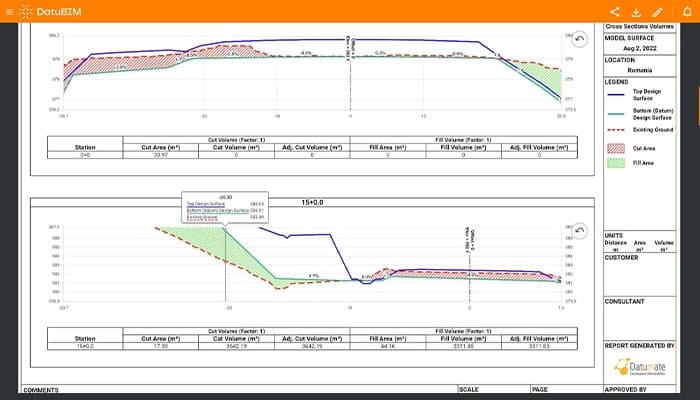
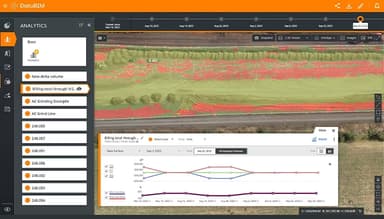
- Data Analysis and Reporting
- Scheduled Reporting
DatuBIM Features
Ongoing Data And Analytics
Accurate engineering data and process analytics enable proactive project management, allowing teams to stay hands-on and informed. Additionally, generating state and progress reports becomes effortless, simplifying the process with just a single click.
Reporting And Documentation
Field data collection is simplified with automated report generation and digital project documentation. It ensures seamless sharing of updates, keeping stakeholders consistently informed and aligned throughout every phase of the project lifecycle.
Supervision And Quality Control
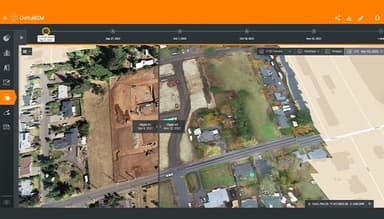
High-resolution drone imagery can optimize quality assurance, inspection, and supervision processes for enhanced site monitoring. This approach improves quality control measures and provides accurate, detailed oversight of a project's progress.
Visualization And Progress Monitoring
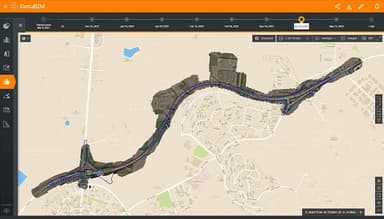
Execution progress can be tracked by comparing digital twins of a construction site across different dates. It enables clear comparisons between design, pre-construction, and as-built phases, helping ensure alignment with schedules and design plans.
Annotations For Easy Collaboration
Georeferenced annotations on any image or file type simplify collaboration with stakeholders. Annotations can be assigned to specific users, ensuring updates and changes are communicated effectively to maintain project alignment.
Pros And Cons of DatuBIM
Pros
Effective for tracking project progress and comparing real-time data
Advanced drone imagery integration
Powerful tools for site documentation
User-friendly interface
Cons
Performance issues with large datasets
Manual design updates can be cumbersome
DatuBIM Reviews
Total 11 reviews
4.9
All reviews are from verified customers
Rating Distribution
5
Stars91%
4
Stars9%
3
Stars0%
2
Stars0%
1
Stars0%
Share your experience
Small Business, 11-50 employees
“Real time ROI clarity”
Pros
Being able to monitor ROI in real time with this software has been a big plus. It shows us right away whether our advertising spend is actually paying off which makes it much easier to put our budget where it will be most effective. The initial setup was simple as well.
Cons
Nothing to mention here.
Rating Distribution
Ease of use
10
Value for money
8
Customer Support
9
Functionality
8
Human Resources, 500+ employees
More than a year
“DATUBIM is an excellent software for monitoring and controlling infrastructure works”
Pros
The ability to document, track and control projects remotely is invaluable, especially for development and railway projects. We regularly use it in collaboration with management companies, clients and all project stakeholders. It allows for planning presentations over current field photos, various data analyses, comparisons of planning vs execution and retrospective reviews at different points along the project timeline.
Cons
Some features related to the integration of computer image processing capabilities are lacking according to me.
Rating Distribution
Ease of use
10
Value for money
10
Customer Support
10
Functionality
10
Construction, 11-50 employees
“User friendly drone operator”
Pros
Great visuals and aesthetics, extremely helpful in our construction projects. The Asmade features are fantastic. The platform is userfriendly and easy.
Cons
It is difficult for me to upload images without GPS coordinates is difficult.
Rating Distribution
Ease of use
9
Value for money
10
Customer Support
10
Functionality
10
Frequently Asked Questions
Does DatuBIM offer an API?
No, DatuBIM does not offer API access.
What language does DatuBIM support?
DatuBIM supports English, Hebrew, Japanese, Chinese, German, and other languages with Latin-based letters and accents.
Does DatuBIM offer a mobile app?
DatuBIM doesn't have a dedicated mobile app, but it can be accessed on tablets via recommended internet browsers such as Chrome, Edge, or Brave.
What other apps does DatuBIM integrate with?
The vendor has not provided a list of integrations.
What types of pricing plans does DatuBIM offer?
The DatuBIM cost structure is based on the number of user licenses and images processed, with no restrictions on the number of projects or drones utilized by the organization. Users can request a detailed analysis of the DatuBIM price.
Who are the typical users of DatuBIM?
DatuBIM is designed to support business owners, general contractors, engineering and consulting firms, CAD designers, project managers, construction managers, quality assurance professionals, and teams handling multi-million-dollar projects.
What level of support does DatuBIM offer?
DatuBIM provides support through phone, email, help desk, FAQs/forums, and a knowledge base.