


Oracle Analytics Cloud
Last Updated
Overview
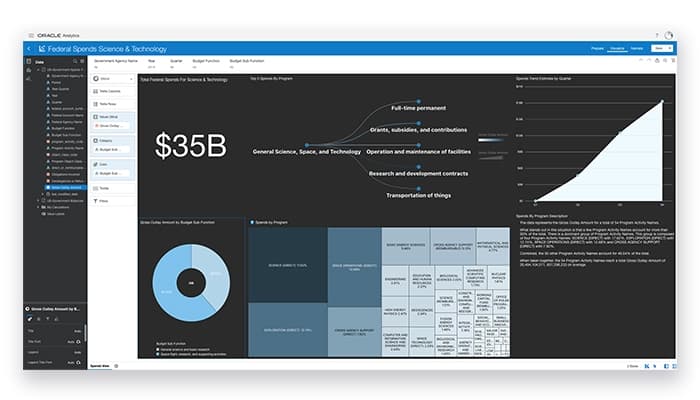
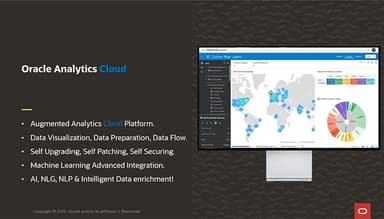
Oracle Analytics Cloud offers advanced tools to help businesses assess, visualize, and act on data. Although handling large datasets can be challenging, Oracle Analytics Cloud excels in driving informed decisions. It comes with seamless integration, artificial intelligence functionalities, and a user-friendly interface for smarter, data-driven success.
Oracle Analytics Cloud Specifications
- Data Visualization
- Customizable Dashboards
- Data Analysis and Reporting
- Scheduled Reporting
Oracle Analytics Cloud Features
AI & ML
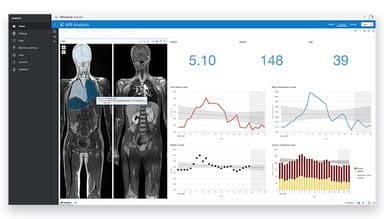
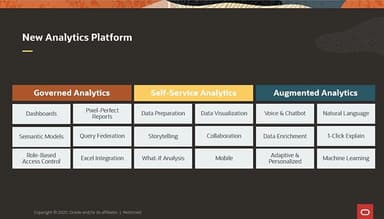
This robust feature enables users to increase their analytics with AI and machine learning. It also empowers everyone, from analysts to data scientists, to perform natural language queries, generate automated insights, and build custom models using advanced integrations for tasks like image analysis.
Visualize
Visualize feature helps users create interactive visualizations easily using a simple drag-and-drop interface. It brings over 45 built-in visualizations, allowing deep data analysis and storytelling, integrating real-time updates and AI-driven dynamic presentations to enhance insights.
Connect
This feature enables seamless integration with different data sources, such as cloud platforms, IoT, and social feeds. It comes with over 40 native connectors, helping users to blend data from both Oracle and non-Oracle systems, optimizing performance, and improving accessibility without extra storage needs.
Data Prep
It assists business users in preparing raw data for analysis by automating data profiling and simplifying edits. It offers built-in data flows and advanced manipulation tools like custom calculations and regular expressions, ensuring secure and error-free data preparation within the platform.
Deployment
Oracle Analytics Cloud offers this feature by providing multiple deployment options, such as fully cloud-based, on-premises, or hybrid. It allows users to scale cloud computing, manage identities, and securely handle data. The platform also supports smooth migration from OBIEE, optimizing performance with live data sets and scheduled flows.
Pros And Cons of Oracle Analytics Cloud
Pros
Robust, customizable user solutions
Integrates well with Oracle databases
Effective data visualization tools
Enables comprehensive decision-making
Cons
Expensive licensing cost
Performance issues with large datasets
Initial setup complexity, according to some users
Oracle Analytics Cloud Reviews
Total 14 reviews
4.3
All reviews are from verified customers
Rating Distribution
5
Stars36%
4
Stars57%
3
Stars7%
2
Stars0%
1
Stars0%
Share your experience
IT, 11-50 employees
More than a year
“Super easy-to-use software”
Pros
This software is extremely helpful and user-friendly for all types of users. We can upload large amounts of data in one go and it's great for generating any kind of reports.
Cons
The license is pretty expensive. any chance of negotiating on that?
Rating Distribution
Ease of use
8
Value for money
7
Customer Support
8
Functionality
8
Consultancy, 500+ employees
More than a year
“It has a lot of customization options”
Pros
The best feature of Oracle Analytics Cloud is its robust, customized solutions tailored to user needs. Users can scale the solution up or down based on their requirements .The product support team is very responsive and quick to resolve queries.
Cons
The only downside I can think of is the cost of the license. It should be more affordable so smaller businesses can use this awesome tool too.
Rating Distribution
Ease of use
10
Value for money
10
Customer Support
10
Functionality
10
Finance, 500+ employees
More than a year
“Easy implementation and efficient tool”
Pros
It is a fantastic tool because it's easy to use and implement. It's accessible to users and allows us to visualize and analyze data. It integrates well with the Oracle SaaS modules, and customer support is good. Overall,it's a user-friendly platform that provides comprehensive solutions, and we use Oracle Cloud for our day-to-day activities.
Cons
Honestly telling there's nothing I don't like about this tool.
Rating Distribution
Ease of use
8
Value for money
8
Customer Support
8
Functionality
8
Frequently Asked Questions
Does Oracle Analytics Cloud offer an API?
Yes, Oracle Analytics Cloud offers an API.
Does Oracle Analytics Cloud have a mobile app?
Yes, Oracle Analytics Cloud has a mobile app for Android and iOS users.
What language does Oracle Analytics Cloud support?
Oracle Analytics Cloud supports a large range of foreign languages, including English, German, Italian, Japanese, Korean, Chinese, Dutch, French, Norwegian, Polish, Portuguese, Russian, Spanish, and Swedish.
What types of pricing plans does Oracle Analytics Cloud offer?
Oracle Analytics Cloud offers several pricing options based on user needs. The Enterprise plan costs $80/user/month, while the Professional plan is priced at $16/user/month. For BYOL (Bring Your Own License) options, both the Professional and Enterprise plans charge $0.3226/OCPU/hour. For more extensive usage, OCPU costs are $1.0753/hour for the Professional plan and $2.1506/hour for the Enterprise plan. Additionally, the Oracle Analytics Server is priced at $1.75/OCPU/hour, and the Apache Kafka Streaming service is offered at $0.10/OCPU/hour. These pricing plans are designed to suit a variety of business sizes and usage levels.
What other apps does Oracle Analytics Cloud integrate with?
Oracle Analytics Cloud integrates with Salesforce, Snowflake, Azure Synapse Analytics, Google Big Query, and Amazon Redshift.
Who are the typical users of Oracle Analytics Cloud?
Oracle Analytics Cloud is tailored for business analysts, business users, data engineers, IT professionals, citizen data scientists, and executives.
What level of support does Oracle Analytics Cloud offer?
Oracle Analytics Cloud offers phone, live chat, chatbot, email/helpdesk, FAQs/forums, and knowledge base support.