


ChatOn
Last Updated
Overview
ChatOn combines AI-driven creativity and efficiency in one platform—helping you generate visuals, summarize documents, and gather insights instantly. While advanced enterprise needs may require complementary solutions, its ease of use and broad capabilities make it a smart choice for professionals who want to work faster with less effort.
Overall Rating
Based on 12 users reviews
3.9
Rating Distribution
Positive
75%
Neutral
8%
Negative
17%
Starting Price
$10
per user per month

ChatOn Specifications
- Natural Language Dialogue
- Automation
- Bot Design & Deployment
- Predictive Capabilities
What Is ChatOn?
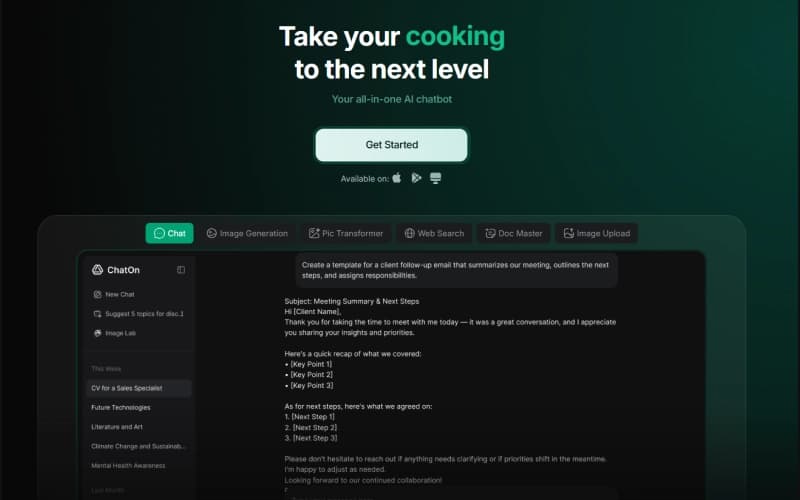
ChatOn is an AI chat app that provides conversational chat, image creation, document processing, and web search features on mobile, desktop, and web. It allows access to multiple underlying language models, including GPT-5, Gemini 3.5 Flash, Claude Sonnet 5, and Perplexity Sonar, from a single interface, as opposed to a single model.
The free version is powered by GPT-4o mini and provides basic chat functionalities, multi-language support, and AI-written text detection for single users. ChatOn Premium unlocks the full model catalog, includes real-time web search, image and video generation, and support for uploading files and images. The platform also provides cross-platform synchronization, meaning that a Premium subscription will carry over between the iOS, Android, and web versions of the app.
What Is ChatOn Best For?
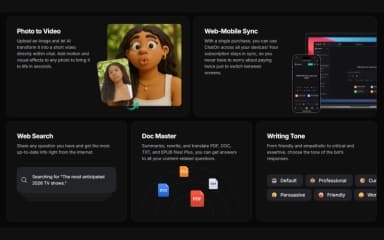
ChatOn stands out for its 'Doc Master' feature, which lets users upload PDF, DOC, TXT, and EPUB files directly into a chat and ask ChatOn to summarize, rewrite, or translate the content. It also answers the follow-up questions related to the document. With this, the time spent reading through long files before pulling out the information a user needs is marginally reduced.
How Much Does ChatOn Cost?
ChatOn pricing is estimated to start at approximately $10/month/user based on industry benchmarks for similar AI chat apps. The vendor, however, features two pricing plans, Free and Premium, with custom pricing.
In addition to the base subscription costs, users should account for the following ChatOn-specific expenses:
- AI Usage Or Premium Model Overages: $5–$20/month for users with high volumes of GPT, Claude, Gemini, Perplexity, image or video generation usage, if usage limits are exceeded
- AI Image And Video Generation Credits: $5–$30/month for heavy users requiring additional image editing, Pic Transformer, or Photo to Video capacity
- Document Processing: $5–$20/month for users processing large volumes of PDFs, DOCs, EPUBs, and other documents beyond included limits
- Business Or Team Subscriptions: $10–$25/user/month where additional user capacity or higher usage limits are offered for small professional teams
Disclaimer: Pricing references are based on publicly available third-party information and industry benchmarks. Actual costs may vary.
ChatOn Integrations
Information about third-party integrations has not been specified by the vendor.
How Does ChatOn Work?
Here's how you can access the platform and use its features:
- Log in to your ChatOn account through the mobile app or website
- Pick a tool from the main menu, such as Chat, Image Generation, Pic Transformer, Web Search, or Doc Master
- Type a prompt, or upload a photo, PDF, DOC, TXT, or EPUB file depending on the tool
- Select a writing tone, such as friendly, professional, or persuasive, for chat responses
- Review the generated text, image, or video, and ask follow-up questions to refine it
- Use the AI keyboard integration to generate or rewrite text inside other apps
- Switch between the iOS, Android, and web versions, since Premium subscriptions sync across devices
Who Is ChatOn For?
The platform serves a wide range of individuals and professionals who need everyday AI assistance, including:
- Content creators
- Social media marketers
- Students and researchers
- Job seekers and recruiters
- Small business owners
- Travelers and hobbyists
ChatOn Use Cases
Based on our analysis of ChatOn's current tools and offerings, we have identified the following key business scenarios where it is well suited:
Content Creators Producing Platform-Specific Social Copy
Creators use ChatOn's prompt library to write captions and post copy for social networks, Instagram, TikTok, Facebook, and LinkedIn. The prompts are organized according to the platforms and formats, from Reels' descriptions to LinkedIn posts. Such an approach allows creating the required format without additional editing of the already generated text since each platform has its own specific format (for example, a caption for Instagram cannot just be copied to TikTok).
Small Teams Comparing AI Models In One App
Marketers and small business owners use ChatOn's Premium plan instead of holding separate ChatGPT Plus, Claude Pro, and Gemini Advanced subscriptions. A single conversation can be routed through GPT-5, Claude Sonnet 5, or Gemini 3.5 Flash without leaving the app or opening a different account for each model, so comparing how two models handle the same brief becomes a matter of picking from a menu rather than juggling tabs.
Students And Researchers Working Through Long Documents
Students can upload lecture notes, research PDFs, or Word docs to Doc Master and have ChatOn summarize, rewrite, or translate specific sections. Doc Master accepts PDF, DOC, TXT, and EPUB formats and takes follow-up questions about what's in an uploaded file, so a student cross-referencing multiple sources doesn't need to go back through all of them from the top.
Job Seekers Preparing Applications Across Multiple Roles
Job seekers can use ChatOn's recruiting and employment prompts to compose a CV, practice interview responses, or deconstruct job requirements. While CV generation, interview-question practice, and job-requirement analysis prompts are presented as separate prompts, the transition from CV composition to interview preparation does not require switching between different apps in between.
Is ChatOn Right For You?
ChatOn is a great option for users who want one subscription covering chat, image generation, and document work, rather than multiple different AI subscriptions. The vendor has been recognized by OpenAI for achieving 1 trillion tokens processed across their user base and has received industry recognition such as the AGA Award and a 2024 Lovie Award.
While it may well be a good choice for general content creation, research, and day-to-day writing, it is not a good fit for companies that need one model with extensive customization, dedicated account support, and enterprise-level features.
Still doubtful if ChatOn is the right fit for you? Connect with us at (661) 384-7070 for further guidance.
ChatOn Features
Image Generation
This feature lets a user type out what they want to see, and ChatOn turns that description into a visual within the chat itself. There's no separate app to open or account to set up first, so the back-and-forth of refining a prompt, adding a detail, changing a style, asking for a different angle, happens in the same thread as the request.
Photo To Video
The app allows the user uploads a still photo, and ChatOn applies motion and visual effects to produce a short video clip from it, generated directly within the chat window rather than through a separate video editor. The output stays in the same thread as the original upload, so the photo and the resulting clip sit side by side in the conversation.
Pic Transformer
This feature helps users to upload an existing photo and select from a set of style options, and ChatOn returns a transformed version of that same image. The style options span a range from artistic filters to more distinct visual effects. This way, a user can try more than one on the same upload before deciding which version to keep.
Web Search
When a user asks a question in chat, ChatOn draws current information from the internet as part of forming its response. In addition to whatever the underlying model already knows from training. This is presented as part of the same reply rather than as a separate set of search results to sift through.
Writing Tone
Before or during a chat, a user can set the tone of the responses, choosing from options like friendly, professional, curious, persuasive, or worried. The tone setting changes how a request is answered, adjusting word choice, and phrasing without requiring the user to rewrite or rephrase the underlying prompt itself.
Pros And Cons of ChatOn
Pros
Strong performance on legal and research-oriented queries, with more depth than other AI tools offer
Responses are well-suited for evaluating ideas, papers, or proposals in a professional or scholarly tone
Writing comes across as natural and fits the tone of the project it's used for
Detailed answers on social and global topics that go beyond a surface-level summary
A stated approach to data handling that some find reassuring compared to other providers
Cons
Image generation results have sometimes fallen short of what was expected in terms of quality
Some responses have overlooked part of a multi-part question, answering only one piece of what was asked
Grammar and punctuation corrections have sometimes introduced changes that weren't actually needed
ChatOn Pricing
Free | Premium |
|---|---|
$0 per month | Custom pricing |
|
|
Disclaimer: The pricing details were last updated on Oct 12, 2026 from the vendor's website. Please contact us for a tailored pricing list.
ChatOn Reviews
Total 12 reviews
3.9
All reviews are from verified customers
Rating Distribution
5
Stars50%
4
Stars25%
3
Stars8%
2
Stars0%
1
Stars17%
Share your experience
Not Specified, N/A employees
“free messages used up, access blocked”
Pros
I paid for the yearly subscription and the invoice shows MXN 1,110.82 but that's it (I'll elaborate in the cons section).
Cons
Even after paying my account still displays that the free messages quota is depleted so I can't access the service at all. I've submitted requests to confirm the subscription status and restore access but the issue hasn't been resolved yet.
Rating Distribution
Ease of use
2
Value for money
2
Customer Support
1
Functionality
1
Not Specified, N/A employees
“prompts quick, replies stall at length”
Pros
Prompts seem to load really fast which makes starting a chat painless.
Cons
No matter how much you ask for more, the responses never expand to the length you expect. Also, when the prompt includes detailed descriptions, the output doesn't depict them correctly, even after long, specific instructions.
Rating Distribution
Ease of use
6
Value for money
7
Customer Support
5
Functionality
7
Not Specified, N/A employees
“user-friendly chat with fast responses”
Pros
It feels user-friendly right from the start and the responses come back quickly. Conversations flow without much waiting which makes it nice to use day to day.
Cons
Nothing to fault Chaton about!
Rating Distribution
Ease of use
10
Value for money
10
Customer Support
10
Functionality
10
Frequently Asked Questions
Does ChatOn have a mobile app?
Yes, ChatOn offers a mobile app for iOS and Android devices.
Does ChatOn offer an API?
The vendor has not specified the availability of an API.
What level of support does ChatOn offer?
The vendor offers support via blogs, FAQs, a support center, and a contact form.
What types of pricing plans does ChatOn offer?
ChatOn price is estimated to start at $10/user/month based on the industry benchmarks for comparable AI chat apps. The vendor offers two plans: Free and Premium, with Premium pricing not publicly specified. Get a tailored ChatOn cost estimate today!
Who are the typical users of ChatOn?
ChatOn features are used by content creators and social media marketers, students and researchers, job seekers and recruiters, small business owners, and travelers and hobbyists who need everyday AI assistance.
What other apps does ChatOn integrate with?
The vendor has not specified any information about ChatOn's third-party integrations.
What languages does ChatOn support?
ChatOn software supports multiple languages.