


Last Updated
Overview
Clipdrop helps teams produce visuals quickly using AI tools like Uncrop and Cleanup. While it may require careful setup for highly API-dependent processes, it supports creative and marketing workflows reliably. Overall, it is a practical solution for teams needing fast, consistent image editing.
Be the first one to leave a review!
No review found

Starting Price
Custom


Clipdrop Specifications
- Visual Recognition
- Automation
- Defect Detection Using Image Analysis
- Multi-Language Support
Clipdrop Features
Cleanup
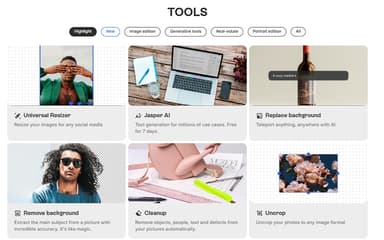
This tool uses AI to remove unwanted objects, people, text, or defects from any image with precision. The algorithm intelligently reconstructs the background behind the removed element, allowing users to create clean, professional-looking photos without complex manual editing or cloning tools.
Image Upscaler
The feature enhances the resolution of pictures by up to 16 times their original size. It employs advanced AI to add detail and remove digital noise, transforming low-resolution images into sharp, high-quality visuals suitable for print or high-definition digital displays.
Background Removal
This feature accurately detects and extracts the main subject from an image, completely removing its background in a single click. It is highly effective for creating product photos with clean backdrops, isolating subjects for composite images, and preparing visuals for various design projects.
Uncrop
The ‘Uncrop’ tool intelligently expands the canvas of an image to any desired aspect ratio. The AI generates new content to fill the extended space, seamlessly continuing the original picture's scenery, objects, and textures to create a wider, more complete visual.
Pros And Cons of Clipdrop
Pros
All-in-one AI editing platform
Intuitive and user-friendly interface
Precise background and object removal
Cons
Inconsistent AI-generated image quality
Customer support time can be improved
Clipdrop Reviews

No reviews yet!
Be the first to review this product
Frequently Asked Questions
What types of pricing plans does Clipdrop offer?
The vendor offers multiple Clipdrop price plans, including Free, Pro ($15/month), and a usage-based API plan. Get in touch for a tailored Clipdrop cost estimate.
Does Clipdrop offer an API?
Yes, it offers API access.
What languages does Clipdrop support?
Clipdrop software is primarily available in English.
Does Clipdrop offer a mobile app?
Yes, it offers a mobile app for Android and iOS platforms.
What level of support does Clipdrop offer?
Clipdrop offers support through email.
Who are the typical users of Clipdrop?
Typical users who benefit from Clipdrop features include businesses across different industries and sectors, such as real estate, e-commerce, digital marketing, and advertising.
What other apps does Clipdrop integrate with?
The software integrates with Adobe Photoshop.