


DiffusionBee
Last Updated
Overview
DiffusionBee helps users create and edit images with text prompts, generative fill, upscaling, and video tools. While it needs macOS version 13.1 or higher, the platform keeps prompts and images on the device. Overall, it is a practical option for people who create images on their own computer.
Be the first one to leave a review!
No review found

Starting Price
Custom

DiffusionBee Specifications
- Visual Recognition
- Automation
- Natural Language Dialogue
- Smart Data Discovery
What Is DiffusionBee?
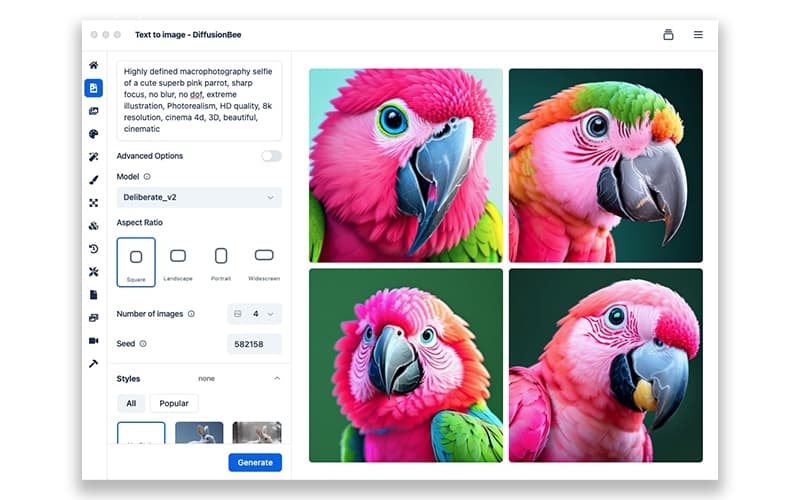
DiffusionBee is an artificial intelligence platform that can create images from text prompts. On its canvas, the software lets users type a prompt or draw by hand. Users can also add a control image to set up the structure of a new picture.
DiffusionBee can change a picture that users already have with a new prompt. From that same picture, the software can create several different versions. It can also train a custom model with the user’s own images. With a trained model, DiffusionBee is able to produce images of specific objects, people, or styles.
What Is DiffusionBee Best For?
DiffusionBee is best for its "AI canvas", which generates AI art inside the application. To start that generation, users can create and edit images by typing a prompt or by drawing by hand. Once the prompt arrives, the canvas returns the finished image within seconds. Typing and drawing work on the same image, so a hand drawing and an AI picture appear together. It results in one tool where people can draw and generate images.
How Much Does DiffusionBee Cost?
DiffusionBee pricing typically falls somewhere between $5 and $15/month. In addition to the base subscription costs, organizations should typically account for the following approximate additional expenses:
- AI Model Resources: Approximately $20–$100/year, depending on the models used
- Local Storage: Around $50–$150/year, based on the volume of models and generated media
- Model Training Resources: Nearly $30–$150/year, depending on the number and size of custom models trained
- External Backup Storage: Close to $30–$120/year, based on the number of models and media that need backup
- Mac Hardware Upgrade: Roughly $800–$1,500 one-time, depending on the hardware needed for generation and training
Disclaimer: Pricing references are based on publicly available third-party information and industry benchmarks. Actual costs may vary.
DiffusionBee Integrations
The vendor has not provided details about third-party integrations for this software.
How Does DiffusionBee Work?
Here are the main steps for setting up DiffusionBee and working with its image tools:
- Download DiffusionBee from the vendor website and open it on a Mac running macOS 13.1 or higher
- Enter a text prompt to create a new image from that written description
- Edit an existing image by applying a text prompt to the same picture
- Select a region inside an image and then add or remove objects there
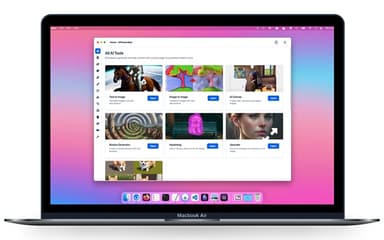
- Use the AI canvas to generate and edit images with prompts and drawing
- Enhance an image by making the picture sharper and higher in resolution
- Train a custom model on a personal image set to create specific objects, people, or styles
- Create animations and videos with the video tools inside the application
Who Is DiffusionBee For?
The software works for people who create and edit images on their own computer. It is typically used by:
- Artists
- Designers
- Marketing agencies
- Illustrators
DiffusionBee Use Cases
Based on our evaluation of DiffusionBee features, we have find some common areas where the platform can be a good fit:
Artists Who Keep Unpublished Work Off Outside Servers
Artists often need to keep unfinished work away from outside servers. DiffusionBee runs every one of its image tools on a local computer. On that same machine, the platform stores prompts, trained models, and finished pictures. Therefore, artists can test rough ideas locally without uploading any file to the cloud.
Designers Preparing Several Options For One Picture
Designers usually show more than one version of the same picture. From a single finished image, DiffusionBee makes several versions through its image variants tool. Its image-to-image tool lets designers change that starting image using a new prompt. Eventually, they can build a full set of choices from that one image.
Marketing Agencies That Need Videos And Still Pictures Together
Marketing agencies frequently need short videos as well as still pictures. With its video tools, DiffusionBee creates the animations and videos agencies need. Through text to image, the platform then makes still pictures from a typed prompt. It helps them cover both kinds of work inside one application.
Illustrators Who Start A Picture From A Hand Drawing
Many illustrators begin a picture from a hand drawing rather than a prompt. On its AI canvas, DiffusionBee lets illustrators draw by hand and type prompts. With the control images tool, the platform sets the structure of the new picture. Illustrators therefore control both the drawing and the structure of one picture.
Is DiffusionBee Right For You?
DiffusionBee suits picture work where the editing tools matter more than team features or shared access. The application includes generative fill and the image upscaler, so users need no second editor for small fixes. The video tools cover animation work as well, which widens what a single application provides.
Because the software runs generative AI on the local machine, it never sends client images to an outside server. Studios that work under confidentiality terms can therefore use it where cloud tools create a problem. Custom model training adds more value, since a team can repeat one visual style across many jobs. The hardware requirement narrows the fit, because DiffusionBee needs macOS 13.1 or higher to run.
Buyers should also weigh generation speed, since one picture takes around thirty seconds on an entry-level Mac. Teams with large daily volumes can test that pace against their own deadlines first. The CreativeML Open RAIL-M license governs free use of generated images, so legal teams may review it.
Still unsure about DiffusionBee software? Contact us at (661) 384-7070 for further guidance regarding the use of the platform.
DiffusionBee Features
Text-To-Image
This feature allows users to describe the picture they want in simple everyday words. DiffusionBee then creates a new picture from that written description inside the application. The software keeps both the description and the finished picture on the user's computer.
Generative Fill
Generative fill works on one small area instead of the whole picture. Users can select that area first and then ask the tool for a new object. Generative fill also removes an object that users no longer want in that spot.
Video Tools
DiffusionBee includes several tools for video work beside its picture tools. These tools generate animations with AI from material that users provide. DiffusionBee also generates full videos and runs this work on the local machine.
Image-To-Image
Image-to-image starts with a picture that users already have on their computer. Users write new instructions for that picture, and the tool changes it to match. The tool keeps the first picture as the starting file for later instructions.
Image Upscaler
The image upscaler works on pictures that users have already finished. It raises the resolution of these pictures with AI and sharpens the small details inside them. DiffusionBee returns the improved picture inside the same application.
Pros And Cons of DiffusionBee
Pros
Keeps every prompt, model, and generated image on the local machine
Generates images from written prompts without sending anything to the cloud
Allows training of a custom model on a personal image set
Lets users add or remove objects inside a selected part of an image
Raises the sharpness and resolution of an existing image within the same application
Cons
Runs much slower on Intel machines that carry no dedicated graphics chip
Takes around thirty seconds for one image on an entry-level Apple silicon Mac
Permits free use of generated images only under the CreativeML Open RAIL-M license
DiffusionBee Reviews

No reviews yet!
Be the first to review this product
Frequently Asked Questions
Does DiffusionBee offer an API?
Information regarding the vendor's API availability has not been provided.
Does DiffusionBee have a mobile app?
No, it does not offer a dedicated mobile app and runs on macOS computers.
What types of pricing plans does DiffusionBee offer?
DiffusionBee price typically falls between $5 and $15/month. Request a custom DiffusionBee cost estimate based on your setup.
What other apps does DiffusionBee integrate with?
Information about third-party software integrations has not been specified by the vendor.
What language does DiffusionBee support?
The platform currently supports the English language.
Who are the typical users of DiffusionBee?
DiffusionBee is widely used by professionals such as artists, designers, marketing agencies, and illustrators.
What level of support does DiffusionBee offer?
The vendor offers support through a help page and a video tour.