


Last Updated
Overview
Gigapixel is an AI Software for image upscaling, which, while requiring significant computer resources for optimal performance, provides industry-leading quality in increasing image resolution up to 6 times without losing vital details. Overall, Gigapixel AI's technical superiority and detailed output make it a compelling choice for professional image enhancement.
Gigapixel AI Specifications
- Deep Learning Software
- Generative AI Software
- Machine Learning Software
- Natural Language Dialogue
Gigapixel AI Features
Nine Specialized AI Models
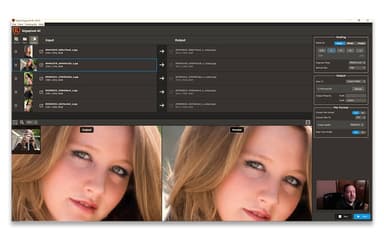
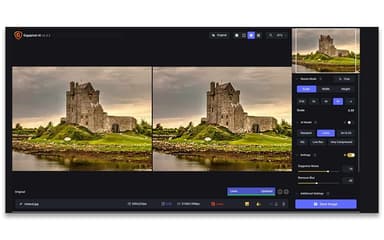
This feature provides users with a selection of upscaling algorithms, each trained for a distinct image type, such as standard photographs, high-fidelity source images, low-resolution files, or content dominated by Text & Shapes. Users can select the optimal model to ensure maximum detail retention and the highest quality output for their specific use case, offering precision unavailable in standard upscaling methods.
Face Recovery Feature
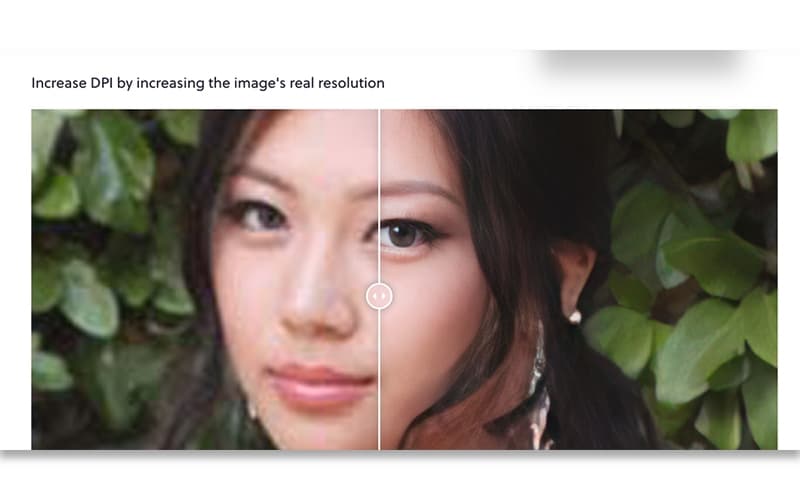
The face recovery functionality is an advanced tool that automatically detects small or low-resolution faces within an image during upscaling. It intelligently reconstructs and refines facial features, such as eyes and skin texture, to ensure they appear sharp and natural in the final, enlarged photograph, which is crucial for portrait and event photography.
6 Times Lossless Zoom
Gigapixel AI allows users to super-scale any image up to 6 times its original size while preserving quality. This core technology means users can zoom in or crop heavily on a subject without the typical loss of clarity. It ensures that every important detail remains crisp and defined for high-quality, print-ready output.
Unlimited Cloud Image Rendering
This powerful feature provides users with the ability to offload the most computationally intensive upscaling tasks to the cloud. This alleviates the strain on the local computer hardware, ensures faster processing times for very large or complex files, and grants access to the latest, most resource-demanding generative AI models.
True-to-Input Detail Generation
The software focuses on maximizing both the level of detail and the accuracy to the original image by generating the "right" new pixels rather than just more pixels. This is a core feature that allows users to explore different AI models while maintaining a realistic and high-fidelity output that is true to the visual source.
Pros And Cons of Gigapixel AI
Pros
Simple, intuitive user-friendly interface
Preserves original quality during upscaling
Works as standalone or editing plugin
Cons
Requires a powerful computer system
Lacks an app for Android users
Gigapixel AI Reviews
Total 5 reviews
4.8
All reviews are from verified customers
Rating Distribution
5
Stars80%
4
Stars20%
3
Stars0%
2
Stars0%
1
Stars0%
Share your experience
Eva K.
Design, N/A employees
More than a year
“Great results and fair pricing”
Pros
Using it feels very easy. It's clearly built for professionals whether you're a photographer or a graphic designer. The price is quite reasonable as a one-time purchase with no ongoing fees. The software also gives you control over the results and the output quality is excellent.
Cons
A good graphics card is definitely recommended. Before buying it's worth reading the system requirements carefully or contacting the company for advice.
Rating Distribution
Ease of use
10
Value for money
10
Customer Support
10
Functionality
10
Thomas S.
Marketing and Advertising, N/A employees
More than a year
“best program!”
Pros
Total game changer for turning the low quality photos clients send over into acceptable images for things like website use. It's a best in class program, works quickly and delivers excellent results. We use it every single day.
Cons
The installation process takes a bit of time but once it's up and running, it works fast.
Rating Distribution
Ease of use
10
Value for money
10
Customer Support
10
Functionality
10
Tabona L.
Media Production, N/A employees
Less than a year
“excellent image results”
Pros
One of the best parts is how well it handles image rescaling whether I need to make the original larger or smaller. It also keeps the original file untouched which is a big plus. On top of that enlarged images usually hold their quality really well and in many cases, actually end up looking better than the original.
Cons
At times the software requires extra file downloads before it will let me complete certain tasks which can be a bit annoying.
Rating Distribution
Ease of use
10
Value for money
10
Customer Support
10
Functionality
10
Frequently Asked Questions
Who are the typical users of Gigapixel AI?
Typical users of Gigapixel AI include professional photographers, fine artists, designers, commercial filmmakers, archivists, digital artists, and visual storytellers.
What level of support does Gigapixel AI offer?
Gigapixel AI provides customer support through phone and email, while also offering an online support request system for further guidance.
What other apps does Gigapixel AI integrate with?
Gigapixel AI integrates with major photo editing software, including Lightroom Classic, Photoshop & Photoshop Elements, Capture One, Apple Photos, and Affinity Photo.
What types of pricing plans does Gigapixel AI offer?
Gigapixel AI offers a Personal Plan at $29/month, a Pro Plan at $50/month and Topaz Studio Plan at $69/month. Request a personalized Gigapixel AI pricing quote today!
What language does Gigapixel AI support?
Gigapixel AI software supports multiple languages, specifically including English, Spanish, German, Portuguese, French, and Japanese.
Does Gigapixel AI offer an API?
Yes, Gigapixel AI offers an API.
Does Gigapixel AI have a mobile app?
Yes, Gigapixel AI offers a dedicated app for iOS users.