


Last Updated
Overview
GravityWrite helps content teams accelerate writing with AI-generated drafts, customizable templates, and multilingual support. While word credits are limited, its organized workspace ensures consistent output and reduces manual workload. Overall, it is a dependable option for marketers and small to midsize businesses seeking efficient, scalable content creation.


GravityWrite Specifications
- Natural Language Dialogue
- Smart Data Discovery
- Self-Service Dashboards
- Text To Speech And Speech To Text
What Is GravityWrite?
GravityWrite is an all-in-one AI content platform built to support end-to-end creation, optimization, and decision-making. It offers more than 250 specialized tools for tasks ranging from research to publishing, supported by advanced AI models and brand-voice training. With integrated analytics, workflow control, and seamless third-party connections, it delivers a data-driven approach to producing content that supports measurable business growth.
GravityWrite Pricing
The vendor offers three GravityWrite price plans:
- Free Plan
- Plus: $19/month
- Pro Plan: $79/month
Disclaimer: The pricing is subject to change.
GravityWrite Integrations
Who Is GravityWrite For?
GravityWrite is ideal for organizations across a wide range of industries and sectors, including:
- Marketing
- E-commerce
- Technology
- Education
- Healthcare
- Media and publishing
- Retail
Is GravityWrite Right For You?
GravityWrite is ideal for businesses, marketers, and content creators seeking scalable, secure, and efficient AI-powered content solutions. With over 6 million AI-generated words daily, 250+ content templates, and trusted by brands like Swiggy and Comcast, it streamlines content creation while maintaining consistency. Its robust platform supports large teams, ensures data security, and empowers organizations to overcome creative blocks, making it a top choice for anyone aiming to accelerate high-quality content production.
Still doubtful if GravityWrite is the right fit for you? Connect with our customer support staff at (661) 384-7070 for further guidance.
GravityWrite Features
AI Blog Writer
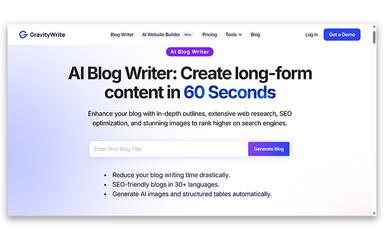
The platform crafts long-form blog content designed to outperform competitors. It generates well-structured, SEO-optimized articles with click-worthy headlines and engaging introductions. Users can produce professional, high-quality blogs in minutes, saving hours of research and editing while boosting organic traffic.
Advanced AI Writing Engine
This feature ensures content is factually accurate and ROI-focused, not just grammatically correct. It delivers optimized writing tailored to your audience while maintaining clarity and engagement. The AI adapts to different content types, from blogs to marketing copy, improving overall content performance.
Social Media Management Tool
GravityWrite software allows scheduling, drafting, and publishing content across multiple platforms from a single dashboard. It streamlines social campaigns, enabling collaboration and consistent messaging. Users gain efficiency while maintaining professional, eye-catching posts that resonate with their audience.
AI Image Generation
The software converts your descriptions into high-quality visuals for blogs, ads, and social posts. Templates, brand colors, and reference images ensure each creation aligns with your style. Fast and intuitive, it eliminates the need for design skills, producing professional images ready for immediate use.
Complete Workflow Solution
This feature manages the entire content creation cycle from drafting to publishing on one platform. It reduces tool switching and simplifies collaboration across teams. By centralizing workflows, it enhances productivity while ensuring consistent quality and faster time-to-market for all content initiatives.
Pros And Cons of GravityWrite
Pros
Enhances creativity and client output
Provides many intuitive tools for creativity
Effectively speeds up long-form article writing
Cons
AI output often requires manual refinement
Technical errors occasionally disrupt functionality
GravityWrite Reviews
Total 20 reviews
4.3
All reviews are from verified customers
Rating Distribution
5
Stars35%
4
Stars65%
3
Stars0%
2
Stars0%
1
Stars0%
Share your experience
Ishan S.
Small Business, 11-50 employees
“faster content creation”
Pros
Running a homeopathy clinic while working as a dietician and nutritionist means I'm constantly writing nutrition blogs, wellness posts, patient awareness content, educational captions and updating health articles for social media. This software has helped make that workload manageable and more organized without making the content sound overly robotic or complicated. I regularly use the blog writer, paragraph generator, rewriting tools, SEO content features, blog outline creator and social media writing tools for nutrition and wellness topics. It helps me build structured health articles, improve rough drafts, come up with topic ideas and prepare educational posts for LinkedIn and other platforms in much less time. I also use it now and then to simplify patient guidance content so it feels clearer and easier to read. Getting started was easy and onboarding never felt difficult even without any technical background. The performance is generally reliable for long form writing and paragraph rewrites and the overall workflow stays well organized for regular content work. I use it often because it saves me a lot of time when I'm managing multiple educational and wellness posts at once.
Cons
When I'm generating longer pieces the content can sometimes start to feel a bit repetitive especially with detailed wellness or educational articles handled in the same workflow. Every so often I still need to manually edit a few paragraphs so the writing sounds more natural and matches my personal style better. I've also noticed that if I try several writing styles on the same topic some of the outputs can end up looking quite similar particularly with long health related content. It's not a major problem in daily use but it does occasionally add extra editing time before the final version feels personal and natural enough.
Rating Distribution
Ease of use
10
Value for money
10
Customer Support
10
Functionality
10
sahil c.
Not Specified, N/A employees
“quality writing with useful functions”
Pros
For blog writing this tool has been really helpful because it produces high quality content that feels AI-detect free. The platform also comes with a wide range of features and is simple to use which saves a lot of time while still helping me maintain content quality.
Cons
Every now and then it drifts away from the intended context so I have to be very clear with my prompts to avoid wasting credits.
Rating Distribution
Ease of use
9
Value for money
9
Customer Support
8
Functionality
9
Aditya R.
Mid Market, 51-100 employees
“tools that save time!”
Pros
Between blogging and regular content work this has been a huge help thanks to its powerful prompt and image generation tools. It has taken a lot of pressure out of my busy routine and made managing my time much easier. I also like that it offers a wide range of tools for different niches. The prompt builder is the feature I use the most because it gives me accurate prompts that I can also use with other AI platforms. When I had to create a logo it even helped me put together a prompt that clearly matched the exact idea I had in mind.
Cons
One thing that really holds it back is the subscription price which feels too expensive especially for students. It would be much more reasonable and helpful if the cost were below 1000.
Rating Distribution
Ease of use
9
Value for money
8
Customer Support
9
Functionality
10
Frequently Asked Questions
What types of pricing plans does GravityWrite offer?
GravityWrite offers three plans, including Free Plan, Plus ($19/month), and Pro Plan ($79/month). Get a detailed GravityWrite cost breakdown tailored to your specific requirements.
Does GravityWrite have a mobile app?
No, GravityWrite does not offer a dedicated mobile app.
Who are the typical users of GravityWrite?
GravityWrite features are used by organizations across various sectors, such as technology, education, marketing, e-commerce, healthcare, media and publishing, and retail.
What level of support does GravityWrite offer?
GravityWrite offers support through contact form, resource hub, and email.
Does GravityWrite offer an API?
Yes, GravityWrite offers an API.
What language does GravityWrite support?
GravityWrite supports multiple languages, including English, Spanish, Arabic, French, and Portuguese.
What other apps does GravityWrite integrate with?
GravityWrite primarily supports integration with WordPress.