


Last Updated
Overview
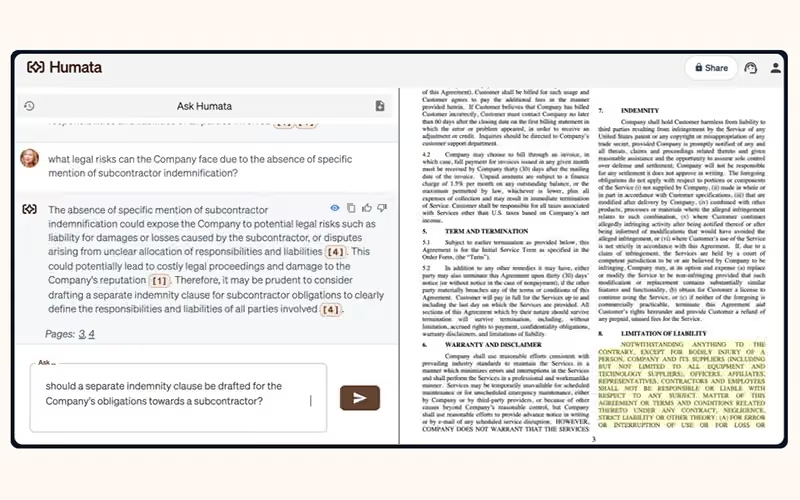
Humata is a powerful document AI tool that lets users chat with their files and knowledge base. While it has limited support for certain specialized file types, it offers unlimited uploads with highlighted, citation-backed answers. This helps teams quickly summarize and search documents.

Humata AI Specifications
- Natural Language Dialogue
- Smart Data Discovery
- Entity Extraction With Text Analytics
- Multi-Language Support
Humata AI Features
Unlimited File Uploads
Humata allows unlimited uploads so you can add as many documents as your work requires without restriction. Its AI processes files at high speed, delivering answers faster than typical reading time. This ensures efficient analysis for research, business, or legal purposes without delays.
Citation-Backed Answers
Humata enhances trust by embedding citations directly into the AI-generated answers. Every insight is linked to its source, enabling full transparency and verification. This feature is especially valuable for academic, legal, or compliance-focused work.
Unlimited Questions
Humata lets you ask unlimited questions about your documents without additional limits. You can refine and re-ask queries until the answers match your needs. This flexibility turns Humata into a highly adaptive AI assistant for complex document analysis.
Seamless Web Embeds
Humata can be embedded into any webpage with a single click, making it easy to share document insights online. This allows customers or team members to instantly access answers without leaving the site. It improves engagement while providing seamless access to important information.
Pros And Cons of Humata AI
Pros
Upload unlimited files for fast, efficient document analysis
Highlights answers with citations for trustworthy, verifiable results
Allows unlimited questions for thorough, refined document exploration
Easy webpage embedding for instant document AI access
Clean interface making organization simple and highly intuitive
Cons
Occasional inconsistent answers requiring additional clarification steps
Support response times vary for complex inquiries
Missing advanced video content analysis capabilities
Humata AI Reviews
Total 1 reviews
5
All reviews are from verified customers
Rating Distribution
5
Stars100%
4
Stars0%
3
Stars0%
2
Stars0%
1
Stars0%
Share your experience
Ricardo Moura
Not Specified, N/A employees
“Essential tool!”
Pros
Across my research and case study work this has become an essential tool for short, medium and long term projects. It processes complex documents quickly and with impressive accuracy, pulling out useful insights in a way that genuinely stands out. The platform feels flexible and efficient which saves me a huge amount of time while also improving the quality of my analysis by revealing patterns and connections I could have easily overlooked. Its ability to work through large datasets without slowing down or losing performance really makes a difference :)
Cons
I don't think I have any issues to mention.
Rating Distribution
Ease of use
10
Value for money
10
Customer Support
10
Functionality
10
Frequently Asked Questions
What other apps does Humata software integrate with?
Currently, the platform mentions forthcoming Single Sign-On (SSO) integration support for major identity providers, including Okta, Google, and SAML, to enhance team security and accessibility features.
What language does Humata software support?
The platform primarily supports English language interactions, ensuring accurate document analysis and responses.
What types of pricing plans does Humata software offer?
Humata offers a straightforward pricing structure that adapts to the user’s needs. Plans start with a Free option for basic use, followed by the student plan at $1.99/month and the Expert plan at $9.99/month. The Team plan costs $49/user/month, while Enterprise pricing is customized. Get a detailed Humata price quote to choose the best plan for your needs.
Who are the typical users of Humata software?
Typical users include academic researchers, students, postdoctoral researchers, and executives or analysts within large enterprises. essentially, anyone who needs to quickly analyze and extract information from dense, long-form documents.
Does Humata software have a mobile app?
No, Humata does not offer an official mobile application.
What level of support does Humata software offer?
The Student plan includes basic chat support, while the Expert and Team plans upgrade to premium chat support. For Enterprise clients, direct sales team consultation and dedicated support channels are also available.
Does Humata software offer an API?
Yes, Humata offers a comprehensive API that allows programmatic access to your documents, conversations, and insights