


Last Updated
Overview
Lightly software simplifies the data labeling and annotation process, enhancing machine learning model training with streamlined workflows. While its advanced AI capabilities can reduce manual effort, the initial setup might be complex for some users. Overall, Lightly AI’s efficiency boosts productivity, making it a valuable tool for data-driven projects.

Lightly Specifications
- Natural Language Dialogue
- Smart Data Discovery
- Self-Service Dashboards
- Text to Speech & Speech to Text
Lightly Features
Automated Data Pipelines
Lightly software’s automated data pipelines streamline the data preparation process by efficiently handling data flow and preprocessing. This speeds up data labeling, reduces manual errors, and ensures consistent data quality.
Feedback Cycle
This feature enables users to iteratively refine data annotations by integrating model performance insights. The continuous improvement loop enhances labeling accuracy and relevance, leading to more effective model training.
Dashboards
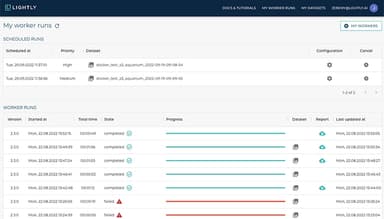
The dashboards provide a comprehensive view of data labeling progress, performance metrics, and workflow efficiency. These visual insights help users monitor project status in real-time, identify bottlenecks, and make informed decisions to optimize data preparation processes.
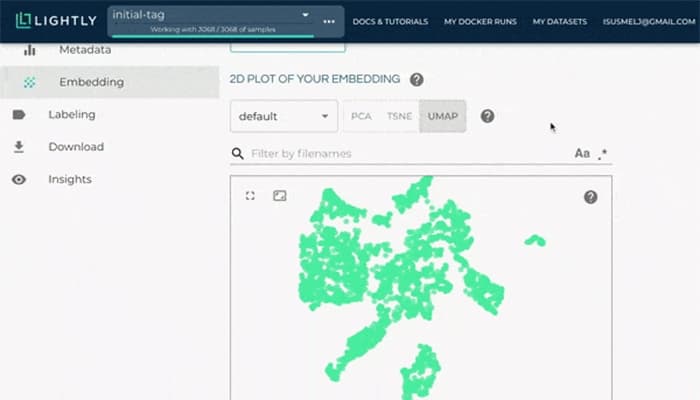
Embeddings
Embeddings facilitate the transformation of data into vector representations for machine learning models. They aid in improving model accuracy by capturing complex patterns and relationships within the data, enhancing the quality of predictions and insights.
Predictions
Lightly software enables users to generate and analyze forecasts based on labeled data. By leveraging advanced algorithms, this tool enhances the ability to anticipate outcomes and trends, supporting more informed decision-making and refining model accuracy.
Pros And Cons of Lightly
Pros
Minimize training data usage
Real-time insights
Pinpoint best labeling features effectively
User-friendly
Customizable pipelines
Cons
Can be expensive for smaller teams
UI could be more intuitive
Some compatibility issues with certain third-party tools
Customer support could be better
Lightly Reviews
Total 12 reviews
4.8
All reviews are from verified customers
Rating Distribution
5
Stars75%
4
Stars25%
3
Stars0%
2
Stars0%
1
Stars0%
Share your experience
Anonymous
Full Stack, 500+ employees
Less than a year
“Single fit solution to all our ML pipelines”
Pros
Automating data curation and selecting the most relevant data for labeling has saved us a lot of time, plus it handles large datasets easily, processing millions of images or thousands of videos quickly. My team loves this feature. It was super easy to integrate into our workflow. Our team set it up in just a week with great support from Lightly.
Cons
Although it's quite thorough, I think the documentation could be more detailed for complex scenarios, and the software's interface could be made more easy and visually engaging. Also, for smaller teams or startups, the price might be a bit high; more flexible pricing options could be a good addition.
Rating Distribution
Ease of use
10
Value for money
9
Customer Support
10
Functionality
10
Mohammad M.
Full Stack, 500+ employees
Less than a year
“I Have a great experience with Lightly for Training AI in my organization”
Pros
I find it quite helpful. I'm still learning, but even at this stage, I can confidently say it's really assisting me in getting my work done.
Cons
I haven't found anything I dislike so far. Even though I'm still learning, it's been really helpful.
Rating Distribution
Ease of use
10
Value for money
10
Customer Support
10
Functionality
10
Nguyen G.
Full Stack, 11-50 employees
Less than a year
“Easy to set up labeling tasks and monitor progress”
Pros
Lightly's active learning feature is fantastic for determining which data points are worth labeling for my machine learning models, requiring much less time and effort.
Cons
Some of the labeling tools provided by Lightly are a bit rigid on their own. For more detailed datasets where the distinctions between data points are subtle, the current labeling methods feel somewhat limited.
Rating Distribution
Ease of use
9
Value for money
10
Customer Support
10
Functionality
10
Frequently Asked Questions
Does Lightly software offer an API?
Yes, Lightly software offers an API.
What language does Lightly software support?
Lightly software supports English.
What other apps does Lightly software integrate with?
Lightly software integrates with Google Cloud, Azure and AWS.
Does Lightly software support mobile devices?
Lightly software supports Android and iOS devices.
What types of pricing plans does Lightly software offer?
Lightly software price starts at $350/month. Users can get custom pricing for their businesses.
Who are the typical users of Lightly software?
The typical users of Lighty software are those in the consultation, transportation and health and wellness industries.
What level of support does Lightly software offer?
Lightly software offers Knowledge Base, email, chat and FAQs.