


Last Updated
Overview
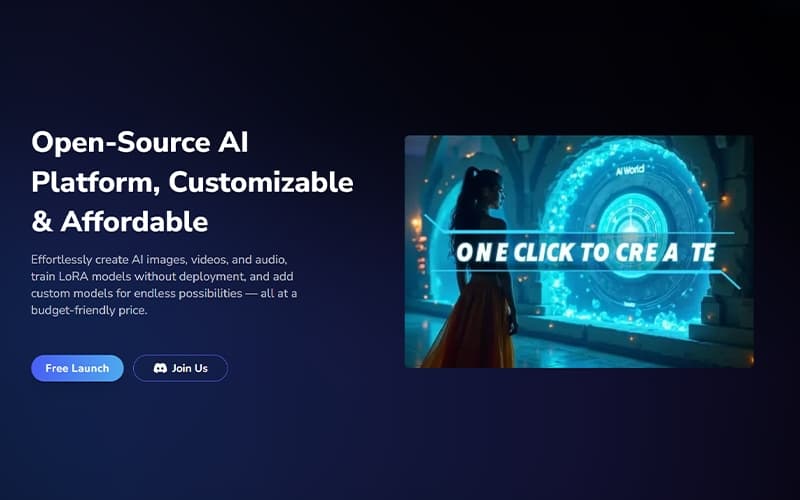
MimicPC enables creators to generate AI images, videos, and audio while providing custom model training for personalized outputs. While GPU-based pricing may not suit all budgets, it suits creative professionals, AI enthusiasts, and studios seeking high-performance AI solutions. Users can experiment with multiple AI models and produce professional-quality content efficiently.
MimicPC Specifications
- Text To Speech & Speech To Text
- Visual Recognition
- Automation
- Multi-Language Support
MimicPC Features
AI Image Generation
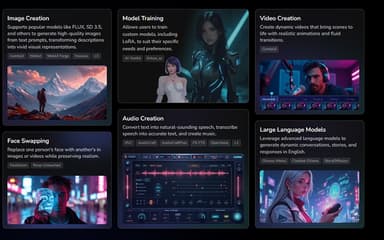
MimicPC transforms text prompts into high-resolution images using models like FLUX and SD 3.5. Users can create artwork, marketing visuals, and product concepts quickly. The platform also allows batch processing for multiple images, saving time for large projects. It supports a wide variety of styles, from realistic to abstract, for creative flexibility.
Video Creation Tools
MimicPC enables realistic AI-generated videos with smooth transitions and professional animation. It supports storyboard creation, frame adjustments, and multimedia overlays, helping creators bring complex visual ideas to life efficiently. The platform also offers rendering options optimized for different resolutions and formats.
Audio Creation Suite
MimicPC converts text to natural-sounding speech, generates music tracks, and transcribes audio files with high accuracy. These tools enhance multimedia projects and allow users to produce voiceovers, background music, and podcasts seamlessly. Users can also fine-tune pitch, tone, and style for personalized audio outputs.
Custom Model Training
Users can train personalized LoRA models to fit specific project needs, improving AI outputs for niche applications. Custom models allow creative flexibility, ensuring that generated content aligns with brand guidelines or artistic preferences. This feature supports repeated experiments and iterative improvement on AI workflows.
Face Swapping
MimicPC replaces or enhances faces in images and videos using deep learning techniques. This feature supports realistic content production for entertainment, marketing, and experimental AI applications, maintaining visual authenticity. Users can also adjust lighting, expressions, and angles for consistent outputs.
Pros And Cons of MimicPC
Pros
Easy access to powerful AI tools without needing expensive GPUs or installations
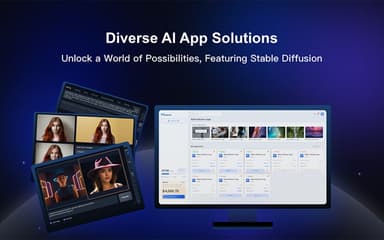
Fast setup with one-click deployment of tools like Stable Diffusion and Whisper
Intuitive dashboard with strong customization options
Cons
Some tutorials and documentation need improvement
Limited storage and some workflows may fail or need verification
MimicPC Reviews
Total 8 reviews
4.6
All reviews are from verified customers
Rating Distribution
5
Stars63%
4
Stars38%
3
Stars0%
2
Stars0%
1
Stars0%
Share your experience
Moldoveanu
Computer Software, 11-50 employees
“reliable performance and helpful support”
Pros
No crashes at all...everything works the way it should. the support team is available when you need help.
Cons
I don't have any real complaints. Just don't judge it too quickly if you've only recently started using it because the learning curve is definitely steep.
Rating Distribution
Ease of use
8
Value for money
10
Customer Support
8
Functionality
10
Daniel L.
Small Business, 11-50 employees
“fast access to AI tools”
Pros
Running AI apps without having to buy one of the newest GPUs has been a really practical option for me. From my perspective, this makes it much more accessible to use those applications and tools on my computer in a way that feels simple, reliable and above all, fast.
Cons
Since Im not a professional user, the pricing still feels a little expensive for what I personally get out of it, even if the offer itself is quite appealing.
Rating Distribution
Ease of use
7
Value for money
6
Customer Support
9
Functionality
8
Anonymous
Events Services, 11-50 employees
“Fantastic software”
Pros
Using great hardware right through my browser has been a huge advantage.
Cons
With so many settings available, having pop-up explanations would be incredibly helpful.
Rating Distribution
Ease of use
10
Value for money
10
Customer Support
8
Functionality
10
Frequently Asked Questions
Does MimicPC offer an API?
Yes, MimicPC offers ComfyUI API Nodes to quickly access ComfyUI workflows and integrate powerful APIs for text-to-image, image-to-video, and more.
What languages does MimicPC support?
MimicPC software is available in English, Spanish, Portuguese, Japanese, and German.
Who are the typical users of MimicPC?
Typical users who benefit from MimicPC features include businesses across various industries and sectors, such as film and video production, audio engineering, marketing, education, and freelance.
What types of pricing plans does MimicPC offer?
MimicPC pricing starts at $13.95/month for the Essential plan, while the Advanced plan is available at $26.95/month. The platform also offers pay-as-you-go pricing and a free trial. Beyond subscription fees, organizations should budget for additional costs such as implementation ($500–$25,000 depending on deployment size), data migration and model setup ($1,000–$10,000), admin and user training ($500–$8,000), and API, cloud storage, or third-party integrations ($2,000–$15,000). Get in touch for a tailored MimicPC cost estimate.
What level of support does MimicPC offer?
MimicPC provides customer support via FAQs, email, and user portal.
What other apps does MimicPC integrate with?
Integration details are not publicly provided.
Does MimicPC have a mobile app?
No, it doesn’t offer a mobile app.