


NotebookLM
Last Updated
Overview
NotebookLM is an Artificial intelligence (AI) research and thinking partner that utilizes Gemini models to generate insights grounded solely in the information you provide, promoting high factual reliability. Despite some users wanting more depth in the answers, its key strengths, like verifiable citation output and the unique ‘Audio Overview’ feature, justify its adoption. Overall, NotebookLM is a compelling choice for accelerating focused research.
Be the first one to leave a review!
No review found

Starting Price
Free


NotebookLM Specifications
- Natural Language Dialogue
- Smart Data Discovery
- Text To Speech & Speech To Text
- Automation
What Is NotebookLM?
NotebookLM, Google's AI research tool, is now called Gemini Notebook. It is powered by AI and can only research the content you provide, whether it be documents, websites, audio files, or anything you upload. Users can ask a question, and it responds with only that content and cites back to where the claims originated. Each notebook now has a secure cloud computer to run code, and can crunch data and create PDFs, spreadsheets, and slide decks straight from your sources, not just summaries.
What Is NotebookLM Best For?
NotebookLM is known for its Audio Overview, which is a two-host spoken overview of uploaded documents, and an interactive mode in which listeners can ask questions while the document is being read aloud. It's a method which students, researchers, and professionals can employ when they are reading through a lot of material, like a long report, lecture notes, or reference material. The feature is suitable for source-driven material, commuting/multitasking, and study/research skills that are more auditory than textual. Overall, users appreciate its ability to aid retention and improve time management.
How Much Does NotebookLM Cost?
NotebookLM cost is estimated to be around $19.99/user/month, based on Google's current AI subscription structure and pricing of comparable AI research and productivity platforms. The vendor offers the following plans:
- Gemini Notebook: Free
- Gemini Notebook In Google AI Pro: Custom Pricing
- Gemini Notebook In Google AI Plus: Custom Pricing
- Gemini Notebook In Google AI Ultra: Custom Pricing
Other than subscription cost user can expect following potential expenses:
- Google Workspace: Around $14–$22/user/month if required separately for business deployment and not already included in the organization's existing Workspace subscription
- Additional Cloud Storage: Approximately $2–$10+/month if the included storage is insufficient
- Taxes: Additional taxes/VAT may apply depending on the customer's country
Disclaimer: The pricing is subject to change.
NotebookLM Integrations
NotebookLM software integrates with Gemini AI.
How Does NotebookLM Work?
Getting started with Gemini Notebook only takes a few steps, from opening a blank notebook to chatting with your own sources.
- Open Gemini Notebook and select Create new notebook to start a fresh, dedicated project space
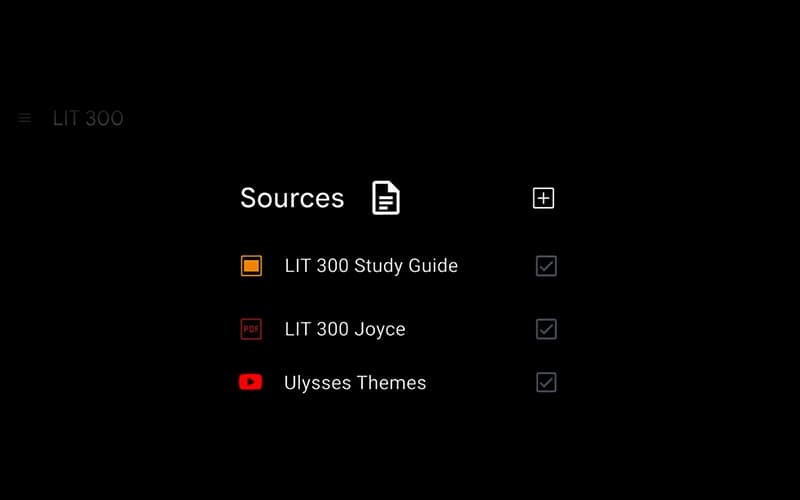
- Upload a source, such as PDFs, Google Docs, web links, or audio files, so Gemini has material to reference
- Add a prompt or instructions to tell Gemini what you're working on or what you want the notebook to focus on
- Review the auto-generated summary in the Chat panel to see what Gemini pulled from your sources
- Ask questions in the chat to get answers grounded directly in your uploaded material, with citations included
- Generate an Audio Overview, video, or study guide from the Studio panel once your sources are in place
- Share the notebook with others by adjusting access settings, so collaborators can view or build on the same sources
Who Is NotebookLM For?
NotebookLM is designed for a range of departments, including:
- Sales
- Training
- Marketing
- Teaching and learning
- Customer support
- Development
NotebookLM Use Cases
We have gathered a list of scenarios, based on the feedback from users and our analysis of NotebookLM features, for which this platform is a good fit for specific operational buyers:
Analysts Comparing Multiple Vendor Reports Side By Side
When evaluating a large amount of vendor documentation, spec sheets and reports, software analysts and consultants frequently compare the information before coming to a conclusion. Instead of opening up a document at a time, they upload everything as sources in a single NotebookLM and then use the chat feature to ask questions from all of them. This changes an assortment of individual PDFs into an individual searchable pool they can question straightforwardly.
Legal Teams Flagging Changes Across Contract Versions
Two copies of the same contract can be uploaded side by side, and a request made to highlight the changes or extract clauses such as confidentiality clauses. In NotebookLM, source-grounded chat connects all flagged differences to the specific document in which they were found, reducing the need for reviewers to second guess which document a clause is from. Where traceability is most important is in redline work, where a single edit could alter contract terms greatly.
Corporate Teams Converting Dense Reports Into Presentation Material
Strategy documents and board packs are not usually delivered in a meeting-ready format. This material is input into NotebookLM and, with its slide deck and summary generation features, business users can generate structured output from the source files. Reviewers say that they like its board-level summaries and internal explainers.
Teams Navigating Long Regulatory Or Legal Documents By Topic
When only a few sections of a legislative text are relevant, dense texts are often needed to be read from beginning to end. Groups that are processing this type of content take advantage of the infographic generation offered by NotebookLM to draw out scope and the key mechanisms, before turning to the mind map feature and identifying the major themes and then digging into the specific clauses. That process is a replacement for scanning through an entire document to look for one exception or threshold.
Is NotebookLM Right For You?
NotebookLM's grounded information retrieval and in-line citations make it a good choice for research where factual accuracy and verifiable sources are required. The platform has been named one of TIME magazine's Best Inventions 2024 and Webby Winner 2025 for Technical Achievement, for its ability to turn in-depth material into trusted, usable insights with it is research accelerator that is accessible to anyone who values data security and research integrity.
Still not sure about NotebookLM? Contact our support team at (661) 384-7070 for further guidance.
NotebookLM Features
Grounded Citations
This is one of the main features that guarantees that each AI-generated response is backed up with clear, in-line references. Each quotation links to the specific source from which the user may read to verify the origin of a specific quote or claim. The system can only extract answers from uploaded documents, not from the Internet, and all answers are traceable to a specific document.
Audio Overview
The ‘Audio Overview' function is a capability that changes documents, videos, and web pages into an audible podcast-like conversation between two AI-powered hosts. Users can opt for a quick brief, in-depth conversation, critique, or debate, and can even jump in during the playback to ask questions. The output is playable on any device and allows transformation of written content into audio content on demand.
Multimodal Ingestion
NotebookLM supports a wide range of source materials, such as PDFs, Google Docs, slides, and YouTube videos, which are processed by the underlying models of Gemini. This enables users to import lecture recordings, product specifications, and other content with a variety of formats into a single notebook, where all content is stored together and can be queried as a single collection.
Content Transformation
The software transforms raw data uploaded by the user into structured data, such as study guides, briefings, presentation outlines or mind maps. These are directly made, from the source media uploaded by a user, without the need for manual reformatting or rewriting. In particular, mind maps can be used to visualize the main themes and sub-themes of a document.
Pros And Cons of NotebookLM
Pros
Quotations include citations in documents, helping verification happens fast
Centralized repository helps keep documentation organized
Integrated AI supports information retrieval in the form of direct questions
One source can set yield reports, audio, video, quizzes, flashcards, and decks
Offers quick summaries of uploaded documents
Cons
Important notes must be pinned to avoid losing insights
While importing a Web URL, only the page text is imported, and images, embeds, and linked pages are omitted
Video Overviews lack subtitles
NotebookLM Pricing
Gemini Notebook | Gemini Notebook In Google AI Plus | Gemini Notebook In Google AI Pro | Gemini Notebook In Google AI Ultra |
|---|---|---|---|
Free | Custom Pricing | Custom Pricing | Custom Pricing |
|
|
|
|
Disclaimer: The pricing details were last updated on Oct 12, 2026 from the vendor's website. Please contact us for a tailored pricing list.
NotebookLM Reviews

No reviews yet!
Be the first to review this product
Frequently Asked Questions
Does NotebookLM offer an API?
No, NotebookLM does not offer an API.
What language does NotebookLM support?
NotebookLM is available in 50+ languages, including English, Arabic, Catalan, Croatian, Czech, Danish, and Dutch.
What level of support does NotebookLM offer?
NotebookLM offers support through FAQs and a help center.
Does NotebookLM have a mobile app?
Yes, NotebookLM has an app for Android and iOS.
Who are the typical users of NotebookLM?
Typical users include departments like sales, training and onboarding, marketing, teaching and learning, customer support, and development.
What other apps does NotebookLM integrate with?
NotebookLM integrates with Gemini AI.
What types of pricing plans does NotebookLM offer?
NotebookLM price is estimated to be around $19.99/user/month. The platform offers a free Gemini Notebook plan and its custom plans are Gemini Notebook In Pro, Gemini Notebook In Plus, and Gemini Notebook In Ultra. Request a personalized NotebookLM pricing quote for your business.