


Paperbox
Last Updated
Overview
Paperbox uses AI-driven document capture to centralize incoming mail and emails into one workflow, saving time and boosting clarity. However, users may face occasional minor configuration challenges. Still, its automated triage, task creation, and reporting features drive efficiency, and it's best suited for insurance and claims teams managing high volumes.


Paperbox Specifications
- Smart Data Discovery
- Automation
- Predictive Capabilities
- Entity Extraction With Text Analytics
What Is Paperbox?
Paperbox is an AI-powered intelligent document processing designed specifically for insurance teams to streamline communication workflows. It acts as a central hub, classifying all incoming documents and emails to eliminate time-consuming manual sorting. The software’s powerful automation improves operational efficiency for both large enterprises and growing teams, ensuring critical information is routed instantly. Paperbox streamlines daily operations to support business scalability by tackling challenges head-on and fostering a problem-solving environment in insurance companies.
Paperbox Pricing
Paperbox cost plans are custom-based. It offers the following bundles:
- Smart Mail-Handling
- Smart File Completion
- Smart Action Workflow
Disclaimer: The pricing is subject to change.
Paperbox Integrations
The software supports integration with multiple platforms, such as:
- Salesforce
- Microsoft 365 software
- Guidewire
- Keylane
- Brio
- CCS
Who Is Paperbox For?
Paperbox is ideal for a range of insurance companies, including:
- Insurance carriers
- Insurance brokers
- Health Insurance
- Finance Firms
Is Paperbox Right For You?
If your insurance or claims team is grappling with unmanageable email loads and inconsistent triage, Paperbox can be the answer. Delays, errors, and inefficient task routing often lead to lost revenue and poor customer service. Paperbox addresses that with AI-based capture, classification, and automation. Trusted by insurers like Belfius and Van Dessel, and backed by ISO 27001 and GDPR Compliance, it offers a scalable structure for growing operations.
Still not sure about Paperbox? Contact our support team at (661) 384-7070 for further guidance.
Paperbox Features
Capture
Paperbox software automatically gathers emails, attachments, scanned files, and physical correspondence into a unified inbox. This eliminates time-consuming manual processes and ensures secure document storage and processing, reducing delays in insurance and claims workflows.
Triage
The triage engine classifies documents by relevance, urgency, and type, routing them instantly to the right team or system. This reduces misallocation, improves turnaround time, and helps insurers handle requests faster while minimizing operational bottlenecks.
Enrichment
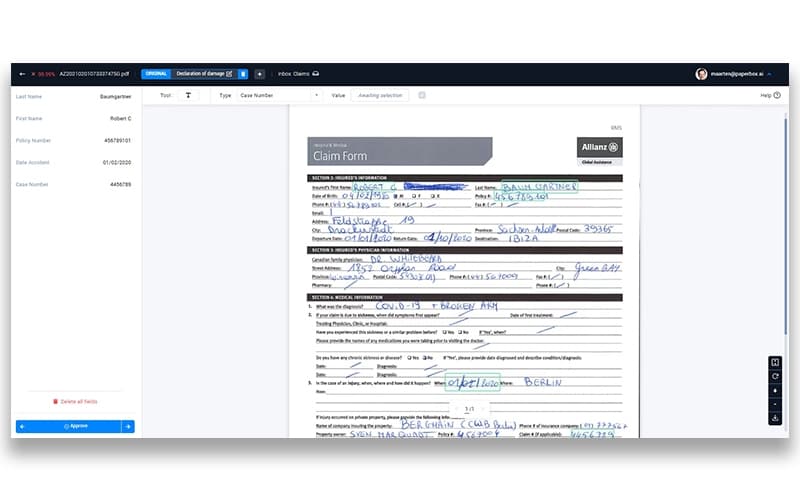
This module enriches documents by extracting essential fields such as claim numbers or policy details and linking them directly to internal systems. This automation cuts down on errors and provides teams with structured insights to make faster, well-informed decisions.
Report
Paperbox features a business dashboard to transform raw workflow data into clear insights. These analytics highlight inefficiencies and provide visibility into processing volumes, turnaround times, and workload distribution.
Pros And Cons of Paperbox
Pros
Reduces administrative workload by automating tasks
Ability to correctly categorize diverse document types
Leverages excellent optical character recognition capabilities
Cons
Developing a feature set still requires frequent updates
Configuration updates lag
Paperbox Reviews
Total 1 reviews
5
All reviews are from verified customers
Rating Distribution
5
Stars100%
4
Stars0%
3
Stars0%
2
Stars0%
1
Stars0%
Share your experience
Graphic Design, 11-50 employees
“Smart document sorting”
Pros
Using machine learning here saves a huge amount of time. Having the system automatically sort documents and place them in the right categories can be a real lifesaver for organizations working to digitize paper records.
Cons
There's very little to complain about though it's still in the early stages and will likely keep gaining useful features over time.
Rating Distribution
Ease of use
10
Value for money
10
Customer Support
10
Functionality
10
Frequently Asked Questions
What other apps does Paperbox integrate with?
Paperbox integrates with platforms such as Salesforce, Microsoft 365, Guidewire, and Keylane.
What types of pricing plans does Paperbox offer?
Paperbox offers Smart Mail-Handling, Smart File Completion, and Smart Action Workflow plans. Request a personalized Paperbox price quote for your business.
What level of support does Paperbox offer?
It offers support via email, phone, contact form, and FAQs.
Does Paperbox have a mobile app?
The vendor has not shared public information regarding a dedicated mobile app.
Who are the typical users of Paperbox?
Its users are insurance carriers, insurance brokers, underwriting teams, and claims management professionals.
What language does Paperbox support?
Paperbox is primarily available in English, Dutch, and French.
Does Paperbox offer an API?
Yes, Paperbox provides an API for document ingestion and processing.