


TrainingData.io
Last Updated
Overview
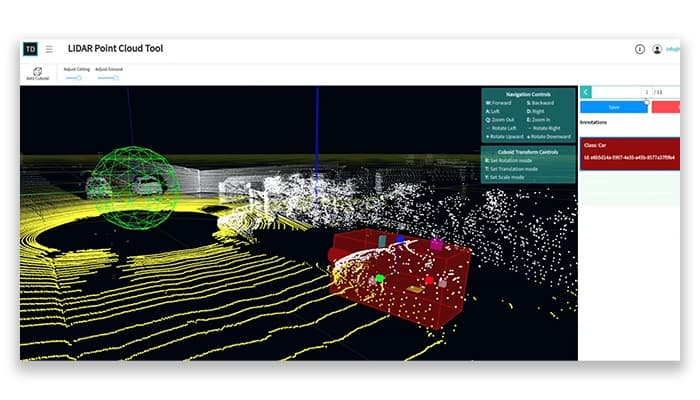
TrainingData.io provides precise labeling actions for Visual AI. It helps data scientists control the quality of their training data. Sometimes, importing large datasets can slow down processing speed. Still, its overall capabilities make integrating data with various AI tools easy.

TrainingData.io Specifications
- Natural Language Dialogue
- Smart Data Discovery
- Self-Service Dashboards
- Text to Speech & Speech to Text
TrainingData.io Features
Pixel Accurate Annotation Tool
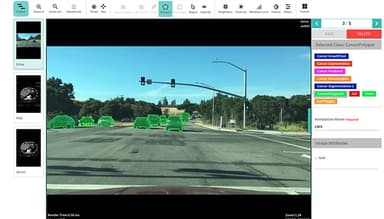
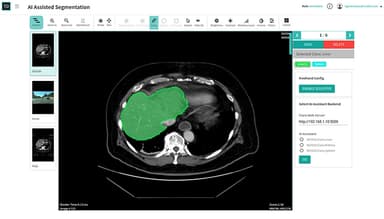
This feature offers precise pixel-level image annotation with superpixel segmentation, brush and eraser tools, and advanced polygon editing. It also enhances efficiency and accuracy due to its freeform drawing with sculptor and AI-assisted labeling featuring active learning.
Annotator Performance Management
TrainingData.io provides a detailed review and rating of individual annotations for precise assessment. Its aggregate performance metrics offer insights into annotators' accuracy and consistency, while collaborative annotation enhances teamwork and efficiency.
Labeling Instruction Management
It ensures clear guidelines for annotators using a WYSIWYG-style Builder for intuitive instructions, reducing errors and language barriers. Its tools enhance precision in annotations with structured categorization.
Data Security And Privacy Controls
This feature is crucial in the on-premises annotation tool with Docker, ensuring secure data handling. Scaling annotations across data servers boosts efficiency. Also, its GPU-enabled Docker image enhances performance for intensive tasks, optimizing the workflow.
WorkForce
It collaborates with "Humans-in-the-loop" for tasks, ensuring quality results from a diverse global workforce. A dedicated success manager provides personalized guidance for project success through effective communication.
Pros And Cons of TrainingData.io
Pros
It can add projects to more than one server
Easy to integrate the data with a variety of AI tools
Makes video and data labeling simple
The dataset is trainable without the need for costly GPU hardware additions
Cons
The speed is slow for certain annotation tools and templates, as per some software users
At times, the import of larger datasets can impact processing speed
TrainingData.io Reviews
Total 10 reviews
4.9
All reviews are from verified customers
Rating Distribution
5
Stars90%
4
Stars10%
3
Stars0%
2
Stars0%
1
Stars0%
Share your experience
Full Stack, 11-50 employees
Less than a year
“SaaS Solution Designed for Data Labeling”
Pros
What really caught my attention about this software is its focus on data security and privacy controls. I also appreciate that it allows us to add projects across multiple servers. It provides all the essential features our development teams need to make full use of the application.
Cons
I've noticed that it can still be a bit buggy at times. You should expect some downtime while using it.
Rating Distribution
Ease of use
10
Value for money
9
Customer Support
10
Functionality
10
Full Stack, 500+ employees
Less than a year
“Reliable software for AI data labeling”
Pros
Most impressive about TrainingData.io is its extensive pool of highly skilled annotators, as well as the variety of annotation tools and templates. These features are incredibly helpful for driving growth in a business.
Cons
TrainingData.io feels a bit sluggish when it comes to the variety of annotation tools and templates. Plus, some features are locked behind paid plans, which might be out of reach for everyone.
Rating Distribution
Ease of use
10
Value for money
10
Customer Support
10
Functionality
10
Full Stack, 11-50 employees
More than a year
“software for Visualizing AI inventory Data”
Pros
Using Training.io, machine learning algorithm-generated images have been instrumental in developing case studies for medical research. Also, the data easily integrates with any AI software, which makes collaboration much more efficient.
Cons
It has introduced new workflows that streamline and translate data without losing any specifications, which is definitely a plus. However, users can only export data in specific formats like JSON and PNG, aside from the usual formats like CSV. This limitation can sometimes make it tricky to adapt the data to custom formats.
Rating Distribution
Ease of use
10
Value for money
9
Customer Support
9
Functionality
10
Frequently Asked Questions
Does TrainingData.io offer an API?
Yes, TrainingData.io provides API access.
What language does TrainingData.io support?
TrainingData.io supports the English language only.
What other apps does TrainingData.io integrate with?
Although the official website does not list any integrations, you can learn about its integration options by watching the TrainingData.io demo.
Does TrainingData.io support mobile devices?
No, TrainingData.io does not offer support for mobile devices.
What types of pricing plans does TrainingData.io offer?
TrainingData.io offers a free version and three paid plans, starting from $10/month for one user. Users can request a custom quote for TrainingData.io cost to decide upon a plan that best fits their business needs.
Who are the typical users of TrainingData.io?
TrainingData.io typically serves healthcare facilities and research centers.
What level of support does TrainingData.io offer?
TrainingData.io offers form submission and phone support.