



Last Updated
Overview
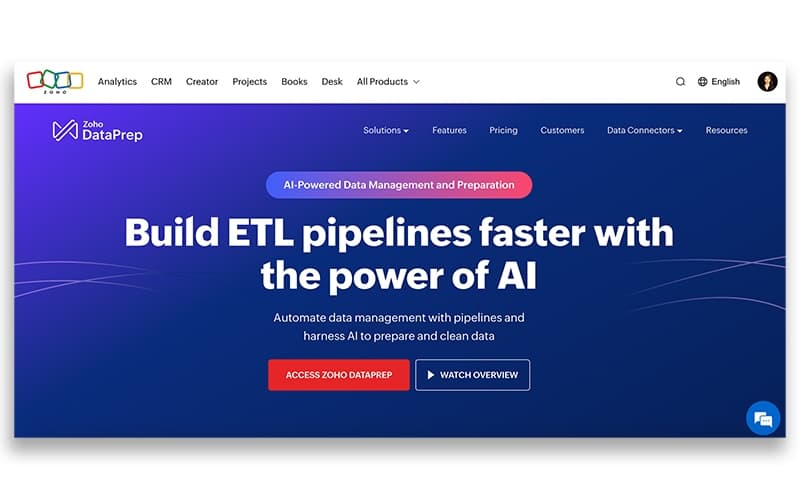
Zoho DataPrep is a self-service data preparation tool that streamlines data cleaning for enhanced analytics. Though some note limited user access controls, its AI-driven automation and seamless integrations simplify complex data workflows. This makes Zoho DataPrep a strong choice for empowering teams to manage data effectively.
Zoho DataPrep Specifications
- AI-Powered Insights
- Machine Learning and AI Integration
- Data Collection and Management
- Cloud-based Access
Zoho DataPrep Features
ETL & Data Pipeline Automation
An automated ETL pipeline that connects to data sources, prepares and validates data, and delivers it to the right destination all on a schedule, so teams always have access to fresh, clean data. It includes a visual pipeline builder, prebuilt pipeline templates for common business use cases, unified scheduling, and a backfill feature to recover data from any failed jobs.
100+ Connectors (Sources & Destinations)
Connect to files, FTP servers, cloud drives, databases, data warehouses, and business applications like Zoho CRM, Zoho Analytics, and Salesforce eliminating data silos across your organization. It also supports change data capture via incremental fetch for faster, more efficient syncs.
AI Capabilities - Ask Zia (DataPrep CoPilot)
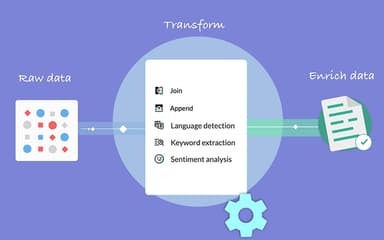
Simply explain your data preparation needs in natural language, and Ask Zia, the generative AI assistant, will generate the required data transforms instantly handling multiple queries at the same time. It also includes Transform by Example (powered by OpenAI), a Chat Formula Builder, and AI-based enrichment such as sentiment analysis and keyword extraction
Data Transformation - 250+ No-Code Transforms
Format and change data using more than 250 transforms without the need for coding. Reshape data using unpivot, pivot, and summary transforms, and blend data from a variety of sources using join and append transforms. Custom Python transforms are also supported for advanced use cases.
Data Quality Management
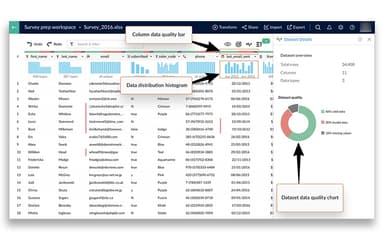
DataPrep continuously measures the quality of your data and identifies ways to fix errors by providing intelligent suggestions. Data quality charts can be used to filter data and resolve issues using the various transforms available. This includes deduplication, fixing missing values, and standardizing formats.
Data Governance, Security & Compliance
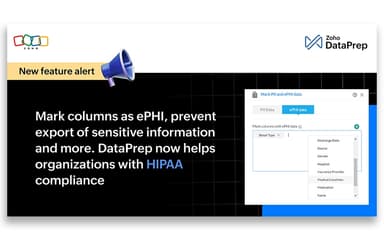
Collaborate securely with teams using fine-grained permissions, and mark sensitive data like PII and ePHI to control access and prevent unauthorized export. An audit trail tracks all activity within the organization for transparency and accountability. DataPrep also helps adhere to data protection regulations like GDPR by masking or tokenizing sensitive data.
Pros And Cons of Zoho DataPrep
Pros
AI-driven automation effectively detects and corrects data errors without coding
Seamless integration with third-party apps simplifies data workflows
Cons
User access controls and dashboard export options are somewhat limited
Data preview limits rows and columns, complicating full data validation
Zoho DataPrep Reviews
Total 1 reviews
4
All reviews are from verified customers
Rating Distribution
5
Stars0%
4
Stars100%
3
Stars0%
2
Stars0%
1
Stars0%
Share your experience
Anonymous
Management Consulting, 1-10 employees
“Works well for pulling data”
Pros
It works really well for pulling data from sources like databases and CSV files, then reshaping it into something usable for a BI platform. In our case, we use it with Zoho Analytics to build dashboards and handle reporting afterward.
Cons
Some tasks can feel a little intimidating at first especially when you need to do something like split two columns based on the values in another column. There is definitely a learning curve before everything starts to click. That said, a lot of the functionality is still discoverable just by right-clicking a column and exploring the available transformation options.
Rating Distribution
Ease of use
7
Value for money
8
Customer Support
8
Functionality
9
Frequently Asked Questions
What language does Zoho DataPrep support?
Zoho DataPrep offers its user interface in multiple languages, including English, Arabic, Chinese, and others.
Does Zoho DataPrep offer an API?
Yes, it supports an API.
What other apps does Zoho DataPrep integrate with?
The platform seamlessly connects with several third-party software, including Google Drive, Amazon Redshift, Salesforce, and Zoho Analytics.
What level of support does Zoho DataPrep offer?
The platformoffers an FAQ forum, instant chat, email, knowledge base, and phone support.
Who are the typical users of Zoho DataPrep?
Zoho DataPrep caters to several businesses and industries, including manufacturing, healthcare, finance and banking, education, IT, retail and e-commerce, as well as marketing and advertising.
Does Zoho DataPrep have a mobile application?
The official documentation and product updates do not mention a standalone mobile app for Zoho DataPrep.
What types of pricing plans does Zoho DataPrep offer?
The platform offers a free plan for startups and small businesses, a Standard plan at $50/month, and an Enterprise plan at a custom cost. In addition, to help users navigate its services and make an informed decision, Zoho DataPrep offers a 15-day free trial for its Standard plan. You can also request a personalized Zoho DataPrep cost today!