


Anytype
Last Updated
Overview
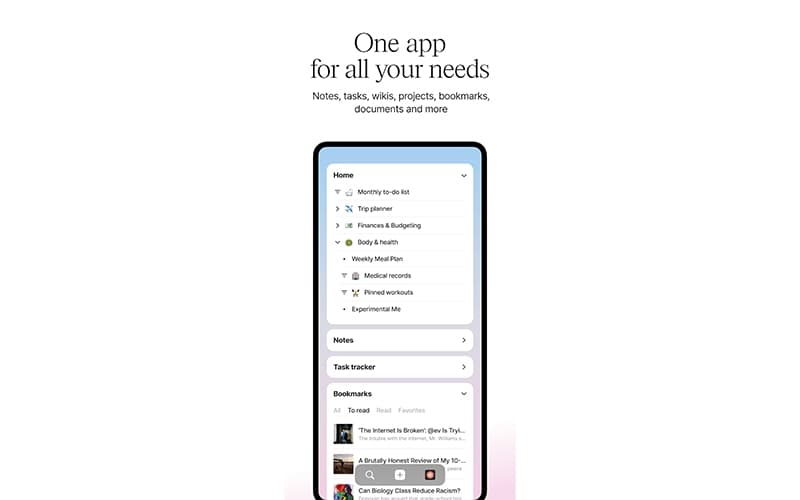
Anytype is a secure, local-first application for organizing, remembering, and sharing information across devices. It offers strong customization and robust end-to-end encryption for privacy, but it lacks extensive traditional third-party integrations found in cloud-based alternatives. It allows private chats, and databases, enabling users to manage tasks, notes, and projects efficiently.


Anytype Specifications
- Real-time Communication
- File Sharing & Management
- Document Management
- Task & Project Management
What Is Anytype?
Anytype is a productivity and collaboration platform for organizing work, knowledge, and information in connected spaces. Teams can create databases, documents, projects, and custom workflows while linking related information together. Its local-first approach also gives users greater control over their data and supports collaboration without relying entirely on traditional cloud-based workspaces.
What Is Anytype Best For?
The platform stands out for its ability to create 'Objects'. Instead of sorting everything into folders, it lets users create objects for notes, tasks, people, projects, and more. These objects can then be linked together as needed. A single note can relate to several projects or people without having to be copied. This makes it easier to build a workspace around how the information actually connects.
How Much Does Anytype Cost?
The platform’s starting price is $5/month under its Plus plan. It offers features like unlimited shared and private channels with 1GB of remote storage, etc. Additional Anytype pricing tiers include:
- Pro- $10/month
- Ultra- $20/month
It also offers a Free plan with up to 100MB of remote storage. Additionally, the platform has a separate plan for businesses, which costs €20/editor/month (approx. $23.23).
Besides the monthly subscription costs, users should also account for additional charges to consider the total cost of ownership. It includes, but is not limited to, the following:
- Storage Overage- $0.50–$1/GB/month
- Extra Shared Channel Beyond Cap- $2/channel/month
- Additional Seats- $3–$5/member/month
Disclaimer: The pricing is subject to change.
Anytype Integrations
The vendor has not disclosed any third-party integrations.
How Does Anytype Work?
Here's how you can get started with the platform:
- Log in to your local vault using your secure encryption keys
- Store all data directly on your device with local-first and offline-capable storage
- Sync files and notes peer-to-peer across your devices without centralized servers
- Write and structure notes using a flexible block-based editor
- Organize tasks, projects, and resources inside customizable databases
- Visualize connections between pages using interactive graph and table views
- Collaborate and chat privately with others using secure local networks
Who Is Anytype For?
Anytype is ideal for a wide range of industries and sectors, including:
- Technology and software
- Education and research
- Marketing and communications
- Professional services
Anytype Use Cases
Based on our assessment of Anytype’s capabilities, we have identified several situations where the platform is well suited for organizations responsible for managing physical assets and equipment:
Food Businesses Organizing Recipes And Meal Plans
Restaurants, catering companies, and food businesses can use Anytype to organize recipes according to dietary needs, ingredients, and meal types. Teams can also build meal plans around customer preferences or service requirements. This helps staff access standardized recipe information and reduces reliance on scattered documents or individual knowledge.
Project Teams Tracking Milestones And Risks
Project teams often struggle when tasks, goals, and risks are recorded across separate documents. They can use Anytype to connect projects with milestones, daily tasks, and risk information. Managers can then review progress in context and give teams a clearer record of outstanding work. Users particularly appreciate how it enables them to move between ‘spaces’, helping them navigate projects quickly.
Education Teams Managing Learning Materials
Training providers and education teams can keep course schedules, learning materials, assignments, and tasks together using Anytpe. Linked information helps instructors and coordinators connect related resources rather than managing disconnected files. This gives teams a structured way to organize educational content and monitor activities requiring follow-up.
Small Teams Sharing Operational Knowledge
With Anytype small teams can use a shared space to maintain internal documentation alongside bugs, events, and team information. This is useful when operational knowledge is scattered across chats and individual files. Employees can document information in one workspace, making important team resources easier to locate.
Food Content Teams Building Knowledge Libraries
Content teams in food and nutrition businesses can use Anytype to document recipes, recommendations, and related resources in connected collections. Instead of repeatedly searching through old documents, employees can organize information by topic or purpose. This supports content planning and makes previously created knowledge easier for teams to reuse.
Startup Teams Planning New Business Projects
Startup teams can use structured project spaces to turn early ideas into actionable plans. They can document research points, objectives, tasks, and next steps as the project develops. This gives founders and team members a shared reference instead of leaving important planning decisions scattered across conversations.
Is Anytype Right For You?
Anytype is worth considering if your team needs to organize projects, knowledge, and operational information without forcing everything into fixed templates. Its connected-object model suits teams that want to link related tasks, documents, resources, and records based on their own way of working.
It may also appeal to businesses with stronger data-control requirements. Anytype for Business supports GDPR compliance, is HIPAA-ready, encrypts data by default.
Industry momentum is shifting toward self-hosted, infrastructure-controlled deployments for sensitive business data. Anytype is responding directly as it is planning dedicated self-hosted plans, giving organizations full control over their infrastructure.
Anytype has continued releasing product updates in 2026, including advanced filters, improved collaboration capabilities, and work on Collections 2.0, a proposed approach to organizing objects around relationships rather than rigid categories.
Want to learn more about Anytype? Contact us at (661) 384-7070 for detailed guidance.
Anytype Features
Custom Objects
Anytype lets teams create objects for different types of information, including tasks, documents, contacts, and projects. Users can define how these objects behave and what information they contain. This flexibility helps businesses structure work around their processes instead of adapting everything to rigid, predefined categories.
Relations
This feature connects objects through specific pieces of information, such as status, owner, date, or category. A project can therefore connect with its tasks, meetings, and related resources. This gives teams more context around individual records and makes connected information easier to navigate across their workspace.
Sets
Sets bring multiple objects into a single working view, with options for sorting, filtering, and choosing different layouts. Teams can use them to create focused views of relevant information. That makes large collections easier to review without manually organizing every record into separate pages or documents.
Templates
Templates let users create reusable structures for recurring types of work. A team can establish predefined fields, layouts, and information for particular objects. It reduces repetitive setup when creating similar records, while keeping important information consistently structured across projects, documents, and other business content.
Version History
Antype features a version history that records changes made to objects, providing a clearer record of how shared information has evolved. This becomes particularly useful when multiple people work within the same space. Teams can review previous changes and maintain greater visibility into edits made across collaborative work.
Pros And Cons of Anytype
Pros
Local-first storage with encryption and self-hosting options
Works offline; no internet connection required
Flexible objects, relations, sets, and knowledge graphs
Peer-to-peer sync across devices
Fast even with complex, deeply connected data
Cons
Web publishing lacks the dark mode
Does not offer multi tab support
At times exporting issues may occur
Anytype Pricing
Free | Plus | Pro | Ultra |
|---|---|---|---|
$0 | $5 per month | $10 per month | $20 per month |
|
|
|
|
Disclaimer: The pricing details were last updated on Sep 25, 2026 from the vendor's website. Please contact us for a tailored pricing list.
Anytype Reviews
Total 1 reviews
5
All reviews are from verified customers
Rating Distribution
5
Stars100%
4
Stars0%
3
Stars0%
2
Stars0%
1
Stars0%
Share your experience
Not Specified, N/A employees
“I'm satisfied”
Pros
Local-first is a big deal to me and Anytype has become my preferred knowledge management tool because of that. That same approach carries over into Manuscripts which makes it reassuring to use since I know my data stays on my device.
Cons
Honestly there's nothing particularly bad to point out.
Rating Distribution
Ease of use
10
Value for money
10
Customer Support
10
Functionality
9
Frequently Asked Questions
Does Anytype have a mobile app?
Yes, Anytype has a mobile app available on iOS and Android devices.
What other apps does Anytype integrate with?
The vendor has not disclosed any third-party integrations.
What level of support does Anytype offer?
Anytype provides support via documentation, community, and email.
What language does Anytype support?
Anytype supports English, Chinese, Arabic, Ukrainian, Korean languages.
What types of pricing plans does Anytype offer?
The vendor offers four plans. Free, Plus: $5/month, Pro: $10/month, Ultra: $20/month, cloud-hosted plan for businesses: €20/editor/month (approx. $23.23). Get a flexible Anytype cost today.
Who are the typical users of Anytype?
Typical users of Anytype include nutritionists, digital creators, marketers, event managers, finance teams, etc.
Does Anytype offer an API?
Yes, Anytype offers an API to its users.