


Last Updated
Overview
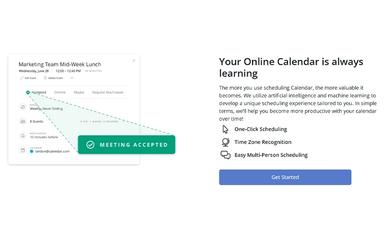
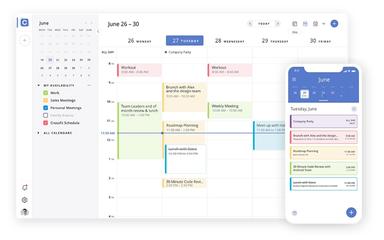
Calendar is a leading collaboration and productivity software solution for scheduling automation, saving valuable time. While you might need to manually set up the time zone, its core advantages lie in seamless integration with major calendar services and offering a unified view of all appointments, ensuring scheduling conflicts are eliminated.
Be the first one to leave a review!
No review found

Starting Price
Custom

Calendar Specifications
- Calendar & Scheduling
- Integration with Other Tools
- Automation & Workflow
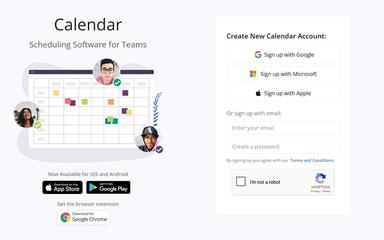
- Mobile Accessibility
What Is Calendar?
Calendar serves as a dedicated scheduling automation platform designed to simplify the complex process of booking meetings and appointments for individuals and teams alike. It focuses on offering a personalized scheduling link that automatically checks your availability against your connected calendars. The software supports a variety of meeting types, including one-on-one, round-robin, and collective events, ensuring that the right people are scheduled efficiently. This focus on streamlined, automated coordination makes it an ideal solution for sales, support, and consulting teams seeking to optimize their workflow and boost client engagement across different business scales.
Calendar Pricing
The software offers multiple plans for its users according to their needs with a free plan available:
- Standard: $20/month
- Pro: $30/month
- Enterprise: Custom Pricing
Disclaimer: Pricing is subject to change.
Calendar Integrations
The software supports integration with multiple systems and platforms:
- Zoom
- Slack
- Salesforce
- Asana
- Dropbox
- Stripe
- Todoist
Who Is Calendar For?
Calendar software is ideal for a wide range of industries and sectors, including:
- Freelancers and consultants
- Sales and marketing teams
- Virtual assistants
- Small businesses
- Mid-market organizations
- Corporate management
- IT professionals
Is Calendar Right For You?
Calendar is an exceptional choice for organizations with a high volume of external or cross-departmental scheduling needs, particularly those with sales or customer-facing teams. Its strength lies in providing advanced routing logic for incoming meeting requests, which automatically assigns leads to the most appropriate team member based on pre-defined criteria. This capability ensures quick response times and efficient lead qualifications.
Still doubtful if Calendar is the right fit for you? Contact our customer support staff at (661) 384-7070 for further guidance.
Calendar Features
Team Scheduling Coordination
This feature allows multiple team members to efficiently coordinate their calendars for group meetings or round-robin lead distribution. Users can easily create a shared scheduling link that checks the availability of everyone involved, providing invitees with a single list of optimal meeting times.
Workflows And Automations
This functionality simplifies the process of finding the best time to meet with multiple internal or external participants without sharing full availability. A host can propose several specific time slots to the invitees, allowing them to vote on the most suitable option directly within the platform.
Meeting Polls And One-Off Meetings
This functionality simplifies the process of finding the best time to meet with multiple internal or external participants without sharing full availability. A host can propose several specific time slots to the invitees, allowing them to vote on the most suitable option directly within the platform.
Routing Forms For Leads
Users can manage numerous independent projects and personal to-do lists within the platform using visually accessible boards. This feature helps in structuring work processes and tracking progress with custom labels for better classification and oversight. The included boards support both general project management and specific frameworks like Kanban/SCRUM, which enhances operational flexibility.
Payment Collection For Appointments
The software enables professionals to monetize their time by requiring a payment during the booking process for specific consultation or service appointments. Integrating with popular payment gateways ensures a seamless financial transaction, reducing no-shows and securing revenue instantly.
Pros And Cons of Calendar
Pros
Easy to use interface
Seamless integrations with other apps
Direct invitations easily delivered to all guests
Cons
Users have requested for more options for scheduling meetings
Notifications often missed when offline from connected apps.
Calendar Reviews

No reviews yet!
Be the first to review this product
Frequently Asked Questions
Does Calendar offer an API?
No, Calendar does not offer an API.
What level of support does Calendar offer?
Calendar provides support via an online submission form.
What language does Calendar support?
Calendar software primarily supports English language.
What other apps does Calendar integrate with?
Calendar integrates with Zoom, Slack, Salesforce, Asana, Dropbox, Stripe, and Todoist.
What types of pricing plans does Calendar offer?
Calendar offers a Free plan for individuals, and paid plans for Standard for $20/month, Pro for $30/month, and Enterprise for custom pricing. Get a detailed Calendar cost breakdown tailored to your specific requirements.
Does Calendar have a mobile app?
Yes, Calendar does offer a dedicated mobile app for Android and iOS users.
Who are the typical users of Calendar?
Typical users include freelancers and consultants, sales and marketing teams, virtual assistants, small businesses, mid-market organizations, and IT professionals.