


Last Updated
Be the first one to leave a review!
No review found

Starting Price
$480
FullCalendar Specifications
- Calendar & Scheduling
- Integration with Other Tools
- Mobile Accessibility
- Customer Support
What Is FullCalendar?
FullCalendar is an open-source JavaScript library used to create interactive, Google Calendar-like event grids and scheduling tools inside web applications. It offers extensive customization, including themes, event styling, and various views, and integrates with major frameworks like React, Vue, and Angular. The standard version is open source, while a premium version provides additional features and support via a license. In short, it is not an app you download. It is a code tool used by programmers or developers to build booking and scheduling systems on websites.
What Is FullCalendar Best For?
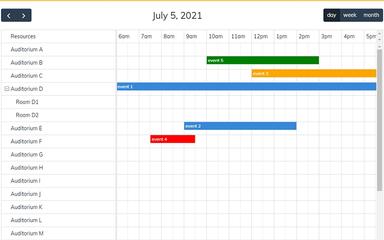
One standout feature of FullCalendar is its ‘Timeline Resource View’, available in the Premium version. Instead of displaying only days and events in a standard calendar layout, this feature places resources such as people, rooms, or equipment in rows on the left, with time and dates shown across the top. It stands out because it helps reduce visual clutter when managing multiple schedules. For example, viewing 20 employees on a standard weekly calendar can make the grid difficult to read. This view aligns each resource on a horizontal timeline, making it easier to see who is busy and when rooms or equipment are available.
How Much Does FullCalendar Cost?
FullCalendar pricing starts at $480 for the Premium plan with up to covering 10 developer seats. The core Standard version is available for free under the MIT license. The vendor also features an OEM plan for custom pricing. A free trail is also available for the Premium plan.
Beyond the license fee, businesses should also account for:
- Redistribution Licensing: Agencies building for clients need a separate Premium license per client if source code editing is allowed, or a single license with minified delivery if it isn't; an OEM license may be more economical for agencies with many clients
- Annual Renewal: Renewing before expiration gets a 50% discount off the base price, renewing after expiration only gets 25% off; without renewal, the last released version can still be used, but without updates or support
Disclaimer: The pricing is subject to change.
FullCalendar Integrations
The vendor integrates with a range of frontend frameworks and libraries, including:
- React
- Vue 3
- Angular
- Preact
- TypeScript
- Web Components
How Does FullCalendar Work?
Follow the steps outlined below to get started with the library after logging in:
- Install FullCalendar into your project through download, CDN, or npm
- Add a simple container element on the page where the calendar should render
- Set the initial view, such as a monthly, weekly, daily, or list layout
- Customize the toolbar, including navigation buttons, titles, and colors
- Add events as data objects with a title, start date, and end date
- Enable date and time interactions, letting users click, select, or drag to create events
- Configure event behavior, including dragging, editing, and deleting existing events
- Style the calendar using custom CSS to match your application's design
Who Is FullCalendar For?
It serves developers and organizations across a range of industries and sectors, including:
- Software development
- Healthcare
- Real estate
- Telecommunications
- Hospitality and events
- Digital agencies
FullCalendar Use Cases
Based on our analysis of user reviews and FullCalendar's features, we have identified key scenarios where this platform is a strong fit for:
Salons And Auto Shops Preventing Double-Booked Chairs Or Bays
When salons, clinics, and auto shops sell services, they usually require an employee and a physical station to be free at the same time. If a receptionist schedules two appointments based only on the workers' availability, they overlook the physical equipment needed. When both clients arrive, one technician has no open chair or lift to perform the work. This mistake forces customers to wait, cuts daily appointment capacity, and directly lowers daily revenue. FullCalendar provides an interface that puts the physical assets—like chairs or service bays, as independent rows. Staff drop bookings directly into a specific station row, which prevents double-bookings by locking that asset.
Agencies Spotting Overloaded Developers Before Deadlines Slip
A digital agency sets long project deadlines that require weeks of continuous work from developers and designers. When managers track deadlines using a standard monthly calendar view, tasks simply pile up as a list of text inside individual day squares. This layout hides how much work is actually piled onto one person. A manager might unknowingly give five complex tasks to one developer while another sits with nothing to do, which can burn out your employee. The software stretches tasks out into horizontal bars across a continuous timeline grid. Managers can look down the employee list to see exactly who has a solid block of color and who has empty white space, making it easy to balance workloads.
Dispatchers Routing Emergency Calls To The Nearest Free Technician
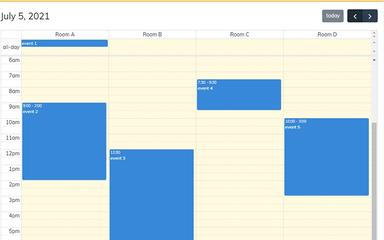
Home-service businesses (like Plumbing, HVAC, and Towing) usually rely on dispatching drivers to urgent emergency calls throughout the day. When a dispatcher receives a call about a flooded basement, they must choose a technician instantly. Without a clear view of everyone's daily schedule, they might send a technician who is actually trapped in the middle of a major three-hour installation, leaving the emergency customer stranded until they cancel and call a competitor. The platform maps every driver’s daily route onto an hourly vertical grid. The dispatcher can spot open afternoon gaps at a glance and route the closest free truck to the emergency call immediately.
Gyms Managing Year-Long Recurring Classes Without Manual Entry
Usually, a fitness studio runs identical classes at the same hours every week of the year. Forcing staff to manually type in hundreds of separate calendar entries for the entire year wastes days of office work. Furthermore, if a trainer falls ill on a single day, deleting that session on a basic calendar can sometimes erase the entire recurring series for the rest of the year. The software uses an automated scheduling engine. The system builds a year-long routine from a single rule, allowing managers to cancel or shift one isolated class without altering any future dates.
Is FullCalendar Right For You?
If you are building a standard event calendar, booking system, or admin dashboard within a modern JavaScript framework, FullCalendar can be a suitable choice. However, it is not a downloadable desktop or mobile application; it is a code library that requires development knowledge to implement and customize. For security-conscious development teams, FullCalendar also supports cryptographic nonce values within its rendering engine.
This helps developers use Content Security Policy (CSP) rules while allowing the calendar to load its required styles safely. CSP nonces can help reduce the risk of unauthorized script injection, particularly in data-heavy web applications, without interfering with the calendar's layout and rendering.
Still not sure if the FullCalendar software is right for you? Contact our support team at (661) 384-7070 for further guidance and expert insights.
FullCalendar Features
Views
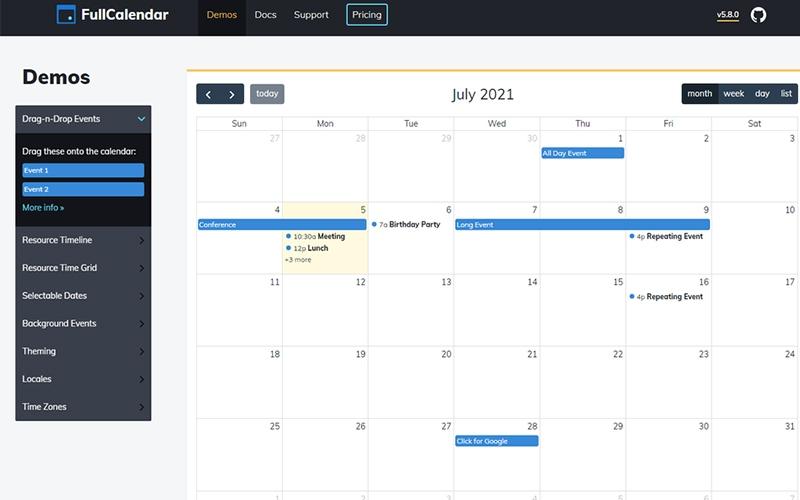
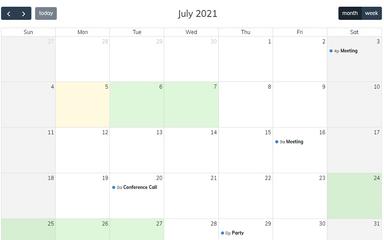
It has a switchable UI engine packed with multiple visual layout perspectives, including traditional grid Month Views, hourly column TimeGrid Views, and clean vertical text List Views. The program automatically adjusts and keeps track of all dates, which means that users can easily switch between the views having all data synchronized. It is very useful for project teams and end-users who need to jump instantly between a bird's-eye monthly roadmap and a detailed, minute-by-minute daily breakdown of their tasks.
Overall Display
The software offers universal control over the calendar's physical layout, sizing, and style parameters. It provides customizable navigation header toolbars, automatic box resizing to fit mobile screen breakpoints, and native styling hooks that automatically adopt the look of popular design tools like Tailwind CSS, Bootstrap 5, or Shadcn. It benefits UI/UX designers who need the calendar interface to perfectly match their application's specific branding, color schemes, and dark/light mode toggles.
Date Clicking And Selecting
It has interactive touch and click listener hooks (specifically dateClick and select) built right into the calendar grid. When a user clicks an empty cell or drags their mouse across a range of days, the software instantly calculates the exact start and end timestamps and fires an event trigger behind the scenes. This capability allows product managers and schedulers building booking platforms to catch a user's click and instantly open up a custom appointment form or reservation window.
Events
The software gives dynamic data fetching and parsing engine built to handle booking records. It allows you to feed asynchronous JSON data feeds directly from a web server into the calendar or auto-sync straight with live Google Calendars. It also offers Background Events, which gray out or color-block specific periods (like public holidays or business closing hours) to prevent bookings.
Event Dragging And Resizing
It has native, browser-based drag-and-drop mechanics. Users can grab the edge of an appointment block to stretch its duration or slide the entire block to a new time slot. The moment the block is dropped, FullCalendar packages the updated time data and sends it straight back to your servers without requiring a slow webpage refresh.
Pros And Cons of FullCalendar
Pros
Supports multiple time zones for cross-country scheduling
Vanilla JavaScript API works fast with React support
Easily manages events, bookings, and overtime in one tool
Provides multiple view options for different scheduling needs
Cons
Themes look plain and lack visual customization
Limited compatibility with certain browsers
FullCalendar Pricing
Standard
nullFreenull


View Price
What's Included
Hundreds of standard features
Connectors for React/Vue/Angular
MIT license 1-10 developers
Source code editing (non-premium features only)
Redistribution (non-premium features only)
Premium
$480null
View Price
What's Included
All Standard features, plus:
Timeline View
Vertical Resource View
Printer-friendly rendering
Stock commercial license
Unlimited developers
Full source code access
Email support (2 tickets/month, 48-hour response)
Minified redistribution
Free trial available
OEM
nullCustom pricingnull
View Price
What's Included
All Premium features, plus:
Customizable license terms
Unlimited email support (24-hour response)
Full redistribution
Disclaimer: The pricing details were last updated on Aug 10, 2026 from the vendor's website. Please contact us for a tailored pricing list.
FullCalendar Reviews

No reviews yet!
Be the first to review this product
Frequently Asked Questions
What level of support does FullCalendar offer?
FullCalendar offers email support for paid licenses.
Does FullCalendar have a mobile app?
No, FullCalendar does not have a dedicated mobile app.
Who are the typical users of FullCalendar?
Typical users of FullCalendar include developers in software development, healthcare, real estate, and telecommunications.
What types of pricing plans does FullCalendar offer?
FullCalendar price starts at $480 for the Premium plan, covering up to 10 developer seats. The core Standard version is free under the MIT license. An OEM plan is also available at custom pricing, and the Premium plan includes a free trial. Contact us for a custom FullCalendar cost quote.
What language does FullCalendar support?
FullCalendar supports the English language.
What other apps does FullCalendar integrate with?
The software integrates with React, Vue, Angular, Preact, TypeScript, and Web Components.
Does FullCalendar offer an API?
Yes, FullCalendar offers an API.