


One Call Now
Last Updated
Overview
One Call Now is a reliable mass-notification system that sends voice, text, and email alerts to groups of any size. Though its strict text-message character limits can restrict detailed updates, its ease of use and pay-as-you-go pricing make it an accessible choice for routine and emergency broadcasts.
Be the first one to leave a review!
No review found

Starting Price
Custom
One Call Now Specifications
- Real-Time Communication
- Calendar & Scheduling
- Integration with Other Tools
- Mobile Accessibility
What Is One Call Now?
One Call Now by Crisis24 is a mass notification service that helps organizations send voice calls, text messages, and emails to large groups from one system. Within the platform, users can organize contacts into groups such as departments or volunteer teams, then send messages only to the relevant recipients. After each message, delivery reports show who was reached, which channel was used, and which contacts may require follow-up.
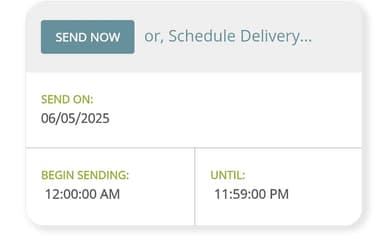
Besides this, organizations can schedule messages in advance for routine communications or time-sensitive alerts. This gives teams a trackable alternative to manual phone trees, where information may change as it passes from one person to another.
What Is One Call Now Best For?
‘Auto Dialer’ is one of One Call Now’s distinctive capabilities. It helps automatically dial contact lists and plays prerecorded messages when recipients answer or calls reach voicemail. Administrators can control the calling sequence or continue calls until a preset response quota is reached. This makes large-scale outbound calling easier to manage as users do not have to rely on repeated manual calls.
How Much Does One Call Now Cost?
One Call Now pricing starts at 5¢/credit for Credit Plan, which is suitable for organizations with varying messaging requirements. The platform also provides an Unlimited Plan starting from $5/week.
Besides this, the vendor offers a free Starter Plan to access its core features without any restrictions.
Apart from the base fee, users may also need to consider the following additional costs:
- Salesforce Or Outlook Integration Setup: $200 – $750 one-time
- Priority Or Dedicated Support Tier: $50 – $150/month
- Extra Admin Seats Or User Logins: $10 – $25/user/month
- Overage Credits Beyond The Credit Plan Base Rate: $0.03 – $0.08/credit
- Custom/Enterprise Plan Premium: 15% – 30% above standard unlimited pricing
User reviews show mixed pricing sentiment. Some find the platform cost-effective for frequent messaging and suitable for nonprofit budgets, but others describe it as relatively expensive. Overall, value appears to depend on message volume, organizational size, and communication frequency.
Disclaimer: The pricing is subject to change.
One Call Now Integrations
One Call Now software supports integration with the following third-party systems:
- Outlook
- Salesforce
How Does One Call Now Works?
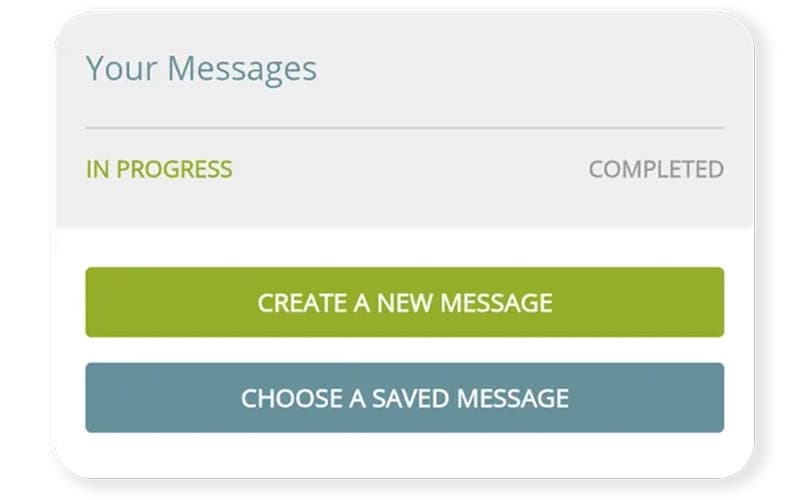
Log in to your account to access the main dashboard and follow these steps to get started:
- Add contacts manually, import them from a spreadsheet, or synchronize them with an existing database
- Organize contacts into groups so messages can be directed to selected recipients or the full contact list
- Create a message by typing it, recording audio, or picking one from your saved message library
- Select the audience for that specific message, whether that's one group or the entire list
- Schedule the message for a later date and time or send it immediately
- Track delivery through the reporting dashboard to see who received the message
Who Is One Call Now For?
One Call Now is mainly suitable for small to medium business in the following industries and sectors:
- Churches and religious communities
- Non-profit organizations
- Property management
One Call Now Use Cases
Based on what we have analyzed from One Call Now features and user feedback, the following are the key scenarios where this software can be a good option.
Property Managers Automating Rent Reminders And Maintenance Notices
Property managers often repeat the same notices across multiple units, especially for rent reminders, maintenance updates, and past-due bills. One Call Now supports scenario-based messages for these recurring situations, and communications can be scheduled in advance. Reviewers highlight the software’s capability to notify residents about power outages and evacuations, with messages sent to the full list or selected resident groups.
Religious Institutions Keeping Congregation Announcements Accurate
One Call Now supports religious organizations in sending prayer requests, service updates, reminders, and urgent announcements to the full congregation or selected groups. This gives each recipient the same version of the update instead of passing details from one person to another. For instance, users highlight the option to review and edit messages before sending, which helps keep details consistent across the congregation.
Employers Confirming Shift Coverage
Employers can use One Call Now to contact staff when open shifts need to be filled. Its ‘Quota Calling’ capability continues placing calls until the required number of live responses is reached, then stops once the staffing target is met. This gives managers a structured way to confirm shift coverage during staffing changes.
Schools Handling Attendance Notifications
One Call Now helps school administrators send attendance-related notices to families without preparing each call separately. Teams can use automated calling for recurring attendance communication and direct the message to the relevant contacts. Users highlight its automated attendance calling feature for its ability to save staff time.
Is One Call Now Right For You?
One Call Now is a practical fit for organizations that need mass communication across expanding contact lists and distributed locations. Its automated voice messaging can send prerecorded messages to tens, hundreds, or thousands of recipients and collect touch-tone responses. The platform also provides enterprise-grade security to safeguard contact data and communications.
The growing volume of automated calls and texts has also brought closer regulatory attention to how consent is managed. Under an FCC rule now set to take effect January 31, 2027, a single opt-out request will need to apply across all future messages from a sender, not just the one it responds to. One Call Now's current policies already require SMS opt-in and give recipients a way to unsubscribe at any time, which aligns its messaging practices with these consent requirements.
Modern Woodmen of America, and StuartCo, and Harvey Browne Memorial Presbyterian Church are among the notable clients of One Call Now.
Still deciding if One Call Now fits your organization? Call us at (661) 384-7070, and we will help you sort it out.
One Call Now Features
Targeted Messaging
The software organizes contacts into dynamic groups ranging from one person to thousands. Senders can choose the relevant group for each communication. It keeps messages focused on the intended recipients instead of the full contact list.
Automated Phone Call System
This feature places bulk outbound calls to selected contact groups and plays a prerecorded message when someone answers. If the call reaches voicemail, the system can deliver the same recording or an alternate version. This allows teams to distribute the same voice message across a large contact list.
Text-To-Speech
One Call Now helps convert typed content into a natural-sounding voice message for automated phone calls. Administrators can prepare the message as text rather than recording fresh audio for every broadcast. The resulting voice message can then be delivered to selected contacts.
Custom Polling
The platform adds predefined response choices to an outgoing message and records recipient answers as they come in. It lets teams use the collected responses to track confirmations, availability, or other requested information from one communication.
Audio Library
This functionality stores prerecorded messages for future broadcasts. Teams can reuse saved recordings for recurring communications, which can speed up preparation for frequently repeated notifications.
Pros And Cons of One Call Now
Pros
Keeps messaging consistent across recipients
Helps teams save manual calling time
Supports automatic contact-list updates through imports
Makes targeted outreach easier to manage
Collects quick responses through surveys
Cons
Voice recordings can feel too short
Some recipients experience dropped calls
Limited SMS character count
One Call Now Reviews

No reviews yet!
Be the first to review this product
Frequently Asked Questions
Who are the typical users of One Call Now?
The platform is mainly used by educators, church leaders, small business owners, and property management professionals.
Does One Call Now have a mobile app?
Yes. It has a dedicated mobile app available for iOS and Android.
Does One Call Now offer an API?
Yes, One Call Now software offers API.
What other apps does One Call Now integrate with?
The software integrates with popular platforms such as Salesforce and Outlook.
What types of pricing plans does One Call Now offer?
The vendor offers three pricing plans: Starter Plan ($0/month), Credit Plan (5¢/credit), and Unlimited Plan ($5/week). Request a One Call Now cost quote.
What level of support does One Call Now offer?
One Call Now provides customer support via email and phone along with live chat option, knowledge base and contact form submission.
What language does One Call Now support?
One Call Now supports multiple languages, including English.