


TheBrain
Last Updated
Key Takeaways
Generated from the text of customer reviews
TheBrain is a knowledge management platform designed for research and project management teams across pharmaceutical and technology industries. Users highlight its mind mapping capabilities for organizing thoughts and visualizing ideas, though some find the web interface less effective than the desktop experience. The vendor recently launched TheBrain 15, featuring agentic AI.
Our Verdict
TheBrain is a suitable option for IT and research sectors seeking a visual knowledge management platform to capture and organize their thoughts. Although pricing for cloud services is on the higher end, small teams with limited cloud requirements may find the free app more suitable. Its mind mapping and interlinking capabilities make it suitable for enterprises managing complex ideas, relationships, and projects.
Overall Rating
Based on 15 users reviews
4.7
Rating Distribution
Positive
93%
Neutral
7%
Negative
0%
Starting Price
$16
per month


TheBrain Specifications
- File Sharing & Management
- Document Management
- Task & Project Management
- Mobile Accessibility
What Is TheBrain?
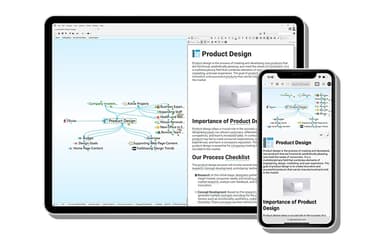
TheBrain is a digital workspace that serves as a knowledge base, connecting documents, notes, files, and web links. It helps link thoughts across timelines and outcomes to build a visual network, with Mind Map and other views allowing teams to explore relationships between different ideas. Users can then explore this network through built-in AI and search tools, which can summarize notes and attachments, and help locate relevant information for developing new ideas.
Additionally, TheBrain’s offline capability allows teams to update notes, and the system stores recent changes when the internet connection is restored. Together, these capabilities make it useful for handling large volumes of ideas across projects.
What Is TheBrain Best For?
The platform’s notable capability is Cerebro, an agentic AI built into TheBrain, which sets it apart from other mind-mapping tools. Users can ask AI to create new notes, summarize lengthy attachments, and suggest links between related thoughts. Having access to an organized knowledge base, the contextual AI helps researchers surface relevant context across complex project databases.
How Much Does TheBrain Cost?
TheBrain pricing starts at $16/month for the Pro Service plan which includes unlimited private sync, Cerebro AI usage, and 30 GB of online storage. The vendor also offers a free mobile app. Further pricing options for the software include:
- TeamBrain: $29/user/month
- Max Service: $48/month
- Enterprise: Custom pricing for on-premises deployment
Other than the base subscription, businesses should also consider the following estimated additional expenses:
- Implementation And Onboarding: Approximately $300–$1,500 one-time, depending on setup requirements and team size
- Data Migration And Knowledge Base Setup: Usually $500–$3,000 one-time, varies with the volume of existing information
- Team Deployment And Configuration: Approximately $500–$2,500 one-time, scaling with the number of users and shared brains
- Custom Training And Onboarding: Somewhere between $300–$1,500, depending on the number of users and training needs
- Ongoing Administration And Maintenance: Typically $100–$300/month, depending on the deployment size and administration requirements
Users generally describe TheBrain’s pricing as moderate to high. Some users consider the software costly when using its full feature set, while others highlight its visual organization, interconnected information, and ability to manage complex data as reasons the cost can be justified.
Disclaimer: The pricing is subject to change.
TheBrain Integrations
The vendor has not publicly disclosed a list of third-party integrations.
How Does TheBrain Work?
Here is how you can get started with the software:
- Log in to TheBrain with your account credentials
- Connect related thoughts to create a dynamic network that reflects how you think
- Attach rich text notes, web links, and local files to relevant thoughts
- Sync your visual network to the cloud to enable cross-device access and encrypted backups
- Share brains with colleagues to improve collaboration across projects
- Use the search bar to surface specific topics and visual relationship maps
- Leverage Cerebro AI to summarize attached documents and suggest new links within your knowledge base
Who Is TheBrain For?
TheBrain can be used across a range of industries, including:
- IT
- Automotive
- Defense
- Entertainment
- Pharmaceuticals
- Aviation
TheBrain Use Cases
Based on our analysis of user feedback and product capabilities, we have identified key scenarios where TheBrain is suitable for research organizations, corporate teams, and multi-project managers:
Corporate Strategists Mapping Interconnected Business Models And Dependencies
Executive planners can face challenges aligning multi-departmental initiatives when linear slide decks offer limited visibility into operational dependencies. TheBrain addresses this challenge through its associative network tool, which links each initiative, owner, and risk as thoughts using parent, child, and jump relationships. Since one thought can sit under several departments at once, strategists can see how a single initiative affects each function and switch to mind map or tree view when presenting it.
Remote Operations Staff Requiring Cross-Platform Data Consistency
Remote workers often encounter data access issues when switching between desktop workstations, tablets, and mobile devices. TheBrain offers a cloud synchronization facility that helps maintain data parity across Windows, macOS, Linux, iOS, Android, and web platforms. Teams can keep large documents in the cloud and download them any device when needed. This helps keep files consistent and accessible across platforms.
Enterprise Researchers Conducting Cross-Source Topic Discovery
Analysts managing large research projects waste time searching disconnected folder structures to locate reference materials. TheBrain's Instant Search engine helps by supporting searches across all stored notes, file attachments, and thought names. This allows researchers to surface relevant thoughts by typing certain letters or keywords, reducing the need to navigate deep subfolder hierarchies.
Research Teams Distributing Notes Via Shared Thought Pages
Research teams can face delays when sharing individual notes or reference materials with external clients who lack system accounts. TheBrain helps researchers remove this access barrier through its Shared Thought Pages feature. They can share any thought by generating a unique, viewable web link. Besides that, it offers one-click notes and reference materials sharing that enable external recipients to view attachments and key details in a browser without creating an account or logging in.
Is TheBrain Right For You?
If an organization manages complex, non-linear information networks and needs to reduce dependency on isolated folder hierarchies, TheBrain may be a suitable choice. The platform supports a network thinking feature that enables users to aggregate unstructured ideas, files, and web resources into a central visual workspace. This creates an interconnected network that preserves contextual relationships as projects expand and datasets grow. Companies, including Dell, Ford, Microsoft, and Disney, rely on this scalable platform to make informed decisions.
Still not sure about the software? Call (661) 384-7070 to discuss deployment needs and determine if TheBrain aligns with your organization's goals.
TheBrain Features
Instant Search
The platform offers a search engine that helps users find relevant context across web, desktop, and mobile devices. It surfaces relevant notes, attached text, and connections, so teams can locate thoughts and related content within larger knowledge bases using search filters. Cross-Brain Search also allows users to search across multiple synced brains.
Network Thinking
TheBrain software practices a network thinking approach rather than rigid folder paths. It links thoughts with ideas in a way that aligns with the user's thinking perspective. This dynamic network helps research teams explore and discover new insights by making it easier to cross-reference related ideas and keep reference materials organized.
Collaborate And Share
TheBrain features collaboration and sharing capabilities that allow teams to publish individual thoughts as web pages or share brains with colleagues using unique links. Shared Thought Pages can include content, attachments, and key details, while TeamBrain adds multi-user collaboration, sharing, and administrative tools for teams.
Cross-Device Sync
The platform’s Smart Sync supports cross-sync capabilities to synchronize brain files across all devices. Through its Light Sync functionality, it can keep large attachments in cloud storage. The attachments remain indexed and searchable, and users can download them when needed, reducing the amount of attachment data stored locally.
Pros And Cons of TheBrain
Pros
Flexible non-linear mapping supports natural thought processes
Search functionality helps navigate through data to access required files and connections
Local storage capability improves database accessibility
Cons
Some users report performance issues with the web interface
The software could offer more consistent mobile app updates
TheBrain Pricing
Free App | Pro Service | TeamBrain | Max Service |
|---|---|---|---|
$0 | $16 per month | $29 per person per month | $48 per month |
|
|
|
|
Disclaimer: The pricing details were last updated on Sep 25, 2026 from the vendor's website. Please contact us for a tailored pricing list.
TheBrain Reviews
Total 15 reviews
4.7
All reviews are from verified customers
Rating Distribution
5
Stars73%
4
Stars20%
3
Stars7%
2
Stars0%
1
Stars0%
Share your experience
Higher Education, 500+ employees
More than a year
“Top choice for organizing your knowledge”
Pros
I started using It back in 2008 when it was still PersonalBrain 4 Pro. I got it to organize a ton of educational stuff I had and honestly I've been hooked on the concept ever since. It's probably one of the very few subscriptions I actually don't mind paying for! They keep improving it too which is awesome.
Cons
I don't get why this tool isn't more popular. Every time I show it to someone, they're like "Whoa, that's awesome!" But somehow barely anyone knows about it. Awareness is super low for how powerful it is.
Rating Distribution
Ease of use
8
Value for money
8
Customer Support
10
Functionality
10
Construction, 1-10 employees
More than a year
“Getting everything organized”
Pros
What I love most is how this tool lets me connect topics in all kinds of ways, I can add multiple parent topics or create jumps to totally unrelated stuff. I dump all my random, abstract thoughts in there and then slowly shape them into something structured.
Cons
The learning curve is definitely a hurdle not because it's hard to use but because it's just different. It takes a while to wrap your head around the way it works even though it's totally worth it once you do.
Rating Distribution
Ease of use
8
Value for money
9
Customer Support
10
Functionality
9
Health, Wellness and Fitness, 1-10 employees
More than a year
“My favorite app for taking notes”
Pros
I really dig the visual layout and the note-taking features like Unlinked Mentions and Backlinks make everything smooth. They recently added AI to help with content creation and brainstorming which is a great bonus. I use It on my phone now too just tap and save cool stuff on the go. Sometimes I find things I saved ages ago and totally forgot about until my digital Brain reminds me!
Cons
At first I couldn't find a ready-made template for the kind of work I do in healthcare. But now with their new AI features, I just build my own. very helpful.
Rating Distribution
Ease of use
10
Value for money
10
Customer Support
10
Functionality
10
Frequently Asked Questions
Does TheBrain have a mobile app?
Yes, TheBrain offers a free mobile app for iOS and Android.
What level of support does TheBrain offer?
TheBrain offers support through phone, email, tutorials, Community Connect, webinars, tutorials, and a user guide.
What language does TheBrain support?
TheBrain is currently available in the English language. Additionally, it supports more than 80 languages for its YouTube tutorials.
Who are the typical users of TheBrain?
Typical TheBrain users include project managers and research teams in the IT, defense, pharmaceuticals, and aviation industries.
Does TheBrain offer an API?
Yes, TheBrain supports a REST API for developers.
What types of pricing plans does TheBrain offer?
TheBrain’s pricing plans include Pro Service at $16/month, TeamBrain at $29/user/month, Max Service at $48/month, and a custom-priced enterprise plan for on-premises deployment. The vendor also offers a free app. Request a personalized TheBrain price quote for your business today.
What other apps does TheBrain integrate with?
The vendor has not publicly disclosed information regarding the software’s integrations.