


Last Updated
Overview
Video to Text AI streamlines content digitization by converting audio and visual media into editable text. While audio with multiple speakers can occasionally require manual review, the platform’s high-speed processing and interactive AI chat analysis ensure superior productivity. Overall, it serves as an essential tool for rapid transcription workflows.
Be the first one to leave a review!
No review found

Starting Price
Custom
Video to Text AI Specifications
- Document Management
- Video to Text AI & Scheduling
- Integration with Other Tools
- Automation & Workflow
What Is Video to Text AI?
This software serves as an automated transcription solution designed to transform spoken words from video files into accurate, editable documents. It utilizes advanced speech recognition algorithms to handle over 100 languages, ensuring precise output for diverse user needs. By eliminating the tedious process of manual typing, content creators and professionals can significantly reduce production time for subtitles and meeting notes, thereby enhancing overall workflow efficiency and content accessibility for their audiences.
Video to Text AI Pricing
Video to Text AI offers a monthly pro plan to its users with a free plan available:
- Pro Plan: $20.00/month
Disclaimer: The pricing is subject to change.
Video to Text AI Integrations
Who Is Video to Text AI For?
Video to Text AI software is ideal for a wide range of industries and sectors, including:
- Journalism
- Digital marketing
- Legal services
- Academic research
- Content production
- Human resources
- Online education
Is Video to Text AI Right For You?
If you require a rapid generation of subtitles or transcripts without manual effort, this platform fits your needs. Its standout capability involves an interactive AI chat that allows users to query their transcripts for summaries, making it perfect for interview-heavy workflows. It specifically caters to users needing quick turnaround for SEO-friendly content. By automating the listening process, it removes bottlenecks from post-production.
Still doubtful if Video to Text AI is the right fit for you? Contact our customer support staff at (661) 384-7070 for further guidance.
Video to Text AI Features
Automated Speech Recognition
The system employs sophisticated algorithms to listen to audio tracks and convert speech into written words instantly. This technology adapts to different speeds of talking, ensuring that the resulting text captures the essence of the conversation accurately for documentation purposes.
Multi-Language Translation
Users can upload content in one language and receive transcripts in several other supported global languages. This function aids businesses in reaching international audiences by breaking language barriers through accurate and context-aware text conversion within the same platform.
Interactive AI Chat
The platform includes a unique feature that allows users to converse directly with their transcribed data to extract insights. You can ask the AI to summarize long meetings or locate specific action items, turning static text into a query database.
Subtitle Generation
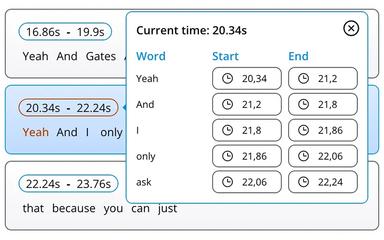
The platform automatically creates time-synced caption files, such as SRT or VTT formats, for video content. This ensures that videos are ready for publishing on social media platforms with accurate subtitles that enhance viewer engagement and improve overall accessibility.
Speaker Identification
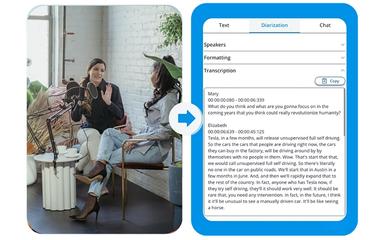
The engine detects when different individuals are speaking and labels the text segments accordingly for better clarity. This diarization process organizes the output into a readable script format, which is essential for analyzing meetings, interviews, or multi-person panel discussions.
Pros And Cons of Video to Text AI
Pros
Fast processing ensures easy handling
Customer support is accurate and fast
Noise reduction aids digital learning creation
Cons
Extensive capabilities may initially overwhelm users
Some users have requested for more features in project management
Video to Text AI Reviews

No reviews yet!
Be the first to review this product
Frequently Asked Questions
Does Video to Text AI offer an API?
Yes, Video to Text AI does offer an API.
Does Video to Text AI have a mobile app?
No, Video to Text AI does not offer a mobile app.
What types of pricing plans does Video to Text AI offer?
The platform provides a Free plan along with a Pro plan at $20.00/month. Get a detailed Video to Text AI cost breakdown tailored to your specific requirements.
What language does Video to Text AI support?
The software supports transcription and translation in over 100 different languages.
Who are the typical users of Video to Text AI?
Typical users include journalists, digital marketers, legal services, and academic researchers.
What level of support does Video to Text AI offer?
Video to Text AI provides support via email, discord channel, and feedback form.
What other apps does Video to Text AI integrate with?
Information about third-party integrations has not been specified by the vendor.