


Last Updated
Overview
VideoScribe enables teams to create compelling whiteboard animations with an extensive library of images, easy drag-and-drop editing, and export options. While it may not offer deep design flexibility, it suits marketing teams, educators, and small businesses focused on visual storytelling.
Be the first one to leave a review!
No review found

Starting Price
Custom

VideoScribe Specifications
- File Sharing Management
- Document Management
- Customer Support
- Analytics Reporting
What Is VideoScribe?
VideoScribe is a whiteboard animation software designed for marketers, educators, HR professionals, and small to medium businesses. It features AI-powered script and voiceover generation, a vast library of royalty-free images, and intuitive drag-and-drop editing. The software enables users to create explainer videos, training materials, and promotional content quickly and efficiently. VideoScribe helps enhance communication and engagement by making it easier to produce visually appealing animated videos without needing advanced design expertise.
VideoScribe Pricing
VideoScribe offers the following plans:
- Free Trial: $0.00/7 days
- Lite: $19.00/month
- Core: $28.00/month
- Max: $35.00/month
Disclaimer: The pricing is subject to change.
VideoScribe Integrations
Who Is VideoScribe For?
VideoScribe is ideal for a wide range of industries and sectors, including:
- Marketing
- Education
- Human resources
- Sales
Is VideoScribe Right For You?
If you’re a marketer, educator, HR professional, or small business owner looking to create engaging animated videos quickly, VideoScribe offers an intuitive platform powered by AI technology. It supports various video types, including explainer videos, promos, and training content, helping enhance communication and save time.
Trusted by leading brands like Deloitte, Amazon, and Coca-Cola, VideoScribe suits users who want to produce professional animations without requiring design expertise. It’s a practical option for teams seeking efficient video creation.
Still doubtful if VideoScribe software is the right fit for you? Connect with our customer support staff at (661) 384-7070 for further guidance.
VideoScribe Features
Huge Image Library And AI Image Generation
This feature helps access millions of royalty-free images, illustrations, icons, and characters to enhance your videos. The AI image generator allows the creation of unique visuals quickly, adding originality to your animations. You can also upload your own images, GIFs, and fonts for a personalized touch.
AI-Powered Script Generation
The software helps create compelling video scripts with the help of AI technology that assists in drafting engaging narratives. This feature streamlines content creation, making it easier to develop clear and professional video messages. It supports efficient storytelling without the need for extensive writing skills.
Animation Styles And Drawing Hands
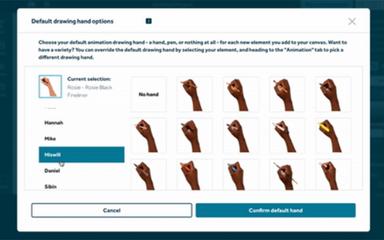
The platform brings your videos to life using a variety of animation styles and drawing hand effects. These options help illustrate your message visually and maintain viewer engagement. The drawing hand feature adds a natural, handcrafted feel to animations.
Control Camera Positions
This feature adjusts camera angles and positions to highlight key parts of your animation effectively. This control enhances the visual flow and focuses within your videos, ensuring important elements stand out. It offers flexibility in storytelling and presentation.
Audio Editing And AI-Powered Voiceovers
The software enhances your videos with built-in audio editing tools and AI-generated voiceovers, which allows for seamless integration of sound and narration, improving clarity and impact. Users can customize audio elements to suit their message and audience preferences.
Pros And Cons of VideoScribe
Pros
Easy to use, even for beginners
Large built‑in image and asset library
Whiteboard‑style animation gives a clean, engaging look
Cons
Export options and output formats are somewhat limited
Rendering and export times can be slow, especially for longer videos
VideoScribe Reviews

No reviews yet!
Be the first to review this product
Frequently Asked Questions
What other apps does VideoScribe integrate with?
Information about third-party integrations has not been specified by the vendor.
Does VideoScribe offer an API?
No, VideoScribe does not offer an API.
What language does VideoScribe support?
VideoScribe primarily supports the English language.
What types of pricing plans does VideoScribe offer?
VideoScribe price includes a Free Trial at $0.00 for 7 days. Paid plans start with Lite at $19.00/month, Core at $28.00/month, and Max at $35.00/month, offering increasing features and usage limits. Get a detailed VideoScribe cost breakdown tailored to your specific requirements.
Does VideoScribe have a mobile app?
No, VideoScribe does not offer a dedicated mobile app.
Who are the typical users of VideoScribe?
VideoScribe features are used by marketing, education, HR, and sales departments.
What level of support does VideoScribe offer?
VideoScribe offers support through phone.