


Last Updated
Overview
Wavebox functions as a specialized productivity browser, consolidating multiple web applications into a single, organized interface. While its initial setup may require training, it offers unmatched productivity benefits like persistent sign-ins for multiple accounts and a powerful Global Search function to quickly locate anything within the browser.
Be the first one to leave a review!
No review found

Starting Price
Custom
Wavebox Specifications
- Real-Time Communication
- File Sharing & Management
- Integration with Other Tools
- Mobile Accessibility
What Is Wavebox?
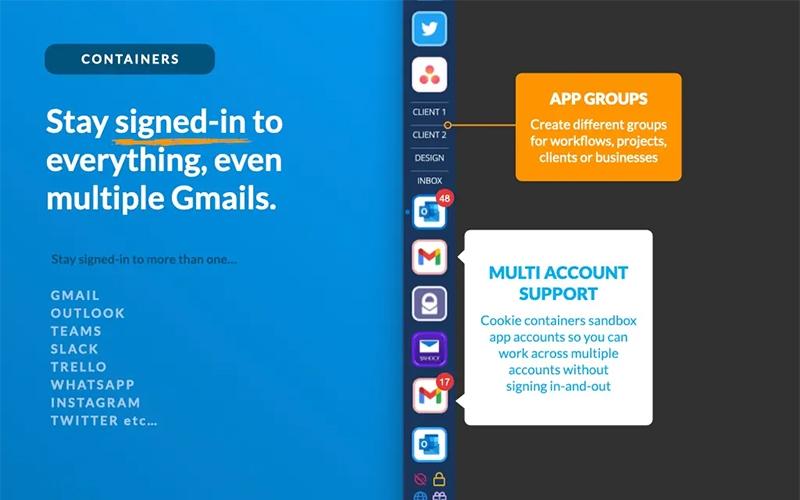
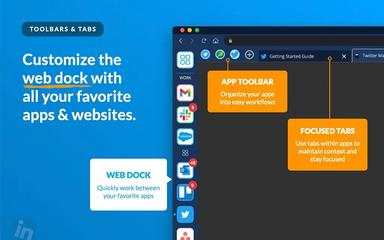
Wavebox serves as an intelligent productivity platform, built on Chromium, that is meticulously designed to declutter the digital workspace for professionals and teams managing multiple web accounts and applications. It allows users to stay signed-in to everything, including multiple accounts for the same service, eliminating the tedious routine of logging in and out or switching between browser profiles. This unified approach, which makes apps central to navigation rather than tabs, streamlines processes for productivity professionals, agencies, and small to mid-sized businesses, significantly boosting organizational efficiency and speed in daily task resolution.
Wavebox Pricing
The software offers multiple plans for its users according to their needs with a free plan available:
- Wavebox Pro: $8.33/month (billed annually)
- Teams: $12.50/month/user
Disclaimer: The pricing is subject to change.
Wavebox Integrations
The software supports integration with multiple systems and platforms:
- Microsoft Teams
- Outlook
- Slack
- Jira
- Discord
- Google suite
Who Is Wavebox For?
Wavebox software is ideal for a wide range of industries and sectors, including:
- Productivity professionals
- Digital agencies
- Virtual assistants
- Small businesses
- Team managers
- Founders
- Non-profit organizations
Is Wavebox Right For You?
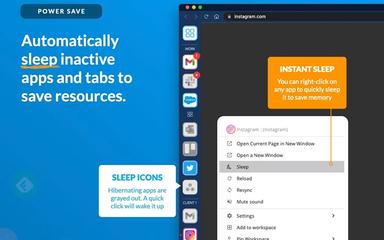
Wavebox is the perfect solution for anyone struggling with digital overload, as its core design philosophy centers on achieving "Digital Calm" by unifying your scattered web life. The browser’s unique ability to utilize auto-sleeping for inactive apps or tabs works in the background to maintain performance while keeping your workspace organized, directly solving the common problem of high memory consumption. This superior memory management feature ensures smooth operation for high-volume users, which is essential for creative and marketing agency environments.
Still doubtful if Wavebox is the right fit for you? Contact our customer support staff at (661) 384-7070 for further guidance.
Wavebox Features
Multi-Account Sign-In
The platform solves the common issue of managing numerous online identities by allowing users to remain signed-in to multiple accounts for the same web service simultaneously. This critical function eliminates the time-consuming process of frequently logging in and out or using separate browsers entirely, thereby accelerating complex workflows that involve client or project segregation.
Unified Notification Management
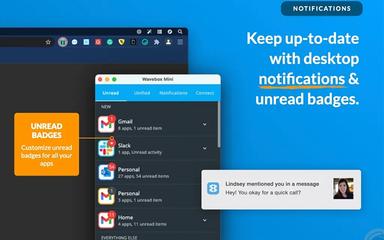
A central, organized feed keeps users instantly aware of activity across all connected applications and accounts in one singular location. This feature, combined with customizable unread badges and desktop notifications for every app, ensures that critical updates are never missed while simultaneously reducing the distraction caused by fragmented alert systems.
Global Search Function
Wavebox includes a powerful, comprehensive search utility that allows users to quickly locate virtually anything within their unified workspace. The search function instantly retrieves results from all integrated apps, open tabs, pinned items, dashboards, widgets, and even Smart Notes, ensuring rapid access to information and substantially speeding up retrieval time.
Shared Team Browser
This feature provides a remotely managed browser for team environments, which is a significant advantage for simplifying the onboarding of new hires. Teams can share a pre-configured setup of all necessary apps and passwords securely, ensuring that every team member has immediate access to the required digital tools and client workspaces.
Link Engine Rules
The platform uses intelligent routing to ensure that clicking on an external link opens the correct application or account within the unified environment. This sophisticated automation eliminates frustrating context switching, guaranteeing that a link from a client's email, for example, opens directly into the client's dedicated project space or app.
Pros And Cons of Wavebox
Pros
Easy to import your bookmarks and Chrome extensions
Streamlines workflow and centralizes web apps
Wide range of customization options
Cons
Extensive capabilities may initially overwhelm users
Muting notifications can be challenging at times
Wavebox Reviews

No reviews yet!
Be the first to review this product
Frequently Asked Questions
Who are the typical users of Wavebox?
Typical users include productivity professionals, digital agencies, virtual assistants, small businesses, team managers, founders, and non-profit organizations.
What level of support does Wavebox offer?
Wavebox offers support via a help center or knowledge base, an AI assistant, email support via a support ticket system, and a Discord community channel.
What types of pricing plans does Wavebox offer?
Wavebox offers a free Basic plan, a Wavebox Pro plan at $8.33/month, and a Teams plan at $12.50/month/user. Get a detailed Wavebox cost breakdown tailored to your specific requirements.
Does Wavebox offer an API?
No, Wavebox does not offer an API.
What other apps does Wavebox integrate with?
Wavebox integrates with apps such as Microsoft Teams, Outlook, Google suite, Slack, WhatsApp, Jira, Discord, and Notion.
Does Wavebox have a mobile app?
No, Wavebox does not offer a dedicated mobile app.
What language does Wavebox support?
Wavebox software supports 100+ languages.