


IM Creator Software
Last Updated
Overview
IM Creator is an easy-to-use website builder that helps you create professional sites without coding. While it may lack some advanced features, its simple approach and scalability make it a solid option for those seeking a straightforward web-building tool.
IM Creator Software Specifications
- Content Creation and Editing Tools (WYSIWYG)
- Media Library Management
- Content Versioning
- Role-Based Permission
IM Creator Software Features
SEO and Page Speed
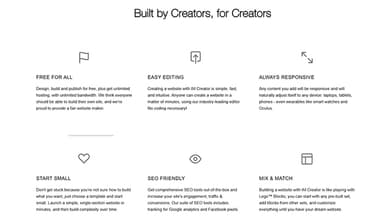
IM Creator software offers built-in SEO tools and optimized page speeds to enhance website visibility and user experience. These features help users rank better on search engines and reduce load times, leading to improved site performance and greater audience engagement.
Automated SSL For Domains
The software automatically provides SSL certificates for your domains, ensuring secure connections for visitors. This feature enhances trustworthiness, boosts SEO rankings, and complies with modern security standards, providing peace of mind for both site owners and their users.
State-Of-The-Art Online Editor
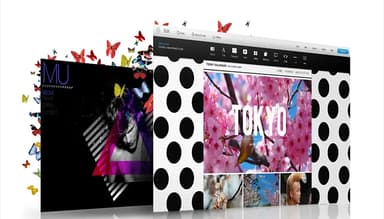
The intuitive online editor enables users to create and customize websites without coding skills. With its user-friendly interface and real-time updates, it enables quick design changes, empowering users to efficiently build professional-looking websites without technical expertise.
Theme Selection and Theme Builder
Users can choose from a variety of themes and enjoy a customizable theme builder, enabling them to create visually appealing websites. This flexibility allows users to personalize their sites easily, ensuring they match their brand identity and resonate with their target audience.
Ecommerce and Blogging
IM Creator supports ecommerce and blogging functionalities, enabling users to set up online stores and create engaging content. This feature provides an all-in-one platform for users to manage sales and communicate with customers, streamlining business and content creation processes.
Pros And Cons of IM Creator Software
Pros
Quick publishing and user-friendly interface
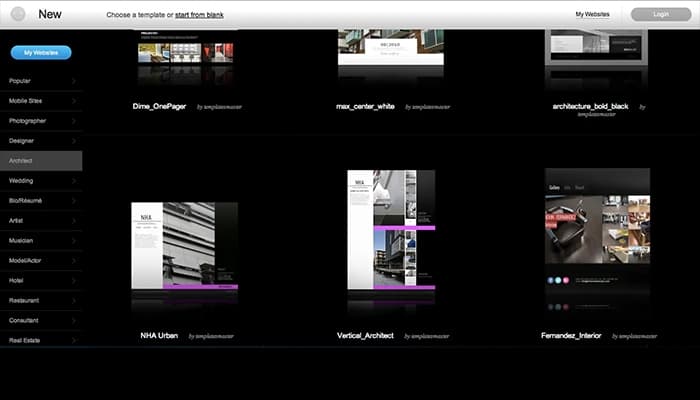
Good variety of templates
Customizable themes offered
Built-in effects and design features
Cons
No backward step for small changes
Not suitable for large-scale sites
IM Creator Software Reviews
Total 7 reviews
4.6
All reviews are from verified customers
Rating Distribution
5
Stars57%
4
Stars43%
3
Stars0%
2
Stars0%
1
Stars0%
Share your experience
Finance, 500+ employees
More than a year
“Great for creating a website”
Pros
I like that the platform allows you to build a website from scratch, but also offers templates to help spark creativity and assist with content creation when needed.
Cons
Once a template is published, it doesn't offer much flexibility for changes. You really need to choose carefully before publishing.
Rating Distribution
Ease of use
8
Value for money
10
Customer Support
10
Functionality
7
Real Estate, 101-500 employees
More than a year
“It offers a lot of options for each topic”
Pros
It's very userfriendly and easy to use. I previously tried GoDaddy but gave up due to issues with photos and quality. There are so many options for each topic, which makes the process much smoother.
Cons
No no no nooo, no complaints at all. There isn't any feature I dislike because it has enough features to meet my needs. Thank you so much!!!
Rating Distribution
Ease of use
10
Value for money
10
Customer Support
9
Functionality
10
Casuality, 1-10 employees
Less than 6 months
“Excellent variety of templates”
Pros
I really liked how simple it is to access professional looking design templates, which can then be customized further. You can also add custom widgets, although you'll need some knowledge of CSS/HTML/JS to make them fit well into the site.
Cons
The editing tools are a bit clunky. You have to first select an area you want to edit, then choose from a menu, which opens up more specific tools. The available menu options depend on the type of item you've inserted, so sometimes you have to guess which items offer the level of customization you need. For example not all elements let you add images that can be placed freely within the item. I understand this limitation is there to ensure responsive design across devices but it does limit freedom in element placement and media options.
Rating Distribution
Ease of use
7
Value for money
8
Customer Support
8
Functionality
6
Frequently Asked Questions
Does IM Creator software offer an API?
Yes, IM Creator software offers an API.
What language does IM Creator software support?
IM Creator supports English, French, Spanish, and German.
What other apps does IM Creator software integrate with?
Schedule a free IM Creator software demo to learn about its integrations.
Does IM Creator software have a mobile app?
No, IM Creator does not have a mobile app.
What type of pricing plans does IM Creator software offer?
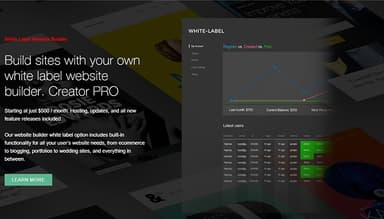
IM Creator software price starts at $8/month for the Premium account and $500/month for the Creator Pro White Label plan. Users can get pricing for a tailormade plan.
Who are the typical users of IM Creator software?
The typical users of IM Creator software are those in the real estate, automotive, and music industries.
What level of support does IM Creator software offer?
IM Creator software offers phone support, chat, email, helpdesk, Knowledge Base, and FAQs.