


Paperturn
Last Updated
Overview
Paperturn transforms your PDFs into interactive, customizable flipbooks that captivate readers. Although learning new features is difficult, document uploads and management are easy. Paperturn is the perfect platform for marketing, presentations, or online publications; it makes content engaging and professional with just a few clicks.
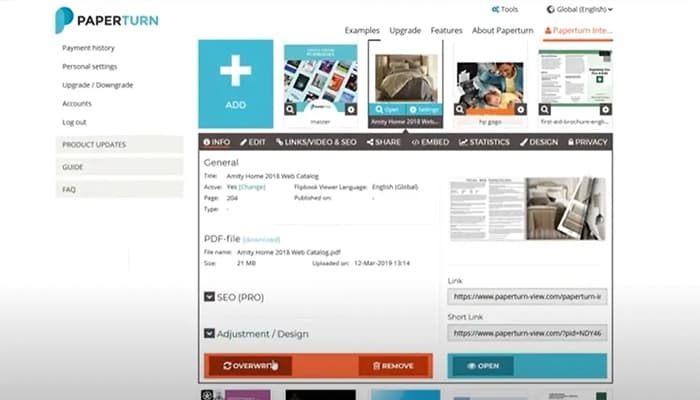
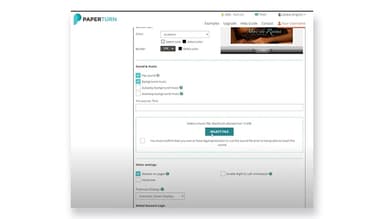

Paperturn Specifications
- Content Creation and Editing Tools (WYSIWYG)
- Media Library Management
- Content Versioning
- Role-Based Permission
Paperturn Features
Responsive Across All Devices
Paperturn offers this feature to ensure your flipbook looks wonderful and works smoothly on any device or browser. This allows the software to open instantly, providing a seamless experience for your readers everywhere.
Your Brand In Focus
It helps personalize your flipbook by adding your company logo and custom domain. It helps create a professional, branded experience, making your flipbook appear custom-made just for your business.
Performance Statistics
Performance Statistics feature allows you to track your flipbook’s performance with detailed statistics or Google Analytics integration. It enables the users to measure engagement, optimize your content, and improve your marketing strategies for better results.
Lead Generation Tools
This feature enables you to capture valuable leads directly within your flipbook. It is equipped with tools like lead capture forms that will allow you to easily collect user information and export it to your CRM or email marketing system for follow-up.
SEO Optimization
It helps in improving your flipbook’s search engine ranking by optimizing it for SEO. It makes it easy for search engines like Google to find and promote your content, driving more traffic and visibility to your flipbook.
Pros And Cons of Paperturn
Pros
Easy document uploads and management
Highly customizable branding options
Smooth web integration
Mobile-friendly viewing experience
Cons
Lacks drop-down menu customization
Learning new features is difficult
Needs to have extra features on lower plans
Paperturn Reviews
Total 10 reviews
5
All reviews are from verified customers
Rating Distribution
5
Stars100%
4
Stars0%
3
Stars0%
2
Stars0%
1
Stars0%
Share your experience
Media, 1-10 employees
Less than a year
“Paperturn takes my digital notes to reality”
Pros
Beyond the ease of uploading material, the additional features that make your publication stand out are amazing. The popups, embedded videos, and other updates really bring a simple manuscript to life.
Cons
I'm not entirely sure about the rules for using pop-ups and other features. I need to fully understand whether uploading pop ups and then later uploading a new PDF with additional pages will mess up the previous pop ups, requiring me to add them back into the updated PDF.
Rating Distribution
Ease of use
8
Value for money
10
Customer Support
9
Functionality
9
Healthcare, 11-50 employees
More than a year
“This tool makes our online catalog pop!”
Pros
I love how simple it is to upload and manage my documents. The web integration is straightforward and the user interface is perfect.
Cons
I have no complaints. We've been happy the entire time.
Rating Distribution
Ease of use
10
Value for money
10
Customer Support
10
Functionality
10
Nonprofits, 11-50 employees
Less than a year
“it provided a great service”
Pros
Paperturn is extremely userfriendly and makes it easy to publish your online booklets and share them with others.
Cons
Our membership only allows one item at a time, which sometimes made it a bit difficult.
Rating Distribution
Ease of use
10
Value for money
8
Customer Support
10
Functionality
9
Frequently Asked Questions
Does Paperturn offer an API?
Yes, Paperturn offers an API.
Does Paperturn have a mobile app?
No, Paperturn does not have a mobile app.
What language does Paperturn support?
Paperturn supports English, Danish, Swedish, French, Spanish, and German languages.
What other apps does Paperturn integrate with?
Paperturn only integrates with Google Analytics 4.
What types of pricing plans does Paperturn offer?
Paperturn cost contains two pricing plans, i.e., the Basic plan that starts at $15/month and the Pro plan that starts at $29/month, both billed monthly. A 14-day free trial is available, helping you choose the plan that suits your business needs
Who are the typical users of Paperturn?
Typical users of Paperturn include marketers and advertisers, businesses and educational institutions, content creators, designers, sales professionals, real estate agents, and e-commerce businesses.
What level of support does Paperturn offer?
Paperturn offers support through phone, live chat, email/help desk, and FAQs/forums.