

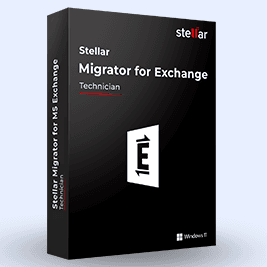
Stellar Migrator for Exchange

Claimed
Last Updated
Overview
Stellar Migrator for Exchange helps IT teams move mailboxes between Exchange Server and Microsoft 365. While it is a desktop software app and can be installed only on Windows, its scheduled migrations, date filters, and migration logs support administrators when they move a large number of mailboxes.
Be the first one to leave a review!
No review found

Starting Price
Custom
Stellar Migrator for Exchange Specifications
- Analytics and Reporting
- User Activity Tracking
- Content Creation and Editing Tools (WYSIWYG)
- Media Library Management
What Is Stellar Migrator for Exchange?
Stellar Migrator for Exchange is a Windows-based tool that moves mailboxes between Exchange Server and Microsoft 365 without requiring PowerShell scripting. It is designed for IT administrators, managed service providers (MSPs), and enterprise IT teams. The software supports selective migration of mailbox folders, so an administrator can move only the items that are needed. Supported data types are emails, contacts, calendars, tasks, notes, and journals. After an initial migration, an incremental migration copies only the items that are new or changed since that run. According to the vendor materials, the tool can also process up to 10 mailboxes at once, so administrators do not have to repeat the same steps for each mailbox during a large migration.
What Is Stellar Migrator for Exchange Best For?
The platform is best known for its automated mailbox matching feature for Exchange migrations. It pairs source and target mailboxes by mailbox ID, so an administrator does not need to map each account by hand. The software is a strong fit for IT teams that migrate large numbers of mailboxes, move between Exchange environments, or transfer many accounts at once.
How Much Does Stellar Migrator for Exchange Cost?
Stellar Migrator for Exchange pricing follows a custom-quote model.
Disclaimer: The pricing is subject to change.
Stellar Migrator for Exchange Integrations
The vendor has not provided details about third-party integrations for this software.
How Does Stellar Migrator for Exchange Work?
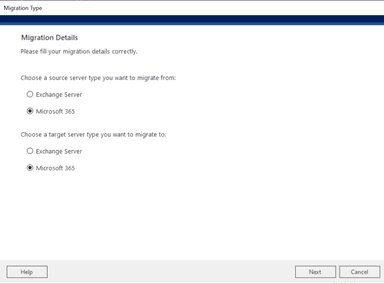
To migrate mailbox data between supported Exchange environments, install Stellar Migrator for Exchange and follow these steps:
- Create a migration job by entering a name, selecting the source and target server types, and choosing the mailbox types to migrate
- Connect to the source server with email credentials and check the list of mailboxes
- Connect to the destination server and check which mailboxes can receive the data
- Map source mailboxes to destination mailboxes by email address, or map unmatched accounts manually
- Select the folder types and date filters, and choose whether to schedule the job or run it yourself
- Read the job summary and start the migration
- Watch progress on the dashboard, check the results for each item, and retry any mailboxes that failed
Who Is Stellar Migrator for Exchange For?
Stellar Migrator for Exchange is suitable for the following users and IT professionals:
- IT administrators
- Enterprise IT teams
- Managed service providers (MSPs)
- Exchange administrators
- Microsoft 365 administrators
Stellar Migrator for Exchange Use Cases
Based on our analysis of Stellar Migrator for Exchange’s current capabilities, we have identified key scenarios where this software is a good fit for IT teams and organizations managing Exchange migrations:
Merged Companies Consolidating Mailboxes Across Microsoft 365 Tenants
A merger or acquisition often leaves a company with two Microsoft 365 tenants that have to be combined into one. Stellar Migrator for Exchange moves mailbox data directly from one tenant to another, including emails, calendars, and contacts. Once the first pass is done, its incremental migration brings over anything that was added or changed since.
Organizations Retiring On-Premises Exchange For Microsoft 365 In Stages
Stellar Migrator for Exchange can migrate from on-premises Exchange to Microsoft 365 using cutover, staged, or hybrid methods. Some organizations want every user moved in a single operation, and others prefer batches. In either case, administrators can schedule migration jobs for a chosen date and time, including a maintenance window.
Administrators Upgrading Existing Exchange Servers To A Newer Release
When an Exchange server reaches the point where it needs replacing, the mailbox data has to move to a version that is still supported. Stellar Migrator for Exchange handles moves from Exchange 2013 or 2016 to Exchange 2019, and from Exchange 2016 or 2019 to Subscription Edition. Administrators map source databases to target databases. Primary, shared, archive, and resource mailboxes can all be migrated this way.
Businesses Leaving Third-Party Hosted Exchange With Limited Admin Access
Moving away from a hosted Exchange service is harder when the provider gives administrators only limited privileges. Stellar Migrator for Exchange can migrate from hosted Exchange to Microsoft 365 using an administrator account with the Application Impersonation role and a CSV file that matches source mailboxes to target mailboxes. If the provider allows it, administrators can also connect to individual mailboxes with a user ID and password.
Managed Service Providers Moving Mailboxes Between Active Directory Domains
Stellar Migrator for Exchange supports cross-domain and cross-forest migrations, which fits managed service providers whose clients run in separate environments. A connection needs only server addresses and credentials. In one published case study, the U.S.-based MSP Om Enterprise Inc. migrated 312 Exchange mailboxes, about 1.5 TB in total, between on-premises servers in different Active Directory domains. It reported roughly one hour of downtime.
Is Stellar Migrator for Exchange Right For You?
If you are an IT administrator, a managed service provider, or part of an enterprise team that needs to move large Exchange mailboxes to Microsoft 365, then Stellar Migrator for Exchange could be a strong fit.
Still unsure about Stellar Migrator for Exchange? Connect with us at (661) 384-7070 for further guidance.
Stellar Migrator for Exchange Features
Incremental (Delta) Migration
Once the initial full migration is finished, the same job can be run again to transfer only items that are new or have been modified since the last run. The job also picks up items that were skipped in an earlier attempt. Because each repeat run covers a smaller set of data, this method suits staged moves and final cutover passes.
Concurrent Mailbox And Item Migration
Stellar Migrator for Exchange migrates up to 10 mailboxes and their items at the same time. The number of mailboxes and items that run together is set in the Max Concurrency window while a job is created. Admins can choose a value that fits the processing capacity of the host machine.
Exchange To Exchange Migration
Stellar Migrator for Exchange moves primary, shared, and archive mailboxes, along with public folders, from one Exchange Server environment to another. It handles same domain, cross domain, and cross forest scenarios and connects with IP addresses and server credentials, so a forest trust does not need to be configured.
Rerun Failed Or Incomplete Migrations
When a job stops or fails, an admin can run it again so that only the remaining or failed items go to the destination server. One to five automatic rerun attempts can be set during job setup. A failed mailbox can usually be migrated again within the same job using the licenses already in place.
Selective Mailbox Folder Migration
Admins can limit a job to certain folder types, including emails, contacts, calendars, tasks, notes, and journals. The interface lists the folder names, and each one can be selected before the job starts. Data outside the selection is not transferred to the destination.
Public Folder Migration
The software migrates public folders from one Exchange server to another and from on premises Exchange to Microsoft 365. It keeps the primary and secondary public folder mailbox structure and can carry over public folder permissions. Shared content stays organized the same way after the move, and users retain access to it.
Scheduled Migration Jobs
A migration job can be scheduled to run on a specific date and time. The schedule can repeat daily, weekly, or monthly, or at a set frequency. Admins can place jobs in non-business hours or maintenance windows, and the job then runs without anyone starting it by hand.
Pros And Cons of Stellar Migrator for Exchange
Pros
Cuts manual work when moving large numbers of mailboxes
Keeps email running with fewer interruptions during planned migrations
Protects mailbox content when data moves between environments
Maps mailboxes automatically, which reduces manual matching work
Lets teams migrate priority accounts first in staged migrations
Cons
Setting up Exchange server connections requires technical knowledge
Migration speed depends on the network and server performance
Complex migrations often need more preparation before they begin
Stellar Migrator for Exchange Pricing
Free Trial | Mailbox Pricing |
|---|---|
$0 | Starting at $250 |
|
|
Disclaimer: The pricing details were last updated on Oct 02, 2026 from the vendor's website. Please contact us for a tailored pricing list.
Stellar Migrator for Exchange Reviews

No reviews yet!
Be the first to review this product
Frequently Asked Questions
What versions of Exchange are supported?
Stellar Migrator for Exchange supports Exchange Server 2010, 2013, 2016, and 2019, as well as Exchange Server Subscription Edition. It also handles migrations between Exchange Server and Microsoft 365.
How many mailboxes can Stellar Migrator for Exchange migrate?
Stellar Migrator for Exchange has pricing options for different mailbox volumes, including more than 500 mailboxes. It can migrate up to 10 mailboxes at the same time, so administrators can handle a larger migration by running it in several batches.
Can Stellar Migrator for Exchange migrate large mailbox lists using a CSV file?
Yes, administrators can use a CSV file to load and map source and destination mailboxes.
Is Stellar Migrator for Exchange cloud-based?
No, Stellar Migrator for Exchange is an on-premises desktop application that runs on Windows.
Do failed mailboxes use up extra licenses?
Failed mailboxes can typically be re-migrated using existing licenses within the same job, without requiring additional licenses.
What migration paths does Stellar Migrator for Exchange support?
Stellar Migrator for Exchange supports migrations between Exchange Server and Microsoft 365 in both directions. Administrators can move from one Exchange Server to another, from Exchange Server to Microsoft 365, or from Microsoft 365 back to Exchange Server. It also moves data from one Microsoft 365 tenant to another. These migrations can span different domains or forests, and the tool can be used to upgrade to Exchange Server Subscription Edition.
How does Stellar Migrator for Exchange help minimize downtime during migration?
Stellar Migrator for Exchange software can migrate mailboxes in more than one pass. After the first pass, an administrator can run another that copies only the items that are new or have changed, so the last pass is smaller. Administrators can also schedule transfers to run during a maintenance window. The tool can move several mailboxes at once, which shortens the total migration time. How much downtime remains depends on the migration setup and the environment.