


HelpWire

Claimed
Last Updated
Overview
HelpWire is a remote support software that enables secure screen sharing and device control to simplify troubleshooting for service teams. While some users mention occasional connection delays, its stable sessions, cross-platform access, and easy onboarding make HelpWire a strong option for business support workflows.
Be the first one to leave a review!
No review found

Starting Price
Custom



HelpWire Specifications
- Remote Video Support Software
- Customer Communications Tools
- Help Desk Software
- Customer Service Automation Software
What Is HelpWire?
HelpWire is a remote desktop support solution that helps service teams resolve user issues through secure screen sharing, session control, and real-time collaboration tools. HelpWire software benefits businesses by reducing support resolution time, improving customer satisfaction, and enabling technicians to deliver consistent assistance across distributed teams.
HelpWire Pricing
Disclaimer: The pricing is subject to change.
HelpWire Integrations
Who Is HelpWire For?
HelpWire software is ideal for a wide range of professionals and sectors, including:
- IT support teams
- Managed service providers
- Customer care units
- Remote work operations
- Device maintenance teams
- Technical repair services
Is Right HelpWire For You?
HelpWire can be a strong fit for teams that need dependable remote assistance without the complexity found in heavier service platforms. Its streamlined design helps businesses support distributed users quickly, while TLS/SSL and AES-256 encrypted access safeguards sensitive workflows. The software suits organizations seeking practical troubleshooting capabilities rather than broad customer service suites. Its focused support approach appeals to teams prioritizing straightforward issue resolution.
Still doubtful if HelpWire software is the right fit for you? Connect with our customer support staff at (661) 384-7070 for further guidance
HelpWire Features
Unattended Access
Access a remote device without anyone on the other end. Use it for after-hours maintenance, background updates, or follow-up work after a live session ends.
On-Demand Remote Support
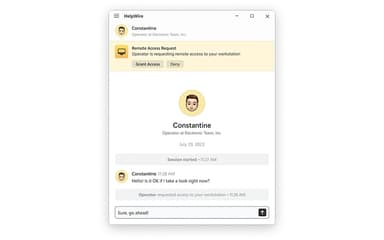
Start a live session with a user who is present at the remote device. The user receives a connection request and grants access before the session begins.
Link-Based Session Start
Send your client a dedicated connection link to launch a session without an ID or password. Clients join without creating an account or entering credentials – useful for both one-time help and recurring support.
P2P Connections with Relay Fallback
HelpWire establishes direct peer-to-peer connections by default to reduce latency and keep control responsive. When a direct connection isn't possible, it falls back to relay servers to maintain the session.
Cross-Platform Support
Connect from Windows, Linux, or macOS. Practical for working with clients who use different operating systems, regardless of which one you’re on yourself.
Encrypted Connections
Remote session data is protected by end-to-end encryption using TLS and AES-256. Relevant when supporting systems that handle sensitive business or client data.
Admin Privilege Elevation
Run apps with elevated privileges on Windows machines. Install software, modify system settings, or access protected directories without walking the client through UAC prompts.
Firewall-Friendly Connectivity
Establish connections without requiring changes to client firewall configurations. Useful when clients operate in enterprise environments where IT policy blocks inbound connections or restricts port access.
File Transfer
Drag files into the session window or use the clipboard to copy them between systems. Deploy installers, config files, or diagnostic tools directly to or from the client’s machine during a session.
Operator Permissions
Control what each operator can see and do through global and group-specific permissions. Helpful for keeping client or group access organized and rights clearly defined across your team.
Pros And Cons of HelpWire
Pros
Provides a stable, reliable connection without any of the interruption
Fast and efficient remote support saves time and effort across platforms
Users praise its easy-to-use interface
Cons
Some users report occasional connection or screen-drop issues during remote sessions
Limited integration and Android support
HelpWire Reviews

No reviews yet!
Be the first to review this product
Frequently Asked Questions
Does HelpWire have a mobile app?
The website does not specify the availability of a standalone mobile application.
What other apps does HelpWire integrate with?
The vendor does not specify the availability of integrations on its website.
Who are the typical users of HelpWire?
Typical users include IT support teams, managed service providers, customer care units, remote work operations, device maintenance teams, and technical repair services.
What level of support does HelpWire offer?
HelpWire offers support through email, phone, and form submission.
Does HelpWire offer an API?
No, HelpWire does not offer an API.
What language does HelpWire support?
The platform is available in the English, German, Spanish, French, Italian, and Portuguese languages.