


Kaizan
Last Updated
Overview
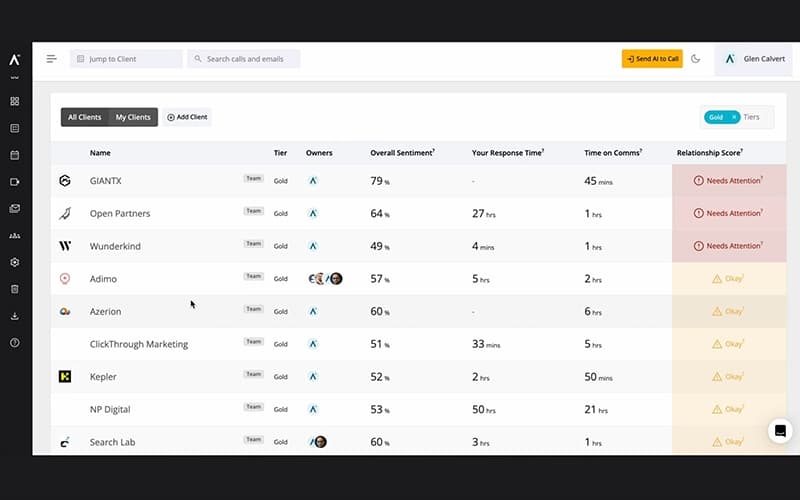
Kaizan is an AI platform that helps account managers spend less time on administrative tasks and deliver stronger client engagement. While some users report occasional performance lags, its AI meeting and email assistants, client sentiment signals, and automated note-writing reduce manual work. Overall, it improves client-facing efficiency.
Kaizan Specifications
- CRM Integration
- Canned Responses
- Analytics And Reporting
- Customer Profiles
Kaizan Features
AI Meeting Assistant And Client Insights
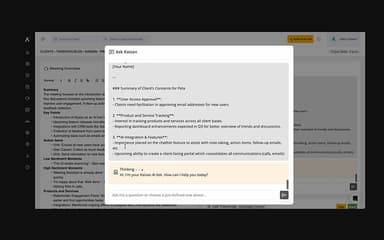
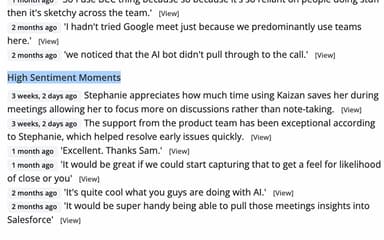
Kaizan features an ‘AI Meeting Assistant’ that takes notes, tracks actions, and measures the sentiment of clients, products, services, and key initiatives. Meetings remain focused on the client, improving clarity and follow-through.
Chatbot And Knowledge Search
With this feature, the platform provides immediate answers to client questions and internal queries. It uses data from company conversations and knowledge bases, helping teams access information quickly and stay well-informed.
AI Health Scoring
The platform assesses all factors affecting client relationship health using the C.A.R.E. framework for benchmarking engagement. With this feature, AI provides recommendations to improve relationships, helping teams maintain stronger, more informed client connections.
Advanced Reporting And Performance Metrics
The software measures Key Performance Indicators (KPIs) that impact client satisfaction and revenue. Reports provide actionable insights, helping teams deliver better client service and demonstrate commitment to client success.
Pros And Cons of Kaizan
Pros
Gives clear insights into client health
Helps identify upsell and growth opportunities
Works seamlessly with existing tools
Cons
Documentation gaps may hinder user workflows
Extensive capabilities may initially overwhelm users
Kaizan Reviews
Total 1 reviews
5
All reviews are from verified customers
Rating Distribution
5
Stars100%
4
Stars0%
3
Stars0%
2
Stars0%
1
Stars0%
Share your experience
Marketing and Advertising, 11-50 employees
“Summarizes conversations and provides transcripts”
Pros
It has been very simple to use and gives excellent feedback across all client communication. It summarizes conversations, provides transcripts and the AI chat makes it fast to look back at what was said whenever I need to check something. The support has been excellent, implementation was quick and simple and it also integrates well with other software. I use it every day.
Cons
Nothing to complain about, I'm very satisfied with its features so far.
Rating Distribution
Ease of use
9
Value for money
9
Customer Support
10
Functionality
8
Frequently Asked Questions
What other apps does Kaizan integrate with?
The platform integrates with several third-party applications and existing systems, including Microsoft and Google workspaces.
What level of support does Kaizan offer?
The platform provides support via ticket submission and FAQs.
Does Kaizan have a mobile app?
No, Kaizan does not offer a mobile app.
Does Kaizan offer an API?
Yes, Kaizan offers an API.
What language does Kaizan support?
The software supports English only.
Who are the typical users of Kaizan?
Kaizan is well-suited for a wide range of industries and sectors, which may include marketing agencies, digital agencies, professional services firms, customer success teams, sales teams, project management teams, and operations teams.
What types of Kaizan price plans are available?
The software offers several plans: Platform Access from £499/month (minimum 10 users), AI Assistant from £49/user/month (minimum 10 users), Custom Agents with custom pricing (minimum 25 users), and Studio with custom pricing (minimum 50 users). Contact us to request a personalized Kaizan cost quote based on your institution's requirements.