

Motadata Reviews
Total 40 reviews
4.5
All reviews are from verified customers
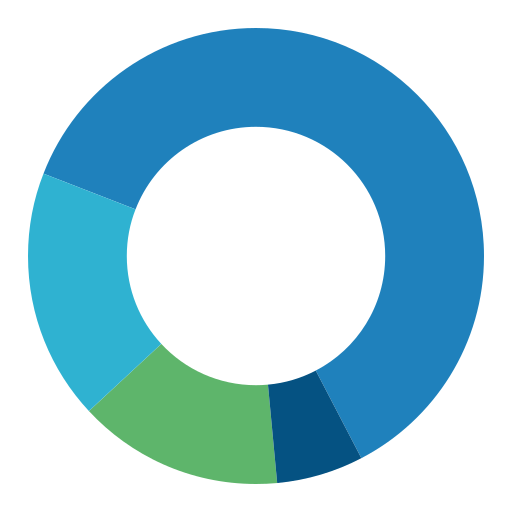
Rating Distribution
5
Stars57%
4
Stars35%
3
Stars8%
2
Stars0%
1
Stars0%
Satisfaction score
Ease of use
9
Value for money
9
Customer Support
9
Functionality
9
Real Estate, N/A employees
Less than 6 months
“Powerful asset tracking insights”
Pros
Dashboard is user-friendly and the detailed asset tracking makes IT asset management much more effective. It also produces insightful reports that help improve operational efficiency.
Cons
Installing the IT Agent on Mac devices is difficult. On top of that, locating and deleting assets in the console can be frustrating.
Rating Distribution
Ease of use
8
Value for money
10
Customer Support
10
Functionality
10
Real Estate, N/A employees
Less than 6 months
“great IT asset visibility”
Pros
This software makes IT asset management much more manageable with real-time tracking, customizable dashboards, lifecycle management and detailed reporting.
Cons
One thing that could be improved is the Mac agent installation which would be better with a default setup option to make deployment simpler.
Rating Distribution
Ease of use
10
Value for money
9
Customer Support
10
Functionality
10
Real Estate, N/A employees
Less than 6 months
“Clear asset inventory”
Pros
Asset management with RDP services helps us maintain a clear inventory of both hardware and software.
Cons
Asset management with RDP services gives us a centralized way to manage IT assets across departments while keeping hardware and software inventory clearly organized.
Rating Distribution
Ease of use
9
Value for money
9
Customer Support
8
Functionality
10
Machinery, N/A employees
Less than 6 months
“Flexible tracking tools”
Pros
Customization options and tracking features are really well done.
Cons
Sorting applications into categories is a little difficult.
Rating Distribution
Ease of use
8
Value for money
9
Customer Support
10
Functionality
9
Information Technology and Services, N/A employees
More than a year
“Supportive team”
Pros
Team has been very supportive, responses come quickly and the solutions provided have been better than expected.
Cons
There's really nothing to point out here since all the services have been up to the mark.
Rating Distribution
Ease of use
10
Value for money
10
Customer Support
8
Functionality
10
Information Technology and Services, N/A employees
Less than 6 months
“Reliable ticket”
Pros
Ticket and asset management are a very important part of our state data centre project and this software handles both in a way that really supports our day-to-day operations.
Cons
At the moment, Service Ops would benefit from a separate dashboard with live monitoring of incident calls that refreshes automatically every 30 seconds which would help us stay aligned with our SLA commitments.
Rating Distribution
Ease of use
9
Value for money
7
Customer Support
7
Functionality
8
Industrial Automation, N/A employees
Less than 6 months
“excellent support”
Pros
Support team has been outstanding and I really appreciate how clearly they explain every available option and share their knowledge throughout the process.
Cons
Even when issues come up their support remains excellent and they do a very good job of walking through every available option and sharing their knowledge clearly.
Rating Distribution
Ease of use
10
Value for money
9
Customer Support
8
Functionality
10
Information Technology and Services, N/A employees
Less than 6 months
“Powerful asset tracking”
Pros
Keeping track of IT assets is much more organized with this software since all the details are in one place. Ticket handling is also easy and the automated workflows cut down a lot of manual work. On top of that, it offers plenty of customization options which makes it flexible for different needs.
Cons
A few features take some time to fully understand in the beginning and connecting it with third-party software can be a bit difficult.
Rating Distribution
Ease of use
8
Value for money
10
Customer Support
10
Functionality
8
Information Technology and Services, N/A employees
Less than 6 months
“user-friendly platform”
Pros
The platform feels very user-friendly and the customization options make it simple to adapt to different needs. It also scales well which is a big plus as requirements grow.
Cons
Performance could be better at times and integration with other tools is not always as convenient as expected. The documentation and support could also use some improvement.
Rating Distribution
Ease of use
10
Value for money
9
Customer Support
8
Functionality
10
Information Technology and Services, N/A employees
Less than 6 months
“Clear dashboards”
Pros
Dashboards are simple and present data in a clear way which helps with faster decision-making. It also integrates easily with existing IT systems and tools, adding a lot of useful functionality.
Cons
Set up at the beginning can be a bit complicated and the configuration process may come with a fairly steep learning curve for some users.
Rating Distribution
Ease of use
8
Value for money
8
Customer Support
7
Functionality
7
Information Technology and Services, N/A employees
Less than 6 months
“Powerful automation boost”
Pros
One of the biggest advantages is how well the platform uses AI and intelligent automation to simplify daily workflows and cut down on manual work. Features like automatic ticket categorization, smart routing and automated patch management make operations much more efficient while also helping reduce human mistakes.
Cons
Getting started with it can take quite a bit of time because the initial setup is fairly complex and comes with a steep learning curve for new users. That can be a real hurdle for organizations that do not have dedicated IT staff or have limited technical knowledge.
Rating Distribution
Ease of use
8
Value for money
10
Customer Support
9
Functionality
8
Architecture & Planning, N/A employees
Less than 6 months
“easy support toolkit”
Pros
Having ticketing, asset management and remote desktop in one place makes this a really complete support tool. It covers the key functions I need and works very well.
Cons
I haven't run into any issues or drawbacks so far.
Rating Distribution
Ease of use
10
Value for money
10
Customer Support
10
Functionality
9
Food & Beverages, N/A employees
Less than a year
“Flexible setup for every need”
Pros
It can be configured very flexibly to match specific requirements.
Cons
Asset Management module is difficult when it comes to uploading.
Rating Distribution
Ease of use
8
Value for money
9
Customer Support
10
Functionality
9
Warehousing, N/A employees
Less than 6 months
“advanced analytics”
Pros
With powerful data management features and powerful analytics built in the platform helps organizations align their IT operations effectively.
Cons
Interface is user-friendly and users appreciate how efficient it makes navigation and day-to-day interaction with the platform.
Rating Distribution
Ease of use
9
Value for money
10
Customer Support
9
Functionality
10
Logistics and Supply Chain, N/A employees
Less than 6 months
“Smart monitoring”
Pros
Across IT infrastructure, applications and networks, this software delivers very broad monitoring coverage. The dashboards can be customized to show critical metrics in real time which makes visibility much better. It also comes with automation for alerting and that helps improve operational efficiency.
Cons
Biggest challenge is the initial setup and configuration which can be fairly complex and may require technical expertise.
Rating Distribution
Ease of use
9
Value for money
9
Customer Support
10
Functionality
10
Building Materials, N/A employees
Less than 6 months
“Unified visibility that delivers”
Pros
Bringing ITSM and NPM together gives a lot of value and having all the details available in one dashboard makes day-to-day work much more convenient.
Cons
Downside is that NPM and ITSM still run on different platforms so it would be much better if both were combined into a single platform.
Rating Distribution
Ease of use
10
Value for money
10
Customer Support
10
Functionality
10
Logistics and Supply Chain, N/A employees
Less than 6 months
“clean visuals”
Pros
Real-time updates make a big difference and the interface looks polished and visually appealing. It feels interactive, while still keeping everything clear, simple and easy to follow.
Cons
Closing a request takes more time than it should because the process feels too long and somewhat time-consuming.
Rating Distribution
Ease of use
10
Value for money
9
Customer Support
10
Functionality
10
Not Specified, N/A employees
Free Trial
“Helpful monitoring for IT teams”
Pros
This is really great software and it works well for IT teams that need to keep track of monitoring tasks. It makes that part of the job pretty easy.
Cons
There are still some areas where it doesn't fully solve the customer's points.
Rating Distribution
Ease of use
9
Value for money
9
Customer Support
8
Functionality
8
Information Technology and Services, N/A employees
Less than 6 months
“Powerful ticket”
Pros
Keeping track of tickets, assets and each helpdesk staff member is very efficient with this product and it lets us see all the details related to any case or device we're handling.
Cons
When working with workgroups at a larger scale, we still haven't found a discovery agent approach that works effectively.
Rating Distribution
Ease of use
10
Value for money
10
Customer Support
10
Functionality
9
Information Technology and Services, N/A employees
More than a year
“simple dashboard”
Pros
Getting started with this product didn't take long at all. The UI and dashboard feel simple and the fields can be customized based on what each end user needs. Reporting is also a strong point.
Cons
I can't think of anything about this product that hasn't worked well for me.
Rating Distribution
Ease of use
10
Value for money
10
Customer Support
10
Functionality
10