


MSM
Last Updated
Overview
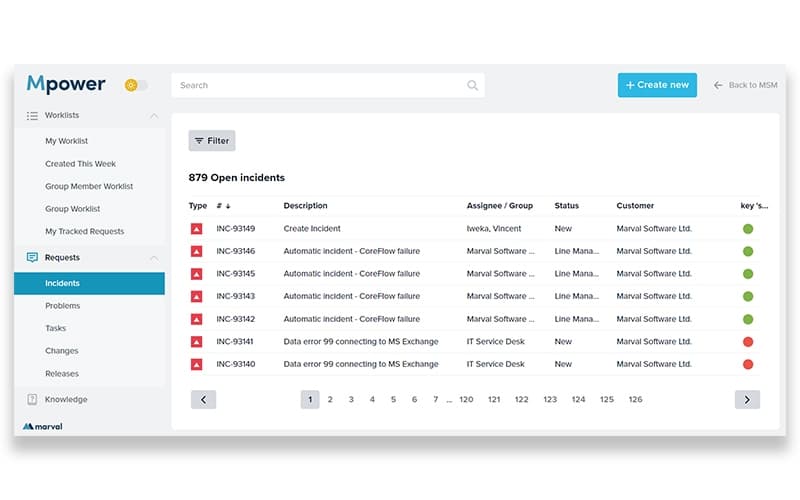
MSM is an IT and Enterprise Service Management platform that helps organizations improve service delivery and operational efficiency. While some users note the web interface might feel slightly dated, MSM’s ITIL compliance, flexible asset and change management, and dependable support make it a strong option for structured service operations.
MSM Specifications
- Analytics And Reporting
- Escalation Management
- Self-Service Portal
- SLA Management
MSM Features
Incident And Request Management
The software handles incident, major-incident, and request fulfilment workflows in a unified system, enabling quick logging, tracking, and resolution, which reduces downtime and ensures accountability.
Asset And Configuration Management
The platform offers CMDB, stock-control, service-asset management and resource tracking, so organizations can keep accurate records of assets, manage lifecycle, and maintain tight control over configuration and inventory changes.
Change And Release Management
MSM enables structured change and release processes via ITIL-aligned workflows and controlled deployment protocols, helping organizations roll out updates or changes reliably while avoiding disruptions.
Self-Service And User Experience
The platform delivers a web-based self-service portal (and mobile interface with offline sync), knowledge management, and real-time chat, giving end-users easy access to support, improving satisfaction and reducing support overhead.
Analytics And Reporting Dashboards
The software provides dashboards, cost and time reports, business analytics, and continual service improvement tools, enabling decision-makers to monitor performance, track KPIs, and make data-driven improvements to service delivery.
Pros And Cons of MSM
Pros
Offers useful asset and CMDB management tools
Powerful request module automates daily operations
Users praise its strong support and training options
Cons
Some users find the web interface a bit outdated
Self-service portal might require some improvements
MSM Reviews
Total 5 reviews
3.4
All reviews are from verified customers
Rating Distribution
5
Stars0%
4
Stars60%
3
Stars20%
2
Stars20%
1
Stars0%
Share your experience
Mechanical or Industrial Engineering, N/A employees
“asset data is a hassle”
Pros
Coming into it mainly to log in and respond to tickets the system handled that part reasonably well. I was able to open a ticket, check its history, see who submitted it and look at any related systems. It also covered the asset management lifecycle.
Cons
Tracking down that related system data could be a chore at times especially if you had not used that part of it in a while. I am also not sure how much integration it actually supports because in our setup all users and assets had to be brought in through database queries and there was no single sign-on.
Rating Distribution
Ease of use
4
Value for money
5
Customer Support
1
Functionality
1
Oil & Energy, N/A employees
“outdated interface”
Pros
Built around ITIL processes, it still adapts well to specific internal workflows. Managing the product is fairly easy and the CMDB can be filled without much trouble through customizable interfaces.
Cons
Web interface feels quite outdated and the self-service portal is not especially user-friendly.
Rating Distribution
Ease of use
5
Value for money
5
Customer Support
3
Functionality
5
Information Technology and Services, N/A employees
“User-friendly with flexible customization”
Pros
Getting around the software feels very simple and it makes personal customization simple to handle.
Cons
Hardcoding limits what can be changed on the front end and deleted data such as users is still retained and included in Xtraction.
Rating Distribution
Ease of use
8
Value for money
7
Customer Support
7
Functionality
9
Frequently Asked Questions
What types of pricing plans does MSM offer?
MSM pricing is customized and tailored to the organization’s needs. Request a custom MSM cost quote for your business now.
Does MSM offer an API?
Yes, MSM offers an API.
Who are the typical users of MSM?
Typical users include organizations in IT services, healthcare, education, government, facilities management, shared services, and enterprises with multi-department operations.
Does MSM have a mobile app?
The software does not offer a standalone mobile app. However, it offers a mobile interface with offline synchronization for users.
What other apps does MSM integrate with?
MSM integrates with multiple software including Slack, Microsoft Teams, Jira, Twilio, SharePoint, Google Maps, and Azure DevOps.
What level of support does MSM offer?
MSM offers support via online contact forms, email, and phone support.
What language does MSM support?
MSM is primarily available in English.